16 april 2009 - Release SliTaz GNU/linux 2.0
The SliTaz project are proud to announce the release of the new stable version of the distribution - SliTaz GNU/Linux 2.0. This new version is the result of one year of community work and provides an ultra lightweight, fast, scalable and stable operating system. SliTaz provides a complete graphical desktop in less than 30MB, applications required for a reliable and robust server environment and 1400 easily installable software packages in a few clicks of the mouse. This new version offers the automounting of partitions (NTFS compliant), wifi support, an office respecting the Freedesktop.org standards (drag and drop), network booting with gPXE and boot.slitaz.org, automatic detection of USB and PCI devices, a GUI package manager and control center, and various graphical tools to manage the distribution. The creation of USB media and bootable LiveCD flavors is also simplified and greatly improved. The core LiveCD includes Firefox 3.0.8, gFTP, LostIRC, ePDFView, mtPaint, Transmission, Osmo and Alsaplayer. The site documentation is updated and you can read the release notes included in the distribution for more details on this stable version. SliTaz GNU/Linux 2.0 is now downloadable from the official mirrors of the project.
http://www.slitaz.org/en/doc/releases/2.0/relnotes.en.html
SliTaz GNU/Linux 2.0 (29 MB) - slitaz-2.0.iso
2009-04-16
2009-01-14
Slitaz - wifi / cooking-20081231
SliTaz GNU/Linux cooking-20081231 (28,3 Mb) - slitaz-cooking.iso
root@slitaz:~# dmesg | tail
ipw2200: Copyright(c) 2003-2006 Intel Corporation
ACPI: PCI Interrupt 0000:03:02.0[A] -> GSI 17 (level, low) -> IRQ 17
ipw2200: Detected Intel PRO/Wireless 2200BG Network Connection
ipw2200: ipw2200-bss.fw request_firmware failed: Reason -2
ipw2200: Unable to load firmware: -2
ipw2200: failed to register network device
ACPI: PCI interrupt for device 0000:03:02.0 disabled
ipw2200: probe of 0000:03:02.0 failed with error -5
cp /lib/udev/rules.d/50-udev-default.rules /etc/udev/rules.d
http://forum.slitaz.org/viewtopic.php?id=1306
root@slitaz:~# cp /lib/udev/rules.d/50-udev-default.rules /etc/udev/rules.d
root@slitaz:~# modprobe ipw2200
root@slitaz:~# dmesg | tail -n5
ipw2200: Intel(R) PRO/Wireless 2200/2915 Network Driver, 1.2.2kmprq
ipw2200: Copyright(c) 2003-2006 Intel Corporation
ACPI: PCI Interrupt 0000:03:02.0[A] -> GSI 17 (level, low) -> IRQ 17
ipw2200: Detected Intel PRO/Wireless 2200BG Network Connection
ipw2200: Detected geography ZZM (11 802.11bg channels, 0 802.11a channels)
root@slitaz:~# lspci -v | tail
Capabilities: [80] Power Management version 2
03:02.0 Network controller: Intel Corporation PRO/Wireless 2200BG [Calexico2] Network Connection (rev 05)
Subsystem: Intel Corporation Device 2701
Flags: bus master, medium devsel, latency 64, IRQ 17
Memory at fbffa000 (32-bit, non-prefetchable) [size=4K]
Capabilities: [dc] Power Management version 2
Kernel driver in use: ipw2200
Kernel modules: ipw2200
http://hg.slitaz.org/wok/rev/8535947fa8a6
changeset: Fix: udev rules missing in /etc/ude/rules.d
changeset 1988: 8535947fa8a6
parent 1987: ebca32bb916e
child 1989: 86ac7ab8775c
author: Eric Joseph-Alexandre
date: Tue Jan 06 13:01:01 2009 +0100 (8 days ago)
files: udev/receipt
description: Fix: udev rules missing in /etc/ude/rules.d
--- a/udev/receipt Mon Jan 05 23:57:02 2009 +0100
+++ b/udev/receipt Tue Jan 06 13:01:01 2009 +0100
@@ -37,6 +37,9 @@ genpkg_rules()
[ -f $fs/lib/$i ] || ( cd $fs/lib ; ln -s $i.*.* $i)
done
+ # Copy rules files to udev conf dir
+ cp -a $src/rules/rules.d/* $fs/etc/udev/rules.d
+
# Default config files in /lib/udev/rules.d and custom on in
# /etc/udev/rules.d.
cp stuff/udev.conf $fs/etc/udev
root@slitaz:~# dmesg | tail
ipw2200: Copyright(c) 2003-2006 Intel Corporation
ACPI: PCI Interrupt 0000:03:02.0[A] -> GSI 17 (level, low) -> IRQ 17
ipw2200: Detected Intel PRO/Wireless 2200BG Network Connection
ipw2200: ipw2200-bss.fw request_firmware failed: Reason -2
ipw2200: Unable to load firmware: -2
ipw2200: failed to register network device
ACPI: PCI interrupt for device 0000:03:02.0 disabled
ipw2200: probe of 0000:03:02.0 failed with error -5
cp /lib/udev/rules.d/50-udev-default.rules /etc/udev/rules.d
http://forum.slitaz.org/viewtopic.php?id=1306
root@slitaz:~# cp /lib/udev/rules.d/50-udev-default.rules /etc/udev/rules.d
root@slitaz:~# modprobe ipw2200
root@slitaz:~# dmesg | tail -n5
ipw2200: Intel(R) PRO/Wireless 2200/2915 Network Driver, 1.2.2kmprq
ipw2200: Copyright(c) 2003-2006 Intel Corporation
ACPI: PCI Interrupt 0000:03:02.0[A] -> GSI 17 (level, low) -> IRQ 17
ipw2200: Detected Intel PRO/Wireless 2200BG Network Connection
ipw2200: Detected geography ZZM (11 802.11bg channels, 0 802.11a channels)
root@slitaz:~# lspci -v | tail
Capabilities: [80] Power Management version 2
03:02.0 Network controller: Intel Corporation PRO/Wireless 2200BG [Calexico2] Network Connection (rev 05)
Subsystem: Intel Corporation Device 2701
Flags: bus master, medium devsel, latency 64, IRQ 17
Memory at fbffa000 (32-bit, non-prefetchable) [size=4K]
Capabilities: [dc] Power Management version 2
Kernel driver in use: ipw2200
Kernel modules: ipw2200
http://hg.slitaz.org/wok/rev/8535947fa8a6
changeset: Fix: udev rules missing in /etc/ude/rules.d
changeset 1988: 8535947fa8a6
parent 1987: ebca32bb916e
child 1989: 86ac7ab8775c
author: Eric Joseph-Alexandre
date: Tue Jan 06 13:01:01 2009 +0100 (8 days ago)
files: udev/receipt
description: Fix: udev rules missing in /etc/ude/rules.d
--- a/udev/receipt Mon Jan 05 23:57:02 2009 +0100
+++ b/udev/receipt Tue Jan 06 13:01:01 2009 +0100
@@ -37,6 +37,9 @@ genpkg_rules()
[ -f $fs/lib/$i ] || ( cd $fs/lib ; ln -s $i.*.* $i)
done
+ # Copy rules files to udev conf dir
+ cp -a $src/rules/rules.d/* $fs/etc/udev/rules.d
+
# Default config files in /lib/udev/rules.d and custom on in
# /etc/udev/rules.d.
cp stuff/udev.conf $fs/etc/udev

2008-12-04
Slitaz - gpxe / qemu
http://mirror.slitaz.org/

gpxe - qemu

http://192.168.1.32/

http://mirror.slitaz.org/boot/slitaz-boot.iso
slitaz-boot.iso 2008-Jul-28 14:34:27 734.0K
slitaz-boot.md5 2008-Jul-28 14:34:27 0.1K
http://wiki.slitaz.org/doku.php?id=quickstart:pxe

gpxe - qemu

http://192.168.1.32/

http://mirror.slitaz.org/boot/slitaz-boot.iso
slitaz-boot.iso 2008-Jul-28 14:34:27 734.0K
slitaz-boot.md5 2008-Jul-28 14:34:27 0.1K
http://wiki.slitaz.org/doku.php?id=quickstart:pxe
2008-11-27
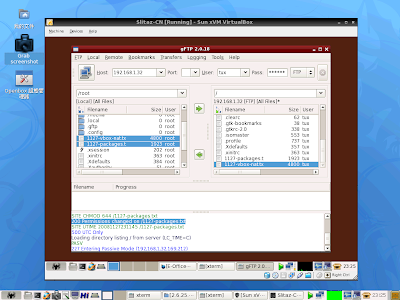
Slitaz - vbox / gftp
vbox-nat-gftp
User Manual
Version 2.0.2 Edition
6.4.1. Configuring port forwarding with NAT
As the virtual machine is connected to a private network internal to VirtualBox and invisible to the host, network services on the guest are not accessible to the host machine or to other computers on the same network. However, VirtualBox can make given services available outside of the guest by using port forwarding. This means that VirtualBox listens to certain ports on the host and resends all packages which arrive on them to the guest on the ports used by the services being forwarded.
To an application on the host or other physical (or virtual) machines on the network, it looks as though the service being proxied is actually running on the host (note that this also means that you cannot run the same service on the same ports on the host). However, you still gain the advantages of running the service in a virtual machine -- for example, services on the host machine or on other virtual machines cannot be compromised or crashed by a vulnerability or a bug in the service, and the service can run in a different operating system to the host system.
You can set up a guest service which you wish to proxy using the command line tool VBoxManage. You will need to know which ports on the guest the service uses and to decide which ports to use on the host (often but not always you will want to use the same ports on the guest and on the host). You can use any ports on the host which are not already in use by a service. An example of how to set up incoming NAT connections to a ssh server on the guest requires the following three commands:
VBoxManage setextradata "Linux Guest"
"VBoxInternal/Devices/pcnet/0/LUN#0/Config/guestssh/Protocol" TCP
VBoxManage setextradata "Linux Guest"
"VBoxInternal/Devices/pcnet/0/LUN#0/Config/guestssh/GuestPort" 22
VBoxManage setextradata "Linux Guest"
"VBoxInternal/Devices/pcnet/0/LUN#0/Config/guestssh/HostPort" 2222
The above example assumes a PCNet virtual network card; if you have configured the guest to use the Intel PRO/1000, replace "pcnet" with "e1000" in the above commands.
The name guestssh is an arbitrary one chosen for this particular forwarding configuration. With that configuration in place, all TCP connections to port 2222 on the host will be forwarded to port 22 on the guest. Protocol can be either of TCP or UDP (these are case insensitive). To remove a mapping again, use the same commands, but leaving out the values (in this case TCP, 22 and 2222).
-------
VBoxManage clonevdi srv1.vdi srv2.vdi
-------
Extract from
http://eoffice.im.fju.edu.tw/phpbb/viewtopic.php?t=4486&start=0&postdays=0&postorder=asc&highlight=
Quote from George Ankner:
If you knew as much as you think you know,
You would realize that you don't know what you thought you knew!
也許正應了列在她上面那一段來自George Ankner睿智的話…
我的一個解讀是:
「假如你理解得像你想像中那樣剔透的話,那麼你終將會體認到:
原先你以為你懂,其實不然!」 ^o^

User Manual
Version 2.0.2 Edition
6.4.1. Configuring port forwarding with NAT
As the virtual machine is connected to a private network internal to VirtualBox and invisible to the host, network services on the guest are not accessible to the host machine or to other computers on the same network. However, VirtualBox can make given services available outside of the guest by using port forwarding. This means that VirtualBox listens to certain ports on the host and resends all packages which arrive on them to the guest on the ports used by the services being forwarded.
To an application on the host or other physical (or virtual) machines on the network, it looks as though the service being proxied is actually running on the host (note that this also means that you cannot run the same service on the same ports on the host). However, you still gain the advantages of running the service in a virtual machine -- for example, services on the host machine or on other virtual machines cannot be compromised or crashed by a vulnerability or a bug in the service, and the service can run in a different operating system to the host system.
You can set up a guest service which you wish to proxy using the command line tool VBoxManage. You will need to know which ports on the guest the service uses and to decide which ports to use on the host (often but not always you will want to use the same ports on the guest and on the host). You can use any ports on the host which are not already in use by a service. An example of how to set up incoming NAT connections to a ssh server on the guest requires the following three commands:
VBoxManage setextradata "Linux Guest"
"VBoxInternal/Devices/pcnet/0/LUN#0/Config/guestssh/Protocol" TCP
VBoxManage setextradata "Linux Guest"
"VBoxInternal/Devices/pcnet/0/LUN#0/Config/guestssh/GuestPort" 22
VBoxManage setextradata "Linux Guest"
"VBoxInternal/Devices/pcnet/0/LUN#0/Config/guestssh/HostPort" 2222
The above example assumes a PCNet virtual network card; if you have configured the guest to use the Intel PRO/1000, replace "pcnet" with "e1000" in the above commands.
The name guestssh is an arbitrary one chosen for this particular forwarding configuration. With that configuration in place, all TCP connections to port 2222 on the host will be forwarded to port 22 on the guest. Protocol can be either of TCP or UDP (these are case insensitive). To remove a mapping again, use the same commands, but leaving out the values (in this case TCP, 22 and 2222).
-------
VBoxManage clonevdi srv1.vdi srv2.vdi
-------
Extract from
http://eoffice.im.fju.edu.tw/phpbb/viewtopic.php?t=4486&start=0&postdays=0&postorder=asc&highlight=
Quote from George Ankner:
If you knew as much as you think you know,
You would realize that you don't know what you thought you knew!
也許正應了列在她上面那一段來自George Ankner睿智的話…
我的一個解讀是:
「假如你理解得像你想像中那樣剔透的話,那麼你終將會體認到:
原先你以為你懂,其實不然!」 ^o^
2008-11-25


2008-11-24


2008-11-20
Slitaz - ISO
http://forum.slitaz.org/viewtopic.php?pid=5028#p5028
* » CD-label for Slitaz live-CD please?
2008-11-16 03:03:17
bellard Contributor
Re: CD-label for Slitaz live-CD please?
Hi,
Please note you can burn http://mirror.slitaz.org/iso/1.0/packages-1.0.iso (255Mb) instead of http://mirror.slitaz.org/iso/1.0/slitaz-1.0.iso (25.Mb).
You will be able to install anything offline with:
Code:
# mount /dev/cdrom /mnt
# /mnt/install.sh
-pascal
NB: for slitaz cooking http://mirror.slitaz.org/iso/cooking/pa … ooking.iso (692Mb) is built every night.
Offline
#4 2008-11-16 20:14:10
oui Contributor
Re: CD-label for Slitaz live-CD please?
sevala offers more labels:
http://forum.slitaz.org/viewtopic.php?pid=4863#p4863
Offline
#5 Yesterday 16:23:45
alanyih Member
Re: CD-label for Slitaz live-CD please?
bellard wrote:
NB: for slitaz cooking http://mirror.slitaz.org/iso/cooking/pa … ooking.iso (692Mb) is built every night.
can't display phpinfo!
Menu --> Development --> PHP info
root@slitaz:~# cat /mnt/iso/install.sh
#!/bin/sh
#
DIR=$(cd $(dirname $0); pwd)
[ -d /var/cache/tazpkg ] || mkdir -p /var/cache/tazpkg
ls -d $DIR/packages/* > /var/lib/tazpkg/mirror
ln -fs $DIR/packages/*/*.tazpkg /var/cache/tazpkg/
ln -fs $DIR/packages/*/packages.* /var/lib/tazpkg
ln -fs $DIR/packages/*/files.list.lzma /var/lib/tazpkg
ln -s $DIR/website /var/www
root@slitaz:~# cat /usr/share/applications/php.desktop
[Desktop Entry]
Encoding=UTF-8
Name=PHP info
GenericName=PHP informations
GenericName[fr]=Informations sur PHP
Comment=PHP configuration informations
Comment[fr]=Informations de configuration de PHP
Exec=firefox http://localhost/phpinfo/
Icon=php.png
Type=Application
Categories=Development;
root@slitaz:~# tazpkg get-install lighttpd
lighttpd-1.4.20 already in the cache : /var/cache/tazpkg
Tracking dependencies for : lighttpd-1.4.20
============================================================================
Missing : pcre
......
Installation of : lighttpd-1.4.20
============================================================================
Copying lighttpd-1.4.20... [ OK ]
Extracting lighttpd-1.4.20... 247 blocks
Extracting the pseudo fs... 545 blocks
Processing pre-install commands...
Installing lighttpd... cp: target '/var/www' is not a directory
[ Faile]
Removing all tmp files... [ OK ]
Processing post-install commands...
Starting web server: LightTPD... [ OK ]
============================================================================
lighttpd (1.4.20) is installed.
Online
#6 Yesterday 22:02:08
bellard Contributor
Re: CD-label for Slitaz live-CD please?
Can you reboot and do this test:
Code:
# mkdir /var/www
# /mnt/iso/install.sh
Thanks,
-pascal
Offline
#7 Today 16:07:55
alanyih Member
Re: CD-label for Slitaz live-CD please?
bellard wrote:
Code:
# mkdir /var/www
# /mnt/iso/install.sh
Well run!
Thankx!
#8 2008-11-20 10:42:06
bellard Contributor
Re: CD-label for Slitaz live-CD please?
FYI http://mirror.slitaz.org/iso/1.0/packages-1.0.iso and http://mirror.slitaz.org/iso/cooking/pa … ooking.iso are fixed now.
-pascal
----------
+case " $OPTIONS " in
+*\ --website\ *)
+ if [ -d /slitaz/home/slitaz/hg/website ]; then
+ echo -n "Adding web site"
+ mkdir $TEMP_DIR/website
+ cp -a /slitaz/home/slitaz/hg/website/* $TEMP_DIR/website
+ cat >>$TEMP_DIR/install.sh<< \ EOF
+[ -d /var/www ] || mkdir -p /var/www
+ln -s \$DIR/website /var/www
+EOF
+ status
+ echo "$(du -hs $TEMP_DIR/website | awk '{ print $1 }') used by web site."
+ fi;;
+esac
-
* » CD-label for Slitaz live-CD please?
2008-11-16 03:03:17
bellard Contributor
Re: CD-label for Slitaz live-CD please?
Hi,
Please note you can burn http://mirror.slitaz.org/iso/1.0/packages-1.0.iso (255Mb) instead of http://mirror.slitaz.org/iso/1.0/slitaz-1.0.iso (25.Mb).
You will be able to install anything offline with:
Code:
# mount /dev/cdrom /mnt
# /mnt/install.sh
-pascal
NB: for slitaz cooking http://mirror.slitaz.org/iso/cooking/pa … ooking.iso (692Mb) is built every night.
Offline
#4 2008-11-16 20:14:10
oui Contributor
Re: CD-label for Slitaz live-CD please?
sevala offers more labels:
http://forum.slitaz.org/viewtopic.php?pid=4863#p4863
Offline
#5 Yesterday 16:23:45
alanyih Member
Re: CD-label for Slitaz live-CD please?
bellard wrote:
NB: for slitaz cooking http://mirror.slitaz.org/iso/cooking/pa … ooking.iso (692Mb) is built every night.
can't display phpinfo!
Menu --> Development --> PHP info
root@slitaz:~# cat /mnt/iso/install.sh
#!/bin/sh
#
DIR=$(cd $(dirname $0); pwd)
[ -d /var/cache/tazpkg ] || mkdir -p /var/cache/tazpkg
ls -d $DIR/packages/* > /var/lib/tazpkg/mirror
ln -fs $DIR/packages/*/*.tazpkg /var/cache/tazpkg/
ln -fs $DIR/packages/*/packages.* /var/lib/tazpkg
ln -fs $DIR/packages/*/files.list.lzma /var/lib/tazpkg
ln -s $DIR/website /var/www
root@slitaz:~# cat /usr/share/applications/php.desktop
[Desktop Entry]
Encoding=UTF-8
Name=PHP info
GenericName=PHP informations
GenericName[fr]=Informations sur PHP
Comment=PHP configuration informations
Comment[fr]=Informations de configuration de PHP
Exec=firefox http://localhost/phpinfo/
Icon=php.png
Type=Application
Categories=Development;
root@slitaz:~# tazpkg get-install lighttpd
lighttpd-1.4.20 already in the cache : /var/cache/tazpkg
Tracking dependencies for : lighttpd-1.4.20
============================================================================
Missing : pcre
......
Installation of : lighttpd-1.4.20
============================================================================
Copying lighttpd-1.4.20... [ OK ]
Extracting lighttpd-1.4.20... 247 blocks
Extracting the pseudo fs... 545 blocks
Processing pre-install commands...
Installing lighttpd... cp: target '/var/www' is not a directory
[ Faile]
Removing all tmp files... [ OK ]
Processing post-install commands...
Starting web server: LightTPD... [ OK ]
============================================================================
lighttpd (1.4.20) is installed.
Online
#6 Yesterday 22:02:08
bellard Contributor
Re: CD-label for Slitaz live-CD please?
Can you reboot and do this test:
Code:
# mkdir /var/www
# /mnt/iso/install.sh
Thanks,
-pascal
Offline
#7 Today 16:07:55
alanyih Member
Re: CD-label for Slitaz live-CD please?
bellard wrote:
Code:
# mkdir /var/www
# /mnt/iso/install.sh
Well run!
Thankx!
#8 2008-11-20 10:42:06
bellard Contributor
Re: CD-label for Slitaz live-CD please?
FYI http://mirror.slitaz.org/iso/1.0/packages-1.0.iso and http://mirror.slitaz.org/iso/cooking/pa … ooking.iso are fixed now.
-pascal
----------
+case " $OPTIONS " in
+*\ --website\ *)
+ if [ -d /slitaz/home/slitaz/hg/website ]; then
+ echo -n "Adding web site"
+ mkdir $TEMP_DIR/website
+ cp -a /slitaz/home/slitaz/hg/website/* $TEMP_DIR/website
+ cat >>$TEMP_DIR/install.sh<< \ EOF
+[ -d /var/www ] || mkdir -p /var/www
+ln -s \$DIR/website /var/www
+EOF
+ status
+ echo "$(du -hs $TEMP_DIR/website | awk '{ print $1 }') used by web site."
+ fi;;
+esac
-
2008-11-14
Slitaz - autologin
Extract from
http://forum.slitaz.org/viewtopic.php?id=238
Step one - disable Slim:
Remove Slim from RUN_DAEMONS in /etc/rcS.conf
Step two - create an executable login script:
Create /usr/bin/loginscript file with the following content:
Code:
#!/bin/sh
/bin/login -f root
Step three - amend /etc/inittab
Code:
tty1::respawn:/sbin/getty -n -l /usr/bin/loginscript 38400 tty1
Step four - create /root/.profile (if you don't have one)
Code:
if [ -z "$SCREEN" ] && [ $(tty) = /dev/tty1 ]; then
while true
do
startx --
sleep 10
done
fi
Note: '[' is a command so make sure there are spaces before and after it.
Step five - reboot
http://listengine.tuxfamily.org/lists.tuxfamily.org/slitaz/2008/04/msg00012.html
http://www.shallowsky.com/blog/linux/autologin-upstart.html
--------
description: Up slim 1.3.1 (automatic login + more customizations)
http://hg.slitaz.org/wok/file/f25290110550/slim/receipt
slim/receipt
changeset 1424: f25290110550
parent: 302fa891a6d2
child: 2a0038b01ed7
author: Pascal Bellard
date: Fri Sep 26 13:16:44 2008 +0000 (6 weeks ago)
permissions: -rw-r--r--
description: Up slim 1.3.1 (automatic login + more customizations)
# SliTaz package receipt.
PACKAGE="slim"
VERSION="1.3.1"
CATEGORY="x-window"
SHORT_DESC="Desktop-independent graphical login manager for X11."
MAINTAINER="pankso@slitaz.org"
DEPENDS="jpeg libpng slitaz-configs"
TARBALL="$PACKAGE-$VERSION.tar.gz"
WEB_SITE="http://slim.berlios.de"
WGET_URL="http://download.berlios.de/slim/$TARBALL"
CONFIG_FILES="/etc/slim.conf"
BUGS="Sometime needs more thant 10 seconds to start (since HAL/DCOP addition). Why ?"
-------------
http://hg.slitaz.org/slitaz-boot-scripts/rev/06dffda5c2ce
changeset: bootopts.sh: autologin support (need slim 1.3.1)
changeset 117: 06dffda5c2ce
parent 116: 36274d47502f
child 118: b648ffc81f2e
tag: 2.5.2
author: Pascal Bellard
date: Sun Sep 28 23:09:36 2008 +0200 (7 weeks ago)
files: etc/init.d/bootopts.sh
description: bootopts.sh: autologin support (need slim 1.3.1)
--- a/etc/init.d/bootopts.sh Wed Sep 24 22:18:30 2008 +0200
+++ b/etc/init.d/bootopts.sh Sun Sep 28 23:09:36 2008 +0200
@@ -112,6 +112,11 @@ if ! grep -q "1000:1000" /etc/passwd; th
fi
fi
+# Autologin option to skip first graphic login prompt.
+if grep -q "autologin" /proc/cmdline; then
+ echo "auto_login yes" >> /etc/slim.conf
+fi
+
# Check for a specified home directory on cmdline (home=*).
#
if grep -q "home=usb" /proc/cmdline; then
----------
2008-11-21
slim-1.3.1.tazpkg 2008-Oct-31 09:02:50 78.5K
slitaz-boot-scripts-2.5.2.tazpkg 2008-Oct-15 22:47:57 13.5K
/etc/init.d/bootopts.sh
#!/bin/sh
# /etc/init.d/bootopts.sh - SliTaz boot options from the cmdline.
#
. /etc/init.d/rc.functions
# Autologin option to skip first graphic login prompt.
if grep -q "autologin" /proc/cmdline; then
echo "auto_login yes" >> /etc/slim.conf
fi
---------
ChangeLog
1.3.1 - 2008.09.26
* Added focus_password config option for focusing password
automatically when default_user is enabled
* Added auto_login option
* Fixed uninitialized daemonmode, see
http://www.freebsd.org/cgi/query-pr.cgi?pr=114366
* Fixed maximum length for password
* Introduced customization options for session text:
font, colors, position, shadows.
-
http://forum.slitaz.org/viewtopic.php?id=238
Step one - disable Slim:
Remove Slim from RUN_DAEMONS in /etc/rcS.conf
Step two - create an executable login script:
Create /usr/bin/loginscript file with the following content:
Code:
#!/bin/sh
/bin/login -f root
Step three - amend /etc/inittab
Code:
tty1::respawn:/sbin/getty -n -l /usr/bin/loginscript 38400 tty1
Step four - create /root/.profile (if you don't have one)
Code:
if [ -z "$SCREEN" ] && [ $(tty) = /dev/tty1 ]; then
while true
do
startx --
sleep 10
done
fi
Note: '[' is a command so make sure there are spaces before and after it.
Step five - reboot
http://listengine.tuxfamily.org/lists.tuxfamily.org/slitaz/2008/04/msg00012.html
http://www.shallowsky.com/blog/linux/autologin-upstart.html
--------
description: Up slim 1.3.1 (automatic login + more customizations)
http://hg.slitaz.org/wok/file/f25290110550/slim/receipt
slim/receipt
changeset 1424: f25290110550
parent: 302fa891a6d2
child: 2a0038b01ed7
author: Pascal Bellard
date: Fri Sep 26 13:16:44 2008 +0000 (6 weeks ago)
permissions: -rw-r--r--
description: Up slim 1.3.1 (automatic login + more customizations)
# SliTaz package receipt.
PACKAGE="slim"
VERSION="1.3.1"
CATEGORY="x-window"
SHORT_DESC="Desktop-independent graphical login manager for X11."
MAINTAINER="pankso@slitaz.org"
DEPENDS="jpeg libpng slitaz-configs"
TARBALL="$PACKAGE-$VERSION.tar.gz"
WEB_SITE="http://slim.berlios.de"
WGET_URL="http://download.berlios.de/slim/$TARBALL"
CONFIG_FILES="/etc/slim.conf"
BUGS="Sometime needs more thant 10 seconds to start (since HAL/DCOP addition). Why ?"
-------------
http://hg.slitaz.org/slitaz-boot-scripts/rev/06dffda5c2ce
changeset: bootopts.sh: autologin support (need slim 1.3.1)
changeset 117: 06dffda5c2ce
parent 116: 36274d47502f
child 118: b648ffc81f2e
tag: 2.5.2
author: Pascal Bellard
date: Sun Sep 28 23:09:36 2008 +0200 (7 weeks ago)
files: etc/init.d/bootopts.sh
description: bootopts.sh: autologin support (need slim 1.3.1)
--- a/etc/init.d/bootopts.sh Wed Sep 24 22:18:30 2008 +0200
+++ b/etc/init.d/bootopts.sh Sun Sep 28 23:09:36 2008 +0200
@@ -112,6 +112,11 @@ if ! grep -q "1000:1000" /etc/passwd; th
fi
fi
+# Autologin option to skip first graphic login prompt.
+if grep -q "autologin" /proc/cmdline; then
+ echo "auto_login yes" >> /etc/slim.conf
+fi
+
# Check for a specified home directory on cmdline (home=*).
#
if grep -q "home=usb" /proc/cmdline; then
----------
2008-11-21
slim-1.3.1.tazpkg 2008-Oct-31 09:02:50 78.5K
slitaz-boot-scripts-2.5.2.tazpkg 2008-Oct-15 22:47:57 13.5K
/etc/init.d/bootopts.sh
#!/bin/sh
# /etc/init.d/bootopts.sh - SliTaz boot options from the cmdline.
#
. /etc/init.d/rc.functions
# Autologin option to skip first graphic login prompt.
if grep -q "autologin" /proc/cmdline; then
echo "auto_login yes" >> /etc/slim.conf
fi
---------
ChangeLog
1.3.1 - 2008.09.26
* Added focus_password config option for focusing password
automatically when default_user is enabled
* Added auto_login option
* Fixed uninitialized daemonmode, see
http://www.freebsd.org/cgi/query-pr.cgi?pr=114366
* Fixed maximum length for password
* Introduced customization options for session text:
font, colors, position, shadows.
-
2008-10-19
Slitaz - slim
#1 2008-10-20 06:32:30
alanyih Member
PLS check! slim-1.3.1
PLS check! slim-default_user
Thanks!
root@slitaz:~# ls -l /var/cache/tazpkg/slim*
-rw-r--r-- 1 root root 80384 Oct 20 12:00 /var/cache/tazpkg/slim-1.3.1.tazpkg
root@slitaz:~# cat /etc/slim.conf | grep default
default_path ./:/bin:/usr/bin:/usr/local/bin
default_xserver /usr/bin/Xvesa
# Available sessions (first one is the default).
# default user, leave blank or remove this line
default_user hacker
root@slitaz:~# cat /etc/passwd
root:x:0:0:Root Administrator:/root:/bin/sh
nobody:x:99:99:Unprivileged User:/dev/null:/bin/false
www:x:80:80:Web Server User:/var/www:/bin/false
messagebus:x:25:25:DBUS Daemon User:/dev/null:/bin/false
haldaemon:x:26:26:HAL Daemon User:/dev/null:/bin/false
tux:x:1000:1000:SliTaz User,,,:/home/tux:/bin/sh
2008-10-30 06:09:47 #2
alanyih Member
Re: PLS check! slim-1.3.1
http://mirror.slitaz.org/packages/cooki … 3.1.tazpkg
slim-1.3.1.tazpkg 2008-Oct-14 15:00:34 78.5K
http://hg.slitaz.org/wok/diff/9733af969 … /slim.conf
diff: slim/stuff/etc/slim.conf
revision 1588: 9733af969c86
parent 656: 3c4e0201ce56
--- a/slim/stuff/etc/slim.conf Tue Apr 22 22:44:49 2008 +0200
+++ b/slim/stuff/etc/slim.conf Thu Oct 16 20:07:39 2008 +0000
@@ -62,7 +62,7 @@ reboot_msg The system is rebooti
# default user, leave blank or remove this line
# for avoid pre-loading the username.
-default_user hacker
+default_user tux
# current theme, use comma separated list to specify a set to
# randomly choose from
Last edited by alanyih (2008-10-30 06:13:09)
-
alanyih Member
PLS check! slim-1.3.1
PLS check! slim-default_user
Thanks!
root@slitaz:~# ls -l /var/cache/tazpkg/slim*
-rw-r--r-- 1 root root 80384 Oct 20 12:00 /var/cache/tazpkg/slim-1.3.1.tazpkg
root@slitaz:~# cat /etc/slim.conf | grep default
default_path ./:/bin:/usr/bin:/usr/local/bin
default_xserver /usr/bin/Xvesa
# Available sessions (first one is the default).
# default user, leave blank or remove this line
default_user hacker
root@slitaz:~# cat /etc/passwd
root:x:0:0:Root Administrator:/root:/bin/sh
nobody:x:99:99:Unprivileged User:/dev/null:/bin/false
www:x:80:80:Web Server User:/var/www:/bin/false
messagebus:x:25:25:DBUS Daemon User:/dev/null:/bin/false
haldaemon:x:26:26:HAL Daemon User:/dev/null:/bin/false
tux:x:1000:1000:SliTaz User,,,:/home/tux:/bin/sh
2008-10-30 06:09:47 #2
alanyih Member
Re: PLS check! slim-1.3.1
http://mirror.slitaz.org/packages/cooki … 3.1.tazpkg
slim-1.3.1.tazpkg 2008-Oct-14 15:00:34 78.5K
http://hg.slitaz.org/wok/diff/9733af969 … /slim.conf
diff: slim/stuff/etc/slim.conf
revision 1588: 9733af969c86
parent 656: 3c4e0201ce56
--- a/slim/stuff/etc/slim.conf Tue Apr 22 22:44:49 2008 +0200
+++ b/slim/stuff/etc/slim.conf Thu Oct 16 20:07:39 2008 +0000
@@ -62,7 +62,7 @@ reboot_msg The system is rebooti
# default user, leave blank or remove this line
# for avoid pre-loading the username.
-default_user hacker
+default_user tux
# current theme, use comma separated list to specify a set to
# randomly choose from
Last edited by alanyih (2008-10-30 06:13:09)
-
2008-10-17
Slitaz - java6-jre
java test

java6-jre

java-fallback

PLS check! get-java6-jre
http://forum.slitaz.org/viewtopic.php?id=926
2008-10-17 13:53:22 #1
alanyih Member
PLS check! get-java6-jre
Processing post install commands...
/usr/bin/tazpkg: cd: line 28: can't cd to /plugins
get-java6-jre-1.0.tazpkg 2008-Oct-14 06:40:01 2.5K application/x-tazpkg
get-java6-jre.sh
.......
Packing : java6-jre-1.6.0_07
================================================================================
Creating the list of files... [ OK ]
Compressing the fs...
Creating full cpio archive...
Restoring original package tree... 197967 blocks
================================================================================
Package java6-jre-1.6.0_07 compressed successfully.
Size : 33.1M java6-jre-1.6.0_07.tazpkg
Installation of : java6-jre-1.6.0_07
================================================================================
Copying java6-jre-1.6.0_07... [ OK ]
Extracting java6-jre-1.6.0_07... 67640 blocks
Extracting the pseudo fs... 197967 blocks
Installing java6-jre... [ OK ]
Removing all tmp files... [ OK ]
Processing post install commands...
/usr/bin/tazpkg: cd: line 28: can't cd to /plugins
================================================================================
java6-jre (1.6.0_07) is installed.
root@slitaz:~# ls -l /usr/lib/firefox-3.0.1/plugins
-rwxr-xr-x 1 root root 15512 Sep 21 08:23 libnullplugin.so
2008-10-17 15:49:34 #2
bellard Contributor
Re: PLS check! get-java6-jre
The fix : http://hg.slitaz.org/wok/rev/c1b4ae2bdeca
Please reload http://mirror.slitaz.org/packages/cooki … 1.0.tazpkg
-pascal
http://hg.slitaz.org/wok/rev/c1b4ae2bdeca
changeset: get-java6-jre: typos
changeset 1595: c1b4ae2bdeca
parent 1594: 713badbd8ef9
child 1596: 270174cf554e
author: Pascal Bellard
date: Fri Oct 17 13:29:48 2008 +0000 (110 minutes ago)
files: get-java6-jre/stuff/get-java6-jre.sh
description: get-java6-jre: typos
--- a/get-java6-jre/stuff/get-java6-jre.sh Fri Oct 17 13:11:57 2008 +0000
+++ b/get-java6-jre/stuff/get-java6-jre.sh Fri Oct 17 13:29:48 2008 +0000
@@ -62,8 +62,8 @@ post_install()
{
echo "Processing post install commands..."
for i in /usr/lib/firefox*; do
- [ -d $i ] || continue
- cd $i/plugins
+ [ -d \$i ] || continue
+ cd \$i/plugins
ln -s /usr/lib/java/jre\$VERSION/plugin/i386/ns7/libjavaplugin_oji.so
done
2008-10-20 08:45:36
alanyih Member
Re: PLS check! get-java6-jre
Thankx!
But have some squares in chart!
java6-jre.png
2008-11-03-21:04
http://www.cnetnews.com.cn/2008/0618/934811.shtml
Linux操作系統JDK中文字體設置方法介紹
首先來說說產生這個問題的原因。java程序啟動的時候會去在$JAVA_HOME/jre/lib /fonts目錄下尋找相應的字體來顯示。由於 JDK默認沒有中文字體,所以我們需要手工的來設置一下,讓java應用程序能夠找到相應的中文字體。這樣就能夠解決問題了。
ln -s $FONTS_PATH/FONT_DIR $JAVA_HOME/jre/lib/fonts/fallback
2008-11-05-13:05
http://wiki.eeeuser.com/howto:javachinesefonts_zh
root@slitaz:~# mkdir /usr/lib/java/jre1.6.0_07/lib/fonts/fallback
root@slitaz:~# ln -s /usr/share/fonts/truetype/uming.ttf /usr/lib/java/jre1.6.0_07/lib/fonts/fallback/.
root@slitaz:~# ls -l /usr/lib/java/jre1.6.0_07/lib/fonts/fallback
lrwxrwxrwx 1 root root 35 Nov 5 10:57 uming.ttf -> /usr/share/fonts/truetype/uming.ttf
root@slitaz:~#
(2008-11-05) Yesterday 06:01:33 #4
alanyih Member
Re: PLS check! get-java6-jre
alanyih wrote:
But have some squares in chart!
http://wiki.eeeuser.com/howto:javachinesefonts_zh
java-fallback.png
Last edited by alanyih (Yesterday 06:09:56)

java6-jre

java-fallback

PLS check! get-java6-jre
http://forum.slitaz.org/viewtopic.php?id=926
2008-10-17 13:53:22 #1
alanyih Member
PLS check! get-java6-jre
Processing post install commands...
/usr/bin/tazpkg: cd: line 28: can't cd to /plugins
get-java6-jre-1.0.tazpkg 2008-Oct-14 06:40:01 2.5K application/x-tazpkg
get-java6-jre.sh
.......
Packing : java6-jre-1.6.0_07
================================================================================
Creating the list of files... [ OK ]
Compressing the fs...
Creating full cpio archive...
Restoring original package tree... 197967 blocks
================================================================================
Package java6-jre-1.6.0_07 compressed successfully.
Size : 33.1M java6-jre-1.6.0_07.tazpkg
Installation of : java6-jre-1.6.0_07
================================================================================
Copying java6-jre-1.6.0_07... [ OK ]
Extracting java6-jre-1.6.0_07... 67640 blocks
Extracting the pseudo fs... 197967 blocks
Installing java6-jre... [ OK ]
Removing all tmp files... [ OK ]
Processing post install commands...
/usr/bin/tazpkg: cd: line 28: can't cd to /plugins
================================================================================
java6-jre (1.6.0_07) is installed.
root@slitaz:~# ls -l /usr/lib/firefox-3.0.1/plugins
-rwxr-xr-x 1 root root 15512 Sep 21 08:23 libnullplugin.so
2008-10-17 15:49:34 #2
bellard Contributor
Re: PLS check! get-java6-jre
The fix : http://hg.slitaz.org/wok/rev/c1b4ae2bdeca
Please reload http://mirror.slitaz.org/packages/cooki … 1.0.tazpkg
-pascal
http://hg.slitaz.org/wok/rev/c1b4ae2bdeca
changeset: get-java6-jre: typos
changeset 1595: c1b4ae2bdeca
parent 1594: 713badbd8ef9
child 1596: 270174cf554e
author: Pascal Bellard
date: Fri Oct 17 13:29:48 2008 +0000 (110 minutes ago)
files: get-java6-jre/stuff/get-java6-jre.sh
description: get-java6-jre: typos
--- a/get-java6-jre/stuff/get-java6-jre.sh Fri Oct 17 13:11:57 2008 +0000
+++ b/get-java6-jre/stuff/get-java6-jre.sh Fri Oct 17 13:29:48 2008 +0000
@@ -62,8 +62,8 @@ post_install()
{
echo "Processing post install commands..."
for i in /usr/lib/firefox*; do
- [ -d $i ] || continue
- cd $i/plugins
+ [ -d \$i ] || continue
+ cd \$i/plugins
ln -s /usr/lib/java/jre\$VERSION/plugin/i386/ns7/libjavaplugin_oji.so
done
2008-10-20 08:45:36
alanyih Member
Re: PLS check! get-java6-jre
Thankx!
But have some squares in chart!
java6-jre.png
2008-11-03-21:04
http://www.cnetnews.com.cn/2008/0618/934811.shtml
Linux操作系統JDK中文字體設置方法介紹
首先來說說產生這個問題的原因。java程序啟動的時候會去在$JAVA_HOME/jre/lib /fonts目錄下尋找相應的字體來顯示。由於 JDK默認沒有中文字體,所以我們需要手工的來設置一下,讓java應用程序能夠找到相應的中文字體。這樣就能夠解決問題了。
ln -s $FONTS_PATH/FONT_DIR $JAVA_HOME/jre/lib/fonts/fallback
2008-11-05-13:05
http://wiki.eeeuser.com/howto:javachinesefonts_zh
root@slitaz:~# mkdir /usr/lib/java/jre1.6.0_07/lib/fonts/fallback
root@slitaz:~# ln -s /usr/share/fonts/truetype/uming.ttf /usr/lib/java/jre1.6.0_07/lib/fonts/fallback/.
root@slitaz:~# ls -l /usr/lib/java/jre1.6.0_07/lib/fonts/fallback
lrwxrwxrwx 1 root root 35 Nov 5 10:57 uming.ttf -> /usr/share/fonts/truetype/uming.ttf
root@slitaz:~#
(2008-11-05) Yesterday 06:01:33 #4
alanyih Member
Re: PLS check! get-java6-jre
alanyih wrote:
But have some squares in chart!
http://wiki.eeeuser.com/howto:javachinesefonts_zh
java-fallback.png
Last edited by alanyih (Yesterday 06:09:56)
2008-10-11
Slitaz - Vmware


http://www.vmware.com/download/ws/
VMware Workstation 6.5 for Linux
Latest Version: 6.5 | 09/23/08 | Build: 118166 | Release Notes
2008-10-05


2008-09-28
Slitaz - Hinedo

Hinedo - 輕鬆聽 Hinet Radio
http://of.openfoundry.org/projects/814
Hinet 提供的免費電台,一定限定在 Windows 下使用 IE 瀏覽器,連上 Hinet Radio 首頁,否則就無法使用,而且操作非常不方便。這個工具在工作列提供一個小圖示,透過選單介面,方便使用者聽 Hinet 廣播
http://of.openfoundry.org/download_path/hinedo/2007.11.18/hinedo_0.4-2_i386.deb
-
2008-09-27
Slitaz - SD / MMC card
SD / MMC card ( mini SD / micro SD )
root@slitaz:~# lsmod
Module Size Used by
mmc_block 9476 0
sdhci 13836 0
mmc_core 36892 2 mmc_block,sdhci
root@slitaz:~# ls -l /dev/mmc*
brw-r----- 1 root root 179, 0 Sep 26 06:57 /dev/mmcblk0
brw-r----- 1 root root 179, 1 Sep 26 06:57 /dev/mmcblk0p1
root@slitaz:~# lspci -v
........
03:01.2 SD Host controller: Ricoh Co Ltd R5C822 SD/SDIO/MMC/MS/MSPro Host Adapter (rev 17)
Subsystem: ASUSTeK Computer Inc. ASUS V6800V
Flags: bus master, medium devsel, latency 64, IRQ 18
Memory at fbffb800 (32-bit, non-prefetchable) [size=256]
Capabilities: [80] Power Management version 2
Kernel driver in use: sdhci
Kernel modules: sdhci
root@slitaz:~# dmesg
.......
sdhci: Secure Digital Host Controller Interface driver
sdhci: Copyright(c) Pierre Ossman
sdhci: SDHCI controller found at 0000:03:01.2 [1180:0822] (rev 17)
ACPI: PCI Interrupt 0000:03:01.2[C] -> GSI 18 (level, low) -> IRQ 18
sdhc0:slot0: Will use DMA mode even though HW doesn't fully claim to support it.
mmc0: SDHCI at 0xfbffb800 irq 18 DMA
mmc0: new SD card at address 05ce
mmcblk0: mmc0:05ce SD02G 1921024KiB
mmcblk0: p1
kjournald starting. Commit interval 5 seconds
EXT3 FS on mmcblk0p1, internal journal
.....
root@slitaz:~# fdisk /dev/mmcblk0
The number of cylinders for this disk is set to 1203.
There is nothing wrong with that, but this is larger than 1024,
and could in certain setups cause problems with:
1) software that runs at boot time (e.g., old versions of LILO)
2) booting and partitioning software from other OSs
(e.g., DOS FDISK, OS/2 FDISK)
Command (m for help): p
Disk /dev/mmcblk0: 1967 MB, 1967128576 bytes
57 heads, 56 sectors/track, 1203 cylinders
Units = cylinders of 3192 * 512 = 1634304 bytes
Device Boot Start End Blocks Id System
/dev/mmcblk0p1 * 1 1204 1920955+ 83 Linux
Command (m for help): q
root@slitaz:~#
Extract from
http://www.lanana.org/docs/device-list/devices-2.6+.txt
LINUX ALLOCATED DEVICES (2.6+ version)
Maintained by Torben Mathiasen
Last revised: 18 March 2008
This list is the Linux Device List, the official registry of allocated
device numbers and /dev directory nodes for the Linux operating
system.
The latest version of this list is available from
http://www.lanana.org/docs/device-list/ or
ftp://ftp.kernel.org/pub/linux/docs/device-list/. This version
may be newer than the one distributed with the Linux kernel.
.....
179 block MMC block devices
0 = /dev/mmcblk0 First SD/MMC card
1 = /dev/mmcblk0p1 First partition on first MMC card
8 = /dev/mmcblk1 Second SD/MMC card
........
root@slitaz:~# lsmod
Module Size Used by
mmc_block 9476 0
sdhci 13836 0
mmc_core 36892 2 mmc_block,sdhci
root@slitaz:~# ls -l /dev/mmc*
brw-r----- 1 root root 179, 0 Sep 26 06:57 /dev/mmcblk0
brw-r----- 1 root root 179, 1 Sep 26 06:57 /dev/mmcblk0p1
root@slitaz:~# lspci -v
........
03:01.2 SD Host controller: Ricoh Co Ltd R5C822 SD/SDIO/MMC/MS/MSPro Host Adapter (rev 17)
Subsystem: ASUSTeK Computer Inc. ASUS V6800V
Flags: bus master, medium devsel, latency 64, IRQ 18
Memory at fbffb800 (32-bit, non-prefetchable) [size=256]
Capabilities: [80] Power Management version 2
Kernel driver in use: sdhci
Kernel modules: sdhci
root@slitaz:~# dmesg
.......
sdhci: Secure Digital Host Controller Interface driver
sdhci: Copyright(c) Pierre Ossman
sdhci: SDHCI controller found at 0000:03:01.2 [1180:0822] (rev 17)
ACPI: PCI Interrupt 0000:03:01.2[C] -> GSI 18 (level, low) -> IRQ 18
sdhc0:slot0: Will use DMA mode even though HW doesn't fully claim to support it.
mmc0: SDHCI at 0xfbffb800 irq 18 DMA
mmc0: new SD card at address 05ce
mmcblk0: mmc0:05ce SD02G 1921024KiB
mmcblk0: p1
kjournald starting. Commit interval 5 seconds
EXT3 FS on mmcblk0p1, internal journal
.....
root@slitaz:~# fdisk /dev/mmcblk0
The number of cylinders for this disk is set to 1203.
There is nothing wrong with that, but this is larger than 1024,
and could in certain setups cause problems with:
1) software that runs at boot time (e.g., old versions of LILO)
2) booting and partitioning software from other OSs
(e.g., DOS FDISK, OS/2 FDISK)
Command (m for help): p
Disk /dev/mmcblk0: 1967 MB, 1967128576 bytes
57 heads, 56 sectors/track, 1203 cylinders
Units = cylinders of 3192 * 512 = 1634304 bytes
Device Boot Start End Blocks Id System
/dev/mmcblk0p1 * 1 1204 1920955+ 83 Linux
Command (m for help): q
root@slitaz:~#
Extract from
http://www.lanana.org/docs/device-list/devices-2.6+.txt
LINUX ALLOCATED DEVICES (2.6+ version)
Maintained by Torben Mathiasen
Last revised: 18 March 2008
This list is the Linux Device List, the official registry of allocated
device numbers and /dev directory nodes for the Linux operating
system.
The latest version of this list is available from
http://www.lanana.org/docs/device-list/ or
ftp://ftp.kernel.org/pub/linux/docs/device-list/. This version
may be newer than the one distributed with the Linux kernel.
.....
179 block MMC block devices
0 = /dev/mmcblk0 First SD/MMC card
1 = /dev/mmcblk0p1 First partition on first MMC card
8 = /dev/mmcblk1 Second SD/MMC card
........
2008-09-21
Slitaz - rootdelay
Extract from
http://www.debianhelp.org/node/3943#comment-45729
Re: unable to mount root fs on unknown--block(0,0)
Submitted by benizi on Sun, 2008-09-14 18:27.
I ran into this same problem. I'd compiled in all the appropriate modules, so I knew that wasn't the problem. But my USB drive still wasn't listed in the "possible options" list that gets spit out before the kernel panic.
The solution for me was to add rootdelay=10 to my kernel options line. It takes several seconds for my USB drive to initialize. So, it wasn't present by the time the kernel attempted to make it the root device.
The full grub.conf entry:
title=linux usb
root (hd0,0)
kernel /2.6.24-r7/testing/kernel rootdelay=10 root=/dev/sdb2
-------
Kernel Parameters
~~~~~~~~~~~~~~~~~
The following is a consolidated list of the kernel parameters as implemented (mostly) by the __setup() macro and sorted into English Dictionary order (defined as ignoring all punctuation and sorting digits before letters in a case insensitive manner), and with descriptions where known.
rootdelay= [KNL] Delay (in seconds) to pause before attempting to mount the root filesystem
/usr/share/doc/kernel-doc-「kernel version」/Documentation/kernel-parameters.txt
---------
Extract from
http://www.debian.org/releases/stable/i386/release-notes/ch-upgrading.zh-tw.html#s-boot-timing
Debian GNU/Linux 4.0 ("etch"), Intel x86 的發行情報
4.6.5 開機時機問題
如果使用由 initramfs-tools 產生的 initrd 來開機的話,在某些狀況下 udev 建立裝置檔的時機比開機 scripts 的動作還慢。
The usual symptoms are that the boot will fail because the root file system cannot be mounted and you are dropped into a debug shell, but that when you check afterwards, all devices that are needed are present in /dev. This has been observed in cases where the root file system is on a USB disk or on RAID, especially if lilo is used.
要避開這個問題的方法是使用 rootdelay=9 開機參數。其中的秒數可能得再加以調整才行。
http://www.debian.org/releases/stable/i386/release-notes/ch-upgrading.en.html#s-boot-timing
4.6.5 Boot timing issues
If an initrd created with initramfs-tools is used to boot the system, in some cases the creation of device files by udev can happen too late for the boot scripts to act on.
The usual symptoms are that the boot will fail because the root file system cannot be mounted and you are dropped into a debug shell, but that when you check afterwards, all devices that are needed are present in /dev. This has been observed in cases where the root file system is on a USB disk or on RAID, especially if lilo is used.
A workaround for this issue is to use the boot parameter rootdelay=9. The value for the timeout (in seconds) may need to be adjusted.
http://www.debianhelp.org/node/3943#comment-45729
Re: unable to mount root fs on unknown--block(0,0)
Submitted by benizi on Sun, 2008-09-14 18:27.
I ran into this same problem. I'd compiled in all the appropriate modules, so I knew that wasn't the problem. But my USB drive still wasn't listed in the "possible options" list that gets spit out before the kernel panic.
The solution for me was to add rootdelay=10 to my kernel options line. It takes several seconds for my USB drive to initialize. So, it wasn't present by the time the kernel attempted to make it the root device.
The full grub.conf entry:
title=linux usb
root (hd0,0)
kernel /2.6.24-r7/testing/kernel rootdelay=10 root=/dev/sdb2
-------
Kernel Parameters
~~~~~~~~~~~~~~~~~
The following is a consolidated list of the kernel parameters as implemented (mostly) by the __setup() macro and sorted into English Dictionary order (defined as ignoring all punctuation and sorting digits before letters in a case insensitive manner), and with descriptions where known.
rootdelay= [KNL] Delay (in seconds) to pause before attempting to mount the root filesystem
/usr/share/doc/kernel-doc-「kernel version」/Documentation/kernel-parameters.txt
---------
Extract from
http://www.debian.org/releases/stable/i386/release-notes/ch-upgrading.zh-tw.html#s-boot-timing
Debian GNU/Linux 4.0 ("etch"), Intel x86 的發行情報
4.6.5 開機時機問題
如果使用由 initramfs-tools 產生的 initrd 來開機的話,在某些狀況下 udev 建立裝置檔的時機比開機 scripts 的動作還慢。
The usual symptoms are that the boot will fail because the root file system cannot be mounted and you are dropped into a debug shell, but that when you check afterwards, all devices that are needed are present in /dev. This has been observed in cases where the root file system is on a USB disk or on RAID, especially if lilo is used.
要避開這個問題的方法是使用 rootdelay=9 開機參數。其中的秒數可能得再加以調整才行。
http://www.debian.org/releases/stable/i386/release-notes/ch-upgrading.en.html#s-boot-timing
4.6.5 Boot timing issues
If an initrd created with initramfs-tools is used to boot the system, in some cases the creation of device files by udev can happen too late for the boot scripts to act on.
The usual symptoms are that the boot will fail because the root file system cannot be mounted and you are dropped into a debug shell, but that when you check afterwards, all devices that are needed are present in /dev. This has been observed in cases where the root file system is on a USB disk or on RAID, especially if lilo is used.
A workaround for this issue is to use the boot parameter rootdelay=9. The value for the timeout (in seconds) may need to be adjusted.
2008-09-18

2008-09-11
Slitaz - perl
urxvt: perl hook 0 evaluation error:
Undefined subroutine &Scalar::Util::weaken
Cooking 20080716
root@slitaz:~# urxvt &
root@slitaz:~# urxvt: perl hook 0 evaluation error: Undefined subroutine &Scalar::Util::weaken called at /usr/lib/urxvt/urxvt.pm line 1178.
urxvt: the locale is not supported by Xlib, working without locale support.
/usr/lib/urxvt/urxvt.pm line 1178.
Scalar::Util::weaken ($proxy->{term} = $self);
root@slitaz:~# urxvt -help
rxvt-unicode (urxvt) v9.02 - released: 2008-01-29
options: perl,xft,styles,combining,blink,iso14755,encodings=eu+vn+jp+jp-ext+kr+zh+zh-ext,fade,transparent,tint,XIM,frills,selectionscrolling,wheel,slipwheel,cursorBlink,pointerBlank,scrollbars=plain+rxvt+NeXT+xterm
Usage: urxvt [options] [-e command args]
...
root@slitaz:~# perl -V
Summary of my perl5 (revision 5 version 10 subversion 0) configuration:
Platform:
osname=linux, osvers=2.6.25.5-slitaz, archname=i686-linux
uname='linux slitaz 2.6.25.5-slitaz #1 smp sun jun 29 21:52:43 cest 2008 i686 unknown '
config_args='-ds -e -Dprefix=/usr'
hint=recommended, useposix=true, d_sigaction=define
useithreads=undef, usemultiplicity=undef
useperlio=define, d_sfio=undef, uselargefiles=define, usesocks=undef
use64bitint=undef, use64bitall=undef, uselongdouble=undef
usemymalloc=n, bincompat5005=undef
Compiler:
cc='cc', ccflags ='-fno-strict-aliasing -pipe -D_LARGEFILE_SOURCE -D_FILE_OFFSET_BITS=64',
optimize='-O2',
cppflags='-fno-strict-aliasing -pipe'
ccversion='', gccversion='4.2.3', gccosandvers=''
intsize=4, longsize=4, ptrsize=4, doublesize=8, byteorder=1234
d_longlong=define, longlongsize=8, d_longdbl=define, longdblsize=12
ivtype='long', ivsize=4, nvtype='double', nvsize=8, Off_t='off_t', lseeksize=8
alignbytes=4, prototype=define
Linker and Libraries:
ld='cc', ldflags =''
libpth=/lib /usr/lib
libs=-lnsl -ldl -lm -lcrypt -lutil -lc
perllibs=-lnsl -ldl -lm -lcrypt -lutil -lc
libc=/lib/libc-2.7.so, so=so, useshrplib=false, libperl=libperl.a
gnulibc_version='2.7'
Dynamic Linking:
dlsrc=dl_dlopen.xs, dlext=so, d_dlsymun=undef, ccdlflags='-Wl,-E'
cccdlflags='-fPIC', lddlflags='-shared -O2'
Characteristics of this binary (from libperl):
Compile-time options: PERL_DONT_CREATE_GVSV PERL_MALLOC_WRAP
USE_LARGE_FILES USE_PERLIO
Built under linux
Compiled at Jun 30 2008 22:43:26
@INC:
/usr/lib/perl5/5.10.0/i686-linux
/usr/lib/perl5/5.10.0
/usr/lib/perl5/site_perl/5.10.0/i686-linux
/usr/lib/perl5/site_perl/5.10.0
/usr/lib/perl5/site_perl
.
Undefined subroutine &Scalar::Util::weaken
Cooking 20080716
root@slitaz:~# urxvt &
root@slitaz:~# urxvt: perl hook 0 evaluation error: Undefined subroutine &Scalar::Util::weaken called at /usr/lib/urxvt/urxvt.pm line 1178.
urxvt: the locale is not supported by Xlib, working without locale support.
/usr/lib/urxvt/urxvt.pm line 1178.
Scalar::Util::weaken ($proxy->{term} = $self);
root@slitaz:~# urxvt -help
rxvt-unicode (urxvt) v9.02 - released: 2008-01-29
options: perl,xft,styles,combining,blink,iso14755,encodings=eu+vn+jp+jp-ext+kr+zh+zh-ext,fade,transparent,tint,XIM,frills,selectionscrolling,wheel,slipwheel,cursorBlink,pointerBlank,scrollbars=plain+rxvt+NeXT+xterm
Usage: urxvt [options] [-e command args]
...
root@slitaz:~# perl -V
Summary of my perl5 (revision 5 version 10 subversion 0) configuration:
Platform:
osname=linux, osvers=2.6.25.5-slitaz, archname=i686-linux
uname='linux slitaz 2.6.25.5-slitaz #1 smp sun jun 29 21:52:43 cest 2008 i686 unknown '
config_args='-ds -e -Dprefix=/usr'
hint=recommended, useposix=true, d_sigaction=define
useithreads=undef, usemultiplicity=undef
useperlio=define, d_sfio=undef, uselargefiles=define, usesocks=undef
use64bitint=undef, use64bitall=undef, uselongdouble=undef
usemymalloc=n, bincompat5005=undef
Compiler:
cc='cc', ccflags ='-fno-strict-aliasing -pipe -D_LARGEFILE_SOURCE -D_FILE_OFFSET_BITS=64',
optimize='-O2',
cppflags='-fno-strict-aliasing -pipe'
ccversion='', gccversion='4.2.3', gccosandvers=''
intsize=4, longsize=4, ptrsize=4, doublesize=8, byteorder=1234
d_longlong=define, longlongsize=8, d_longdbl=define, longdblsize=12
ivtype='long', ivsize=4, nvtype='double', nvsize=8, Off_t='off_t', lseeksize=8
alignbytes=4, prototype=define
Linker and Libraries:
ld='cc', ldflags =''
libpth=/lib /usr/lib
libs=-lnsl -ldl -lm -lcrypt -lutil -lc
perllibs=-lnsl -ldl -lm -lcrypt -lutil -lc
libc=/lib/libc-2.7.so, so=so, useshrplib=false, libperl=libperl.a
gnulibc_version='2.7'
Dynamic Linking:
dlsrc=dl_dlopen.xs, dlext=so, d_dlsymun=undef, ccdlflags='-Wl,-E'
cccdlflags='-fPIC', lddlflags='-shared -O2'
Characteristics of this binary (from libperl):
Compile-time options: PERL_DONT_CREATE_GVSV PERL_MALLOC_WRAP
USE_LARGE_FILES USE_PERLIO
Built under linux
Compiled at Jun 30 2008 22:43:26
@INC:
/usr/lib/perl5/5.10.0/i686-linux
/usr/lib/perl5/5.10.0
/usr/lib/perl5/site_perl/5.10.0/i686-linux
/usr/lib/perl5/site_perl/5.10.0
/usr/lib/perl5/site_perl
.
2008-09-10
Slitaz - terminal
xterm-urxvt

LXterm

lilyterm

fc-list :lang=zh
root@slitaz:~# uname -a
Linux slitaz 2.6.25.5-slitaz #1 SMP Fri Jul 11 17:27:07 CEST 2008 i686 unknown
root@slitaz:~# fc-list
Fixed:style=SemiCondensed
DejaVu Sans:style=Bold
DejaVu Sans:style=Book
文鼎PL細上海宋Uni,AR PL ShanHeiSun Uni,文鼎PL細上海宋Uni:style=Regular
AR PL ShanHeiSun Uni:style=Regular
DejaVu Sans Mono:style=Book
root@slitaz:~# fc-list :lang=zh
文鼎PL細上海宋Uni,AR PL ShanHeiSun Uni,文鼎PL細上海宋Uni:style=Regular
AR PL ShanHeiSun Uni:style=Regular
root@slitaz:~#

LXterm

lilyterm

fc-list :lang=zh
root@slitaz:~# uname -a
Linux slitaz 2.6.25.5-slitaz #1 SMP Fri Jul 11 17:27:07 CEST 2008 i686 unknown
root@slitaz:~# fc-list
Fixed:style=SemiCondensed
DejaVu Sans:style=Bold
DejaVu Sans:style=Book
文鼎PL細上海宋Uni,AR PL ShanHeiSun Uni,文鼎PL細上海宋Uni:style=Regular
AR PL ShanHeiSun Uni:style=Regular
DejaVu Sans Mono:style=Book
root@slitaz:~# fc-list :lang=zh
文鼎PL細上海宋Uni,AR PL ShanHeiSun Uni,文鼎PL細上海宋Uni:style=Regular
AR PL ShanHeiSun Uni:style=Regular
root@slitaz:~#
2008-09-09
Slitaz - uming
將全真字型 (TrueType) 轉為點陣字 (pcf)


摘錄自
http://penkia.blogspot.com/2008/04/truetype-pcf.html
apt-get install xfonts-utils gbdfed
使用 gbdfed 匯入 (import) 字型 (如 /usr/share/fonts/truetype/arphic/uming.ttf) 並另存為 uming.bdf
用 bdftopcf 和 gzip 指令將它壓縮:
bdftopcf uming.bdf -o uming.pcf; cat uming.pcf | gzip -9 > uming.pcf.gz
多合一小型Linux光盤
>SliTaz号称世界上最小的Linux桌面发行版,真的够小了,比 Damn Small Linux还
>目前找到个繁体中文了,不过那个繁体的字体真是难看,中英文不成比例,看起来很不习惯。
摘錄自
"文鼎PL上海宋Uni" 中文萬國碼 TrueType 明體字型
Package: ttf-arphic-uming (0.1.20060928-2)
"文鼎PL上海宋Uni" 中文萬國碼 TrueType 明體字型
文鼎PL上海宋Uni "AR PL ShanHeiSun Uni" 是一套高品質中文萬國碼 TrueType 字型 (uming.ttf),是由文鼎科技慷慨提供給自由軟體社群的文鼎PL細上海宋 (Big5 碼) 以及文鼎PL簡報宋 (GB 碼) 的衍生版本,惟使用者利用時必須遵守文鼎公眾授權書 (Arphic Public License) 的規定。
本字型所有的字體已從原始的文鼎PL細上海宋 (Big5 碼) 與文鼎PL簡報宋 (GB 碼),擴展到涵蓋 ISO8859-1,2,3,4,9,10,13,14,15, BIG5, GB2312-80 與 HKSCS-2004 等字元編碼,同時並根據萬國碼 4.1 標準,收錄客家與閩南語的注音延伸套件。多種 MBE (Modern Bopomofo Extensions) 的字體也涵蓋在本字型中。本字型支援 CNS 11643 與 GB 18030 標準,日文與韓文仍持續緩慢地開發中。需要更多 Big5 與 GB2312 沒有提供的漢字、或希望使用華人地區少數民族語言的使用者,應該會想要安裝本套件。
本字型也收錄了 Firefly 的點陣字,以提供更佳的小型字體描繪效果。 (僅有 Big5 與 GB2312 制定的字碼適用)
本字型是 ttf-arphic-bsmi00lp 與 ttf-arphic-gbsn00lp 套件的替代選擇。
如果你用 X Window 系統,請安裝 "x-ttcidfont-conf" 套件以便在 X 使用本字型。
如果你需要 MBE 字體而非萬國碼制定的台灣注音符號字體,你需要安裝 xdelta 套件並使用 dpkg-reconfigure 重新組態本套件。
原始作者: 文鼎科技開發股份有限公司
網址: http://www.arphic.com.tw/
由 高盛華 Arne Goetje (arne@linux.org.tw) 修訂
網址: http://www.cjkunifonts.info 或
http://www.freedesktop.org/wiki/Software_2fCJKUnifonts


摘錄自
http://penkia.blogspot.com/2008/04/truetype-pcf.html
apt-get install xfonts-utils gbdfed
使用 gbdfed 匯入 (import) 字型 (如 /usr/share/fonts/truetype/arphic/uming.ttf) 並另存為 uming.bdf
用 bdftopcf 和 gzip 指令將它壓縮:
bdftopcf uming.bdf -o uming.pcf; cat uming.pcf | gzip -9 > uming.pcf.gz
多合一小型Linux光盤
>SliTaz号称世界上最小的Linux桌面发行版,真的够小了,比 Damn Small Linux还
>目前找到个繁体中文了,不过那个繁体的字体真是难看,中英文不成比例,看起来很不习惯。
摘錄自
"文鼎PL上海宋Uni" 中文萬國碼 TrueType 明體字型
Package: ttf-arphic-uming (0.1.20060928-2)
"文鼎PL上海宋Uni" 中文萬國碼 TrueType 明體字型
文鼎PL上海宋Uni "AR PL ShanHeiSun Uni" 是一套高品質中文萬國碼 TrueType 字型 (uming.ttf),是由文鼎科技慷慨提供給自由軟體社群的文鼎PL細上海宋 (Big5 碼) 以及文鼎PL簡報宋 (GB 碼) 的衍生版本,惟使用者利用時必須遵守文鼎公眾授權書 (Arphic Public License) 的規定。
本字型所有的字體已從原始的文鼎PL細上海宋 (Big5 碼) 與文鼎PL簡報宋 (GB 碼),擴展到涵蓋 ISO8859-1,2,3,4,9,10,13,14,15, BIG5, GB2312-80 與 HKSCS-2004 等字元編碼,同時並根據萬國碼 4.1 標準,收錄客家與閩南語的注音延伸套件。多種 MBE (Modern Bopomofo Extensions) 的字體也涵蓋在本字型中。本字型支援 CNS 11643 與 GB 18030 標準,日文與韓文仍持續緩慢地開發中。需要更多 Big5 與 GB2312 沒有提供的漢字、或希望使用華人地區少數民族語言的使用者,應該會想要安裝本套件。
本字型也收錄了 Firefly 的點陣字,以提供更佳的小型字體描繪效果。 (僅有 Big5 與 GB2312 制定的字碼適用)
本字型是 ttf-arphic-bsmi00lp 與 ttf-arphic-gbsn00lp 套件的替代選擇。
如果你用 X Window 系統,請安裝 "x-ttcidfont-conf" 套件以便在 X 使用本字型。
如果你需要 MBE 字體而非萬國碼制定的台灣注音符號字體,你需要安裝 xdelta 套件並使用 dpkg-reconfigure 重新組態本套件。
原始作者: 文鼎科技開發股份有限公司
網址: http://www.arphic.com.tw/
由 高盛華 Arne Goetje (arne@linux.org.tw) 修訂
網址: http://www.cjkunifonts.info 或
http://www.freedesktop.org/wiki/Software_2fCJKUnifonts