Showing posts with label android. Show all posts

2018-11-05

Radxa - SD Images


SD Images

SD images for the rock are images booting and running on the uSD card completely. This is good when you want to try different OS or new version of the firmware without touching the nand flash.

Downloading SD Images

Check your hardware revision (Pro or Full/Lite), then download image "for SD card" from here

Writing SD image to SD card

Windows

See the readme in the individual image zip file for additional information on which tool to use.
Before beginning, you will need to prepare a high quality SD card of at least 8GB. A poor quality SD card will result in boot failures.
  • Download the Win32DiskImager from here.
  • Download the image from above link.
  • Use the Win32DiskImager to Write the image into SD card
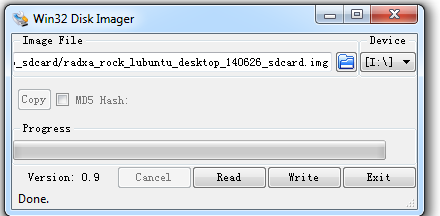
 Win32DiskImager.png


Linux

We use dd in Linux to write the image:
   sudo dd if=radxa_rock_xxxx_sdcard.img of=/dev/sdx              # x is the disk name of your uSD card on your PC

Mac OS X

We use dd and Apple's diskutil utility to write the image:
  1. Run diskutil list to determine the drive associated the SD card (ex: /dev/disk4)
  2. Unmount the existing disk sudo diskutil unmountDisk /dev/diskX where X is the disk name of your uSD card on your PC
  3. Write the image file to the uSD card sudo dd if=radxa_rock_xxxx_sdcard.img of=/dev/diskX where X is the disk name of your uSD card on your PC

Booting to SD Card

  1. Power off the Rock
  2. Insert the SD card
  3. Power on the Rock and it will boot to the SD card 

Radxa - Make SD booting images


Make SD booting images

http://wiki.radxa.com/Rock/make_sd_image


Rock/pro/lite has on board NAND flash, but can also boot from exteranl uSD card. uSD card has a higher booting priority. This page introduce how to make a completely off NAND bootable image for sd card.

Introduction

To boot from uSD card and run the system on uSD card, we need the following
  • bootloader for booting from uSD card - u-boot-sd.img
  • parameter for uSD card layout and kernel cmdline - parameter.img
  • kernel+ramdisk - boot.img
  • a rootfs - rootfs.ext4

Prepare images

u-boot for sdcard

Follow the instruction at Make u-boot for sdcard to create the u-boot-sd.img for sd card.

get the parameter

Download the parameter from dl.radxa.com
wget http://dl.radxa.com/rock/images/parameter/parameter_linux_sd
rkcrc -p parameter_linux_sd parameter.img                                      #where to get rkcrc, refer to http://radxa.com/Rock/flash_the_image "Flash with rkflashtool"

build the kernel

Follow the Booting Linux(3.0.36) or build mainline kernl page to make the boot.img.

make the roofts

Follow the instructions here to make the Ubuntu or Debian rootfs - rootfs.ext4.

Write to the sdcard

First, let's clean the uSD card.
sudo dd if=/dev/zero of=/dev/sdx bs=1M count=1

Then, create the partitions with fdisk
export START_SECTOR=65536              

why the start sector is 65536(32MB offset) is we need reserve some sectors # for boot.img/parameter/bootloader before the filesystem starts.
 
sudo fdisk /dev/sdx  << EOF
n
p
1
$START_SECTOR

w
EOF

Now we have a new partition for rootfs starting at START_SECTOR. It's time to write the images to the sdcard.
 
sudo dd if=u-boot-sd.img of=/dev/sdx conv=sync seek=64 
sudo dd if=parameter.img of=/dev/sdx conv=sync seek=$((0x2000))
sudo dd if=boot.img of=/dev/sdx conv=sync seek=$((0x2000+0x2000))
sudo dd if=rootfs.ext4 of=/dev/sdx1 conv=sync

Insert the uSD card to rock/pro/lite, you can boot from uSD card now.

Rockchip Boot flow


Here is Rockchip pre-released binaries which may be mentioned later:
https://github.com/rockchip-linux/rkbin
And Rockcip Linux GPT partition here.

Boot flow

Here is a table show the detail what we may use in Rockchip platform, for 2 boot stage:
- use U-Boot SPL;
- use Rockchp idbLoader which is combinded by Rockchip ddr init bin and miniloader bin;


Then when we talking about boot from eMMC/SD/U-Disk/net, they are in different concept:
  • Stage 1 is always in boot rom, it loads stage 2 and may load stage 3(when SPL_BACK_TO_BROM option enabled).
  • Boot from SPI flash means firmware for stage 2 and 3(SPL and U-Boot only) in SPI flash and stage 4/5 in other place;
  • Boot from eMMC means all the firmware(including stage 2, 3, 4, 5) in eMMC;
  • Boot from SD card means all the firmware(including stage 2, 3, 4, 5) in SD card;
  • Boot from U-Disk means firmware for stage 4 and 5(not including SPL and U-Boot) in Disk, optionally only including stage 5;
  • Boot from net/tftp means firmeware for stage 4 and 5(not including SPL and U-Boot) on the network;


Boot Flow 1 is typical Rockchip boot flow with Rockchip miniloader;
Boot Flow 2 is used for most SoCs with U-Boot TPL for ddr init and SPL for trust(ATF/OP-TEE) load and run into next stage;
Boot Flow 3 is use only for RK3399 with SPL ATF support;
Boot Flow 4 is used for armv7 SoCs which do not support trust;

Note 1. If loader1 have more than 1 stage, program will back to bootrom and bootrom load and run into next stage. eg. If loader1 is tpl and spl, the bootrom will run into tpl first, tpl init ddr and back to bootrom, bootrom then load and run into spl.
Note 2. If trust is enabled, loader1 need to load both trust and u-boot, and then run into trust in secure mode(EL3 in armv8), trust do the initialize and run into U-Boot in non-secure mode(EL2 in armv8).
Note 3. For trust(in trust.img or u-boot.itb), armv7 has only one tee.bin with or without ta, armv8 has bl31.elf and option with bl32.
Note 4. In boot.img, content can be zImage and its dtb for Linux, and can optionally be grub.efi, and can be AOSP boot.img, ramdisk is option;  


2016-02-13

MSM8916-OTG


MSM8916-OTG

1. Vodafone VF-895N
http://specdevice.com/showspec.php?id=6b28-515b-ffff-ffffb104159b

Communications
Phone GSM; Net: HSPA
WiFi wlan; IEEE 802.11 b/g/n; Qualcomm 8916 Snapdragon 410; AP Mode
USB Host Yes
Bluetooth Bluetooth 4.0
GPS Yes


2. UtorCase for Vodafone Smart prime 6 and Xbox or Playstation controller
http://utorcase.com/devices/vodafone-smart-prime-6#.VrKsj8u2FFQ

Device Image:

Dimensions:
141.7 x 71.9 x 9 mm (5.58 x 2.83 x 0.35 in)
Brand:
Vodafone
USB On-The-Go or USB Host Enabled:
Yes

Keyword:
SMART
Prime
6
Short Name:
VSp6
Sold on SW:
No
Weight (g):
155


3. ASUS ZE500KL / Z00E

Linux localhost 3.10.49-perf-gd1c5ee8 #1 SMP PREEMPT Mon Oct 26 16:13:26 CST 2015 aarch64 GNU/Linux


2016-01-13

houdini and binfmt_misc


houdini and binfmt_misc


qemu user mode and binfmt_misc
http://alanyih.blogspot.tw/2013/06/slitaz-qemu-user-mode-and-binfmtmisc.html
Kernel Support for miscellaneous (your favourite) Binary Formats v1.1
==============================================================
https://www.kernel.org/doc/Documentation/binfmt_misc.txt
This Kernel feature allows you to invoke almost (for restrictions see below)
every program by simply typing its name in the shell.
This includes for example compiled Java(TM), Python or Emacs programs.
To achieve this you must tell binfmt_misc which interpreter has to be invoked
with which binary. Binfmt_misc recognises the binary-type by matching some bytes
at the beginning of the file with a magic byte sequence (masking out specified
bits) you have supplied. Binfmt_misc can also recognise a filename extension
aka '.com' or '.exe'.
First you must mount binfmt_misc:
mount binfmt_misc -t binfmt_misc /proc/sys/fs/binfmt_misc
Chrooting to: /opt/rootfs-armhf/
http://alanyih.blogspot.tw/2013/06/slitaz-setup-rootfs-armhf.html
3. Mount the binfmt_misc handler
# modprobe binfmt_misc
# mount -t binfmt_misc binfmt_misc /proc/sys/fs/binfmt_misc 
4. register our format with the kernel via the procfs
root@slitaz:~# echo ':arm:M::\x7fELF\x01\x01\x01\x00\x00\x00\x00\x00\x00\x00\x00\x00\x02\x00\x28\x00:\xff\xff\xff\xff\xff\xff\xff\x00\xff\xff\xff\xff\xff\xff\x00\xff\xfe\xff\xff\xff:/usr/bin/qemu-arm-static:' > /proc/sys/fs/binfmt_misc/register
5. check register
root@slitaz:~# cat /proc/sys/fs/binfmt_misc/arm
enabled
interpreter /usr/bin/qemu-arm-static
flags:
offset 0
magic 7f454c4601010100000000000000000002002800
mask ffffffffffffff00ffffffffffff00fffeffffff

1.
tux@slitaz:~ $ adb shell
shell@Z00A:/ $ mount | grep binfmt
binfmt_misc /proc/sys/fs/binfmt_misc binfmt_misc rw,relatime 0 0


2.
shell@Z00A:/ $ grep bridge /default.prop
ro.dalvik.vm.native.bridge=libhoudini.so


3.
shell@Z00A:/ $ ls -l /proc/sys/fs/binfmt_misc
-rw-r--r-- root root 0 2015-12-20 21:24 arm_dyn
-rw-r--r-- root root 0 2015-12-20 21:24 arm_exe
--w------- root root 0 2015-12-20 21:24 register
-rw-r--r-- root root 0 2015-12-20 21:24 status


4.
shell@Z00A:/ $ cat /proc/sys/fs/binfmt_misc/status
enabled


5.
shell@Z00A:/ $ cat /proc/sys/fs/binfmt_misc/arm_exe
enabled
interpreter /system/bin/houdini
flags: P
offset 0
magic 7f454c46010101000000000000000000020028


6.
shell@Z00A:/ $ cat /proc/sys/fs/binfmt_misc/arm_dyn
enabled
interpreter /system/bin/houdini
flags: P
offset 0
magic 7f454c46010101000000000000000000030028
shell@Z00A:/ $

2016-01-11

Intel Houdini - Binary Translator


Intel Houdini - Binary Translator
ro.product.cpu.abi=x86
ro.product.cpu.abilist=x86,armeabi-v7a,armeabi
ro.product.cpu.abilist32=x86,armeabi-v7a,armeabi
ro.product.cpu.abilist64=
ro.dalvik.vm.isa.arm=x86

libhoudini: What It Means for Developers
libhoudini is a proprietary ARM translation layer for x86-powered Android devices. It allows an app that has NDK binaries for ARM, but not x86, to still run on x86 hardware, albeit not as quickly as it would with native x86 binaries.
Given ARM’s near-stranglehold on the Android ecosystem, libhoudini is hugely useful for Intel and hardware vendors interested in using Intel’s mobile CPUs. Without it, only apps that ship x86 NDK binaries would be compatible with x86-powered devices like the Samsung Galaxy Tab 3 10.1” tablet. Some developers probably skip x86 NDK binaries, because they are not aware of popular x86-powered devices, or lack one for testing, or are concerned over APK size. The Play Store for x86 would shrink substantially from the million-plus apps available to ARM devices, to those that do not use the NDK or happen to ship x86 binaries. libhoudini makes ARM-only NDK binaries usable on x86, giving x86-powered Android devices access to more of the Play Store catalog.

2016-01-07

Intel Atom Z3580


Intel Atom Z3580
model name : Intel(R) Atom(TM) CPU Z3580 @ 1.33GHz
ro.product.board=moorefield
ro.board.platform=moorefield

Intel® Atom™ Processor Z35xx
Introducing 「Moorefield」; 2014 Quad Core Processor Family for Android Devices
This year Intel will introduce the new Intel® Atom™ processor family Z35xx (code-named "Moorefield"), which offers an ideal combination of fast, smart performance and long battery life for Android devices.
Based on Intel's 22nm Silvermont microarchitecture, the 64-bit-ready SoC features four Intel architecture (IA) cores for up to 2.3GHz of compute performance.

2016-01-03

ZE551ML / Z00A - Intel Atom


ZE551ML / Z00A - Intel Atom 

        Device -- Model -- RAM/CPU
  • Z00AD -- ZE551ML -- 4GB/2.3GHz or 4GB/1.8GHz or 2GB/1.8GHz (5.5 in 1080p FHD Screen)
  • Z008D -- ZE550ML -- 2GB/1.8GHz (5.5 in 720p HD Screen)
  • Z00D -- ZE500CL -- 2GB/1.6GHz
1.
tux@slitaz:~ $ uname -a
Linux slitaz 3.2.71-slitaz64 #2 SMP Sat Oct 10 15:35:50 CEST 2015 x86_64 GNU/Linux


2.
tux@slitaz:~ $ adb shell uname -a
Linux localhost 3.10.20-x86_64_moor-265388-ga4369b3 #1 SMP PREEMPT Thu Sep 17 20:35:29 CST 2015 x86_64 GNU/Linux


3.
tux@slitaz:~ $ adb shell cat /proc/version
Linux version 3.10.20-x86_64_moor-265388-ga4369b3 (jenkins@android01-RS704D-E6-PS8) (gcc version 4.8 (GCC) ) #1 SMP PREEMPT Thu Sep 17 20:35:29 CST 2015


4.
tux@slitaz:~ $ adb shell cat /proc/cpuinfo | head -26
processor    : 0
vendor_id    : GenuineIntel
cpu family    : 6
model       : 90
model name    : Intel(R) Atom(TM) CPU  Z3580  @ 1.33GHz
stepping    : 0
microcode    : 0x34
cpu MHz       : 500.000
cache size    : 1024 KB
physical id    : 0
siblings    : 4
core id       : 0
cpu cores    : 4
apicid       : 0
initial apicid    : 0
fpu       : yes
fpu_exception    : yes
cpuid level    : 11
wp       : yes
flags       : fpu vme de pse tsc msr pae mce cx8 apic sep mtrr pge mca cmov pat pse36 clflush dts acpi mmx fxsr sse sse2 ss ht tm pbe syscall nx rdtscp lm constant_tsc arch_perfmon pebs bts rep_good nopl xtopology nonstop_tsc aperfmperf pni pclmulqdq dtes64 monitor ds_cpl vmx est tm2 ssse3 cx16 xtpr pdcm sse4_1 sse4_2 movbe popcnt tsc_deadline_timer aes rdrand lahf_lm 3dnowprefetch ida arat epb dtherm tpr_shadow vnmi flexpriority ept vpid tsc_adjust smep erms
bogomips    : 2662.40
clflush size    : 64
cache_alignment    : 64
address sizes    : 36 bits physical, 48 bits virtual
power management:


5.
tux@slitaz:~ $ adb shell cat /system/build.prop | grep -Ei 'ze551|z00a|abi|x86|moor'
ro.build.display.id=LRX21V.WW-ASUS_Z00A-2.20.40.97_20150917_1572_user
ro.build.version.incremental=WW_Z00A-WW_2.20.40.97_20150917_1572_user_rel-user-20150917
ro.product.model=ASUS_Z00A
ro.product.name=WW_Z00A
ro.product.device=Z00A
ro.product.board=moorefield
# ro.product.cpu.abi and ro.product.cpu.abi2 are obsolete,
# use ro.product.cpu.abilist instead.
ro.product.cpu.abi=x86
ro.product.cpu.abilist=x86,armeabi-v7a,armeabi
ro.product.cpu.abilist32=x86,armeabi-v7a,armeabi
ro.product.cpu.abilist64=
ro.board.platform=moorefield
ro.build.fingerprint=asus/WW_Z00A/Z00A:5.0/LRX21V/2.20.40.97_20150917_1572_user:user/release-keys
ro.build.csc.version=WW_ZE551ML_2.20.40.97_20150917
ro.dalvik.vm.isa.arm=x86
ro.asus.browser.uap=ASUS-ZE551ML
dalvik.vm.isa.x86.features=sse4_2,aes_in,popcnt,movbe
ro.config.hwrlib=T9_x86
tux@slitaz:~ $

2015-12-31

ZenFone 2 Review: Cheap, Fast, Big, Flawed


ZenFone 2 Review: Cheap, Fast, Big, Flawed


Contents


Android’s ART replaced Dalvik for many reasons, some of them being that AOT trumped JIT compilation and that Dalvik’s garbage collector was inefficient. Ultimately, it aims to improve app performance and the results have been widely discussed ever since ART’s original optional implementation on KitKat. With better performance and less of a need for native and platform-dependent code, the x86 architecture can benefit as apps become more efficient and do not have as many ARM hooks that need to be translated by libhoudini or whatever method of binary translator that gets put in place. Moreover, developers can port their ARM-based NDK applications to x86 and avoid binary translation altogether for more efficient results (some documentation by Intel can be found here). We hope that ASUS does bring further ART optimizations from more recent and upcoming Android builds to strengthen the process.

2015-12-27

Unlock bootloader


Unlock bootloader
5. Unlocking Bootloader (UNOFFICIAL METHOD)
BootLoader Unlock (both ZE551ML and ZE550ML)
http://forum.xda-developers.com/showpost.php?p=61426871&postcount=26
http://forum.xda-developers.com/zenfone2/general/congrats-to-bootlocker-unlocked-t3138547

 
Official bootloader unlock for ZenFone 2 is now available
Unlocking your bootloader allows you to put custom software onto your device. Many developers have created custom ROMs and have had to hack their way into the ZenFone 2 to make this available to powerusers in the community.
Now, unlocking the bootloader is as easy as downloading the utility, installing it, and running it.
Proceed with caution and read below notice before attempting
From the ASUS Support site: Unlock Device App: Unlock bootloader
Utilities (1)
 Version V1.0
 Description
Unlock Device App: Unlock boot loader
Notice:
1. Update your software image to V2.20.40.139 or latest version
2. Before you download, install, and use the Unlock Device App you acknowledge and assume complete risk to the quality and performance of this App, including but not limited to the following: once you activate the App you will not be able to recover your ASUS product (“Original Product”) back to original locked conditions; the Original Product with the activated App will not be deemed the Original Product; the Revised Product will no longer be covered under the warranty of the Original Product; the software of Revised Product will no longer be deemed the software of the Original Product and can no longer receive ASUS software updates; your purchased digital content may also be affected.
You also acknowledge ASUS does not guarantee service satisfaction to any Revised Product, including events involving paid service requested by you to be performed to the Revised Product.
Furthermore, such repaired Revised Product will not be covered under the warranty of the Original Product; the software of the repaired Revised Product will not be deemed the software of the Original Product and will not receive ASUS software updates.
It is strongly advised that you avoid activating this App unless you fully understand and accept the risks that may arise.

2015-12-26

Resources (for Asus ZE551ML / ZE550ML)


Resources (for Asus ZE551ML / ZE550ML)

Asus Zenfone 2 | Resources all in one thread
1. Drivers | ADB installer
2. Recovery Related Stuff (Entering Recovery|Stock Recovery | Custom Recovery)
3. Rooting | Flashing | Applying OTA
4. Changing from CN to WW version
5. Unlocking Bootloader (UNOFFICIAL METHOD)
6. Xposed Framework Installer
7. Viper4Android Related Stuff
8. Adjusting DPI without root
9. NTFS support for OTG devices

[INDEX] Asus Zenfone 2

Click on a Link below for More Info

2015-12-23

Slitaz -- adb / fastboot


sh: /usr/bin/adb: No such file or directory


1.
tux@slitaz:~ $ adb --help
sh: /usr/bin/adb: No such file or directory

tux@slitaz:~ $ which adb

tux@slitaz:~ $ ls -l /usr/bin/adb
ls: /usr/bin/adb: No such file or directory


2.
tux@slitaz:~ $ tazpkg info android-platform-tools

TazPKG information
===========================================
 Package : android-platform-tools
Version : r19.0.1
Category : development
Short desc : Platform-Tools for Google Android SDK (adb and fastboot).
Maintainer : pankso@slitaz.org
License : custom
Depends : android-sdk
Web site : http://developer.android.com
Size : 820k/4.8M
===========================================


3.
tux@slitaz:~ $ tazpkg -lf android-platform-tools
Installed files by: android-platform-tools
===========================================
/opt/android-sdk/platform-tools/adb
/opt/android-sdk/platform-tools/api/api-versions.xml
/opt/android-sdk/platform-tools/fastboot
/opt/android-sdk/platform-tools/NOTICE.txt
/opt/android-sdk/platform-tools/source.properties
/opt/android-sdk/platform-tools/systrace/AUTHORS
/opt/android-sdk/platform-tools/systrace/LICENSE
/opt/android-sdk/platform-tools/systrace/NOTICE
/opt/android-sdk/platform-tools/systrace/prefix.html
/opt/android-sdk/platform-tools/systrace/script.js
/opt/android-sdk/platform-tools/systrace/style.css
/opt/android-sdk/platform-tools/systrace/suffix.html
/opt/android-sdk/platform-tools/systrace/systrace-legacy.py
/opt/android-sdk/platform-tools/systrace/systrace.py
/opt/android-sdk/platform-tools/systrace/UPSTREAM_REVISION
==========================================
 15 files installed with android-platform-tools


4.
tux@slitaz:~ $ /opt/android-sdk/platform-tools/adb version
Android Debug Bridge version 1.0.31
tux@slitaz:~ $

2015-12-04

Zenfone 2 ZE500KL / Z00E


ZE500KL / Z00E

Platform   OS      Android OS, v5.0 (Lollipop), planned upgrade to v6.0 (Marshmallow)
           Chipset Qualcomm MSM8916 Snapdragon 410
           CPU     Quad-core 1.2 GHz Cortex-A53
           GPU     Adreno 306

Linux localhost 3.10.49-perf-gd1c5ee8 #1 SMP PREEMPT Mon Oct 26 16:13:26 CST 2015 aarch64 GNU/Linux

Processor : AArch64 Processor rev 0 (aarch64)
CPU architecture: 8
Hardware : Qualcomm Technologies, Inc MSM8916

1.
tux@slitaz:~ $ adb devices
List of devices attached
F9AXXXXXX714 device

2.
tux@slitaz:~ $ adb shell
shell@ASUS_Z00E_2:/ $ su

3.
root@ASUS_Z00E_2:/ # grep -Ei '500kl|z00e|abi|8916' /system/build.prop
ro.product.model=ASUS_Z00ED
ro.product.device=ASUS_Z00E_2
ro.product.board=msm8916
# ro.product.cpu.abi and ro.product.cpu.abi2 are obsolete,
# use ro.product.cpu.abilist instead.
ro.product.cpu.abi=arm64-v8a
ro.product.cpu.abilist=arm64-v8a,armeabi-v7a,armeabi
ro.product.cpu.abilist32=armeabi-v7a,armeabi
ro.product.cpu.abilist64=arm64-v8a
ro.board.platform=msm8916
ro.build.product=ZE500KL
ro.build.fingerprint=asus/WW_Phone/ASUS_Z00E_2:5.0.2/LRX22G/12.8.5.156-20151026:user/release-keys
ro.build.csc.version=WW_ZE500KL-12.8.5.156-20151026
# from device/qcom/msm8916_64/system.prop
# system.prop for msm8916
# [ASUS BSP] Jacob Kung - ZE500KL support golve mode property
# [ASUS BSP] Jacob Kung - ZE500KL support double tap mode property
# [ASUS BSP] Jacob Kung - ZE500KL support gesture mode property
# [ASUS BSP] Jacob Kung - ZE500KL support flipcover mode property
# [ASUS BSP] Jacob Kung - ZE500KL default enable touch check proximity before gesture wake up
#Set for msm8916
ro.asus.browser.uap=ASUS-ZE500KL
root@ASUS_Z00E_2:/ #

2015-11-30

adb - aarch64


Android Debug Bridge (adb)
AArch64 Processor (aarch64)


1.
tux@slitaz:~ $ uname -a
Linux slitaz 3.2.71-slitaz64 #2 SMP Sat Oct 10 15:35:50 CEST 2015 x86_64 GNU/Linux


2.
tux@slitaz:~ $ adb version
Android Debug Bridge version 1.0.31


3.
tux@slitaz:~ $ lsusb | grep ASUS
Bus 001 Device 003: ID 0b05:5f03 ASUSTek Computer, Inc.

tux@slitaz:~ $ lsusb -v | grep -A 15 0b05:5f03
Bus 001 Device 003: ID 0b05:5f03 ASUSTek Computer, Inc.
Device Descriptor:
bLength                 18
bDescriptorType         1
bcdUSB                  2.00
bDeviceClass            0 (Defined at Interface level)
bDeviceSubClass         0
bDeviceProtocol         0
bMaxPacketSize0        64
idVendor           0x0b05 ASUSTek Computer, Inc.
idProduct          0x5f03
bcdDevice           ff.ff
iManufacturer           1 Android
iProduct                2 Android
iSerial                 3 F9AXXXXXX714
bNumConfigurations      1 


4.
tux@slitaz:~ $ adb shell
shell@ASUS_Z00E_2:/ $ uname -a
Linux localhost 3.10.49-perf-gd1c5ee8 #1 SMP PREEMPT Mon Oct 26 16:13:26 CST 2015 aarch64 GNU/Linux


5.
shell@ASUS_Z00E_2:/ $ cat /proc/cpuinfo
Processor : AArch64 Processor rev 0 (aarch64)
processor : 0
processor : 1
processor : 2
processor : 3
Features : fp asimd crc32
CPU implementer : 0x41
CPU architecture: 8
CPU variant : 0x0
CPU part : 0xd03
CPU revision : 0

Hardware : Qualcomm Technologies, Inc MSM8916
shell@ASUS_Z00E_2:/ $

2014-06-02

radxa -- Serial console debugging


Serial console debugging / putty


1.
Connect the cable
Board    TTL2USB Cable
RX    ->  Green
TX    ->  White
GND   ->  Black 


2.
root@slitaz:/home/tux# dmesg | tail
usb 2-1: new full-speed USB device number 3 using uhci_hcd
usbcore: registered new interface driver usbserial
USB Serial support registered for generic
usbcore: registered new interface driver usbserial_generic
usbserial: USB Serial Driver core
USB Serial support registered for pl2303
pl2303 2-1:1.0: pl2303 converter detected
usb 2-1: pl2303 converter now attached to ttyUSB0
usbcore: registered new interface driver pl2303
pl2303: Prolific PL2303 USB to serial adaptor driver


3.
root@slitaz:/home/tux#  cat /proc/tty/drivers
/dev/tty             /dev/tty        5         0 system:/dev/tty
/dev/console         /dev/console    5         1 system:console
/dev/ptmx            /dev/ptmx       5         2 system
/dev/vc/0            /dev/vc/0       4         0 system:vtmaster
usbserial            /dev/ttyUSB   188      0-253 serial
serial               /dev/ttyS       4         64-67 serial
pty_slave            /dev/pts      136         0-1048575 pty:slave
pty_master           /dev/ptm      128         0-1048575 pty:master
unknown              /dev/tty        4         1-63 console


4.
root@slitaz:/home/tux# ls -l /dev/ttyUSB*
crw-rw----    1 root     dialout   188,   0 May  2 21:41 /dev/ttyUSB0


5.
root@slitaz:/home/tux# grep dialout /etc/group
dialout:x:95:tux


6.
root@slitaz:/home/tux# tazpkg -gi putty


7.
DDR Version 1.04 20130517
In
DDR3
300MHz
Bus Width=32 Col=10 Bank=8 Row=15 CS=2 Die Bus-Width=16 Size=2048MB
Memory OK
OUT
BUILD=====2
SdmmcInit=0 0
FwPartOffset=0 , 0
No.1 FLASH ID:2c 64 44 4b a9 0
OK! 248205
unsigned!
SecureBootEn = 0 0
Boot ver: 2013-12-02#2.08
start_linux=====253060
 2571850 Starting kernel...@0x60408000

<hit enter to activate fiq debugger>
[    0.000000] Booting Linux on physical CPU 0x0
[    0.000000] Initializing cgroup subsys cpu
[    0.000000] Initializing cgroup subsys cpuacct
[    0.000000] Linux version 3.10.37-slitaz (root@slitaz) (gcc version 4.6.3 (SliTaz) ) #1 SMP PREEMPT Sun May 18 00:04:25 UTC 2014
[    0.000000] CPU: ARMv7 Processor [413fc090] revision 0 (ARMv7), cr=10c53c7d
[    0.000000] CPU: PIPT / VIPT nonaliasing data cache, VIPT aliasing instruction cache
[    0.000000] Machine: RK30board, model: rockchip,rk3188

2014-06-01

radxa -- device-tree


device-tree

1.
[..]
Starting udhcpc client on: eth0...
udhcpc (v1.20.2) started
Sending discover...
Sending discover...
Sending discover...
No lease, forking to background
Processing: /etc/init.d/local.sh
Starting all daemons...
Generating Dropbear rsa key... [ Done ]
Generating Dropbear dss key... [ Done ]
Starting SSH server: Dropbear... [ Done ]

Welcome to Radxa Rock
SliTaz boot time: 6s


2.
root@slitaz:~# dmesg | grep -B 3 Machine
[ 0.000000] Linux version 3.10.37-slitaz (root@slitaz) (gcc version 4.6.3 (SliTaz) ) #1 SMP PREEMPT Fri May 16 13:57:21 UTC 2014
[ 0.000000] CPU: ARMv7 Processor [413fc090] revision 0 (ARMv7), cr=10c53c7d
[ 0.000000] CPU: PIPT / VIPT nonaliasing data cache, VIPT aliasing instruction cache
[ 0.000000] Machine: RK30board, model: rockchip,rk3188


3.
root@slitaz:~# ls /proc/device-tree
#address-cells                 nandc
#size-cells                    pinctrl@20008000
adc@2006c000                   pmu@20004000
aliases                        pwm@20030000
amba                           pwm@20030010
ap0-vcc-domain                 pwm@20050020
ap1-vcc-domain                 pwm@20050030
backlight                      rga@10114000
bootram@10080000               rk_screen
bootrom@10120000               rksdmmc@10214000
cache-controller@10138000      rksdmmc@10218000
chosen                         rksdmmc@1021C000
cif-vcc-domain                 rockchip,sram
clocks                         rockchip-hdmi-i2s
clocks-init                    rockchip-hdmi-spdif
codec-hdmi-i2s                 rockchip-i2s@0x1011a000
codec-hdmi-spdif               rockchip-spdif@0x1011e000
compatible                     rockchip_suspend
cpu_axi_bus                    serial@10124000
cpus                           serial@10126000
dvfs                           serial@20064000
dwc-control-usb@200080ac       serial@20068000
fb                             spi@20070000
fiq-debugger                   spi@20074000
flash-vcc-domain               sram@10080020
hsic@10240000                  timer@20038000
i2c@2002d000                   timer@20038020
i2c@2002f000                   timer@20038040
i2c@20056000                   timer@20038060
i2c@2005a000                   timer@20038080
i2c@2005e000                   timer@200380a0
interrupt-controller@1013d000  twd-wdt@1013c620
interrupt-parent               usb@10180000
ion                            usb@101c0000
lcdc0-vcc-domain               vccio0-vcc-domain
lcdc1-vcc-domain               vccio1-vcc-domain
lcdc@1010c000                  vmac-phy
lcdc@1010e000                  vmac@10204000
memory                         wdt@2004c000
name                           wireless-wlan

4.
root@slitaz:~# cat /proc/device-tree/compatible
rockchip,rk3188root@slitaz:~#

root@slitaz:~# cat /proc/device-tree/chosen/bootargs
clk_ignore_unused console=ttyFIQ0,115200 console=tty0 root=/dev/mmcblk0p2 rw rootfstype=ext4 init=/sbin/init mac_addr=de:ad:de:ad:be:ef initrd=0x62000000,0x003E0000 mtdparts=rk29xxnand:0x00008000@0x00002000(boot),-@0x0000A000(linuxroot) bootver=2013-12-02#2.08 firmware_ver=4.2.2

root@slitaz:~# cat /proc/device-tree/wireless-wlan/compatible
wlan-platdataroot@slitaz:~#

Slitaz -- ghex


GHex is a simple binary editor.

root@slitaz:/tmp# hexdump -C /home/tux/putty-0517-140415.log | head 
00000000  3d 7e 3d 7e 3d 7e 3d 7e  3d 7e 3d 7e 3d 7e 3d 7e  |=~=~=~=~=~=~=~=~|
00000010  3d 7e 3d 7e 3d 7e 3d 20  50 75 54 54 59 20 6c 6f  |=~=~=~= PuTTY lo|
00000020  67 20 32 30 31 34 2e 30  35 2e 31 37 20 31 34 3a  |g 2014.05.17 14:|
00000030  30 34 3a 31 35 20 3d 7e  3d 7e 3d 7e 3d 7e 3d 7e  |04:15 =~=~=~=~=~|
00000040  3d 7e 3d 7e 3d 7e 3d 7e  3d 7e 3d 7e 3d 0d 0a 00  |=~=~=~=~=~=~=...|
00000050  44 44 52 20 56 65 72 73  69 6f 6e 20 31 2e 30 34  |DDR Version 1.04|
00000060  20 32 30 31 33 30 35 31  37 0d 0a 49 6e 0d 0a 44  | 20130517..In..D|
00000070  44 52 33 0d 0a 33 30 30  4d 48 7a 0d 0a 42 75 73  |DR3..300MHz..Bus|
00000080  20 57 69 64 74 68 3d 33  32 20 43 6f 6c 3d 31 30  | Width=32 Col=10|
00000090  20 42 61 6e 6b 3d 38 20  52 6f 77 3d 31 35 20 43  | Bank=8 Row=15 C| 

root@slitaz:/tmp# hexdump -C /home/tux/putty-0517-125735.log | head 
00000000  3d 7e 3d 7e 3d 7e 3d 7e  3d 7e 3d 7e 3d 7e 3d 7e  |=~=~=~=~=~=~=~=~|
00000010  3d 7e 3d 7e 3d 7e 3d 20  50 75 54 54 59 20 6c 6f  |=~=~=~= PuTTY lo|
00000020  67 20 32 30 31 34 2e 30  35 2e 31 37 20 31 32 3a  |g 2014.05.17 12:|
00000030  35 37 3a 33 35 20 3d 7e  3d 7e 3d 7e 3d 7e 3d 7e  |57:35 =~=~=~=~=~|
00000040  3d 7e 3d 7e 3d 7e 3d 7e  3d 7e 3d 7e 3d 0d 0a 44  |=~=~=~=~=~=~=..D|
00000050  44 52 20 56 65 72 73 69  6f 6e 20 31 2e 30 34 20  |DR Version 1.04 |
00000060  32 30 31 33 30 35 31 37  0d 0a 49 6e 0d 0a 44 44  |20130517..In..DD|
00000070  52 33 0d 0a 33 30 30 4d  48 7a 0d 0a 42 75 73 20  |R3..300MHz..Bus |
00000080  57 69 64 74 68 3d 33 32  20 43 6f 6c 3d 31 30 20  |Width=32 Col=10 |
00000090  42 61 6e 6b 3d 38 20 52  6f 77 3d 31 35 20 43 53  |Bank=8 Row=15 CS|


2014-05-29

radxa -- symlink error / unzip

unzip tarball fail on symlink error: File name too long #34

"git archive" seems to be broken wrt zip files
> IOW, the zip file looks right. I wonder if this is actually a bug in
> "unzip".

It is. This only happens if you have more then 16k entries and when one
of the 16k entry infos is reused it happend to be previously used for a
symlink entry.

Here's a patch for unzip60 for reference:
--- process.c
+++ process.c
@@ -1751,6 +1751,12 @@ int process_cdir_file_hdr(__G)    /* ret
= (G.crec.general_purpose_bit_flag & (1 << 11)) == (1 << 11); 
#endif

+#ifdef SYMLINKS     
+    /* Initialize the symlink flag, may be set by the platform-specific     
+       mapattr function.  */     
+    G.pInfo->symlink = 0;
+#endif
+
return PK_COOL;

} /* end function process_cdir_file_hdr() */

radxa -- symlink error / git clone


git clone -b topic/i2c-rk3x-clean-v4 https://github.com/xqms/linux.git

1. git clone -b topic/i2c-rk3x-clean-v4 https://github.com/xqms/linux.git
root@slitaz:/run/media/tux/data-ln/radxa/src# time git clone -b topic/i2c-rk3x-clean-v4 https://github.com/xqms/linux.git
Cloning into 'linux'...
remote: Counting objects: 3545990, done.
remote: Compressing objects: 100% (589980/589980), done.
remote: Total 3545990 (delta 2926520), reused 3545990 (delta 2926520)
Receiving objects: 100% (3545990/3545990), 982.04 MiB | 51 KiB/s, done.
Resolving deltas: 100% (2926520/2926520), done.
Checking out files: 100% (46829/46829), done.
real    45m 35.28s
user    3m 22.76s
sys    0m 27.40s


2. check files
root@slitaz:/run/media/tux/data-ln/radxa/src# ls -l linux/drivers/ata/pata_atp867x.c
-rw-r--r--    1 root     root         14638 May 27 10:43 linux/drivers/ata/pata_atp867x.c
root@slitaz:/run/media/tux/data-ln/radxa/src# ls -l linux/drivers/misc/vmw_vmci/vmci_queue_pair.c
-rw-r--r--    1 root     root         97276 May 27 10:43 linux/drivers/misc/vmw_vmci/vmci_queue_pair.c
root@slitaz:/run/media/tux/data-ln/radxa/src# ls -l linux/include/uapi/linux/pci_regs.h
-rw-r--r--    1 root     root         46587 May 27 10:44 linux/include/uapi/linux/pci_regs.h
root@slitaz:/run/media/tux/data-ln/radxa/src# ls -l linux/kernel/sched/Makefile
-rw-r--r--    1 root     root           905 May 27 10:44 linux/kernel/sched/Makefile
root@slitaz:/run/media/tux/data-ln/radxa/src# ls -l linux/security/selinux/netnode.c
-rw-r--r--    1 root     root          8424 May 27 10:44 linux/security/selinux/netnode.c
root@slitaz:/run/media/tux/data-ln/radxa/src# 


radxa -- symlink error: File name too long


symlink error: File name too long


1. Download xqms/linux as a zip file
https://github.com/xqms/linux/archive/topic/i2c-rk3x-clean-v4.zip


2. unzip i2c-rk3x-clean-v4.zip
symlink error: File name too long

/usr/src/linux-topic-i2c-rk3x-clean-v4/drivers/ata/pata_atp867x.c -> /*^J *...
/usr/src/linux-topic-i2c-rk3x-clean-v4/drivers/misc/vmw_vmci/vmci_queue_pair.c -> /*^J *...
/usr/src/linux-topic-i2c-rk3x-clean-v4/include/uapi/linux/pci_regs.h -> /*^J...
/usr/src/linux-topic-i2c-rk3x-clean-v4/kernel/sched/Makefile -> ifdef CONFIG...
/usr/src/linux-topic-i2c-rk3x-clean-v4/security/selinux/netnode.c -> /*^J *...


3. No such file or directory
root@slitaz:~# ls -l  /usr/src/linux-topic-i2c-rk3x-clean-v4/drivers/ata/pata_atp867x.c
ls: /usr/src/linux-topic-i2c-rk3x-clean-v4/drivers/ata/pata_atp867x.c: No such file or directory

root@slitaz:~# ls -l /usr/src/linux-topic-i2c-rk3x-clean-v4/drivers/misc/vmw_vmci/vmci_queue_pair.c
ls: /usr/src/linux-topic-i2c-rk3x-clean-v4/drivers/misc/vmw_vmci/vmci_queue_pair.c: No such file or directory

root@slitaz:~# ls -l  /usr/src/linux-topic-i2c-rk3x-clean-v4/include/uapi/linux/pci_regs.h
ls: /usr/src/linux-topic-i2c-rk3x-clean-v4/include/uapi/linux/pci_regs.h: No such file or directory

root@slitaz:~# ls -l /usr/src/linux-topic-i2c-rk3x-clean-v4/security/selinux/netnode.c
ls: /usr/src/linux-topic-i2c-rk3x-clean-v4/security/selinux/netnode.c: No such file or directory

root@slitaz:~# ls -l /usr/src/linux-topic-i2c-rk3x-clean-v4/kernel/sched/Makefile
lrwxrwxrwx    1 root     root           905 May 26 16:59 /usr/src/linux-topic-i2c-rk3x-clean-v4/kernel/sched/Makefile -> ifdef CONFIG_FUNCTION_TRACER?CFLAGS_REMOVE_clock.o = -pg?endif??ifneq ($(CONFIG_SCHED_OMIT_FRAME_POINTER),y)?# According to Alan Modra <alan@linuxcare.com.au>, the -fno-omit-frame-pointer is?# needed for x86 only.  Why this used to be enabled for all architectures is beyond?# me.  I suspect most platforms don't need this, but until we know that for sure?# I turn this off for IA-64 only.  Andreas Schwab says it's also needed on m68k?# to get a correct value for the wait-channel (WCHAN in ps). --davidm?CFLAGS_core.o := $(PROFILING) -fno-omit-frame-pointer?endif??obj-y += core.o proc.o clock.o cputime.o?obj-y += idle_task.o fair.o rt.o deadline.o stop_task.o?obj-y += wait.o completion.o idle.o?obj-$(CONFIG_SMP) += cpupri.o cpudeadline.o?obj-$(CONFIG_SCHED_AUTOGROUP) += auto_group.o?obj-$(CONFIG_SCHEDSTATS) += stats.o?obj-$(CONFIG_SCHED_DEBUG) += debug.o?obj-$(CONFIG_CGROUP_CPUACCT) += cpuacct.o?