2019-03-13

AF106 air mouse - Pairing


AF106 Multi - Function Remote Control
Shenzhen Excel Digital technology Co.,LTD
https://fccid.io/QZVCZ-DG-AF100/User-Manual/Users-Manual-1860569


tux@slitaz:~$ dmesg | tail
[26830.291379] usb 3-11: new full-speed USB device number 3 using xhci_hcd
[26830.419998] usb 3-11: New USB device found, idVendor=26e3, idProduct=0002
[26830.420014] usb 3-11: New USB device strings: Mfr=0, Product=2, SerialNumber=0
[26830.420021] usb 3-11: Product: Exceldigi Company
[26830.422532] input: Exceldigi Company as /devices/pci0000:00/0000:00:14.0/usb3/3-11/3-11:1.0/0003:26E3:0002.0003/input/input16
[26830.422831] hid-generic 0003:26E3:0002.0003: input,hidraw2: USB HID v1.10 Mouse [Exceldigi Company] on usb-0000:00:14.0-11/input0
[26830.424758] input: Exceldigi Company as /devices/pci0000:00/0000:00:14.0/usb3/3-11/3-11:1.1/0003:26E3:0002.0004/input/input17
[26830.476686] hid-generic 0003:26E3:0002.0004: input,hidraw3: USB HID v1.10 Keyboard [Exceldigi Company] on usb-0000:00:14.0-11/input1
[26830.478584] input: Exceldigi Company as /devices/pci0000:00/0000:00:14.0/usb3/3-11/3-11:1.2/0003:26E3:0002.0005/input/input18
[26830.530744] hid-generic 0003:26E3:0002.0005: input,hidraw4: USB HID v1.10 Device [Exceldigi Company] on usb-0000:00:14.0-11/input2


1. General Description
This product is a multi-function remote controller with Air Mouse, Multimedia Control and Motion Sense Support.

2. Features
a). Elegant ID design ;
b). Ultra low power consumption wireless technology, low interference;
c). Low working voltage:1.6V~3.2V;
d). Anti-shake algorithm

3. Multimedia Keys
a). There are 16 keys in this product, and all can be customized according to customers’
requirements;
b). Paring Key: to pair the USB receiver with the remote controller;
c). Power Key: press and hold for 3 seconds to force power off the remote controller;
d). Any key to wake up the remote controller from hibernation mode.

4. Indicators
a). There is one LED indicator in this product.
b). The LED will be always on when the product is in working mode.
c). The LED will be blinking at 2Hz when the connection is broke.
d). The LED will be blinking at 5Hz when it’s in paring mode.

5. Pairing
Warning: This operation may disconnect the original paired connection, please operate with cautions.
a). Plug in the USB dongle receiver, press the button hidden in the hole on the USB receiver with a pin, the indicator shall blink quickly.
b). Within 10 seconds, press the button in the hole in the battery cartridge (right above the batteries), if the indicator turns into always on, paring succeeds. If indicator continues blinking, please repeat the pairing operation.

6. Factory Reset
Warning: Make sure the mouse function can not perform normally before conduct this operation.
a) Remove batteries, Press and Hold the Left key and the Right key on the navigation panel, install batteries, the indicator shall blink quickly.
b) Place the remote controller on a stable surface and make sure it stays still, then press OK key, the indicator shall turn off.
c) Release OK key, if the indicator turns on and stays on, the operation succeeds.

7. Mouse Sensitivity
a) The default setting is in high speed mode,
b) Press and hold the Left key and the Right key on the navigation panel for 3 seconds, the sensitivity will set to a lower speed.

8. Hibernation
a) The remote controller will turn into hibernation mode when stays still for 15 seconds.
b) Press any key to wake up the remote controller.

10.Specification:
Communication  2.4Ghz
Working Distance 10m
Angel   No limitation
Frequency  2.402-2.480Ghz
Power   2 AAA batteries
Dimension  138.92*41.77*27.93 mm
USB   USB2.0
OS   Windows,Mac os,linux,android


2018-11-24

Next -- blender-2.79b


blender-2.79b

# tazpkg -gi glu


blenderKeyboardShortcuts

blendervisualhotkeys

Next -- vblank_mode=0 glxgears


vblank_mode=0 glxgears

root@slitaz:~# glxinfo | egrep 'render|version'

direct rendering: Yes
server glx version string: 1.4
client glx version string: 1.4
GLX_MESA_multithread_makecurrent, GLX_MESA_query_renderer,
GLX version: 1.4
GLX_MESA_multithread_makecurrent, GLX_MESA_query_renderer,
Extended renderer info (GLX_MESA_query_renderer):
Max core profile version: 4.5
Max compat profile version: 3.0
Max GLES1 profile version: 1.1
Max GLES[23] profile version: 3.1
OpenGL renderer string: Mesa DRI Intel(R) Haswell Desktop x86/MMX/SSE2
OpenGL core profile version string: 4.5 (Core Profile) Mesa 17.3.4
OpenGL core profile shading language version string: 4.50
GL_ARB_conditional_render_inverted, GL_ARB_conservative_depth,
GL_MESA_texture_signed_rgba, GL_NV_conditional_render, GL_NV_depth_clamp,
OpenGL version string: 3.0 Mesa 17.3.4
OpenGL shading language version string: 1.30
GL_ARB_compute_shader, GL_ARB_conditional_render_inverted,
GL_NV_conditional_render, GL_NV_depth_clamp, GL_NV_light_max_exponent,
OpenGL ES profile version string: OpenGL ES 3.1 Mesa 17.3.4
OpenGL ES profile shading language version string: OpenGL ES GLSL ES 3.10
GL_OES_fbo_render_mipmap, GL_OES_geometry_point_size,
root@slitaz:~#

root@slitaz:~# uname -a
Linux slitaz 4.17.7-slitaz #2 SMP Sat Jul 21 08:34:51 Europe 2018 i686 GNU/Linux

root@slitaz:~#

root@slitaz:~# vblank_mode=0 glxgears
ATTENTION: default value of option vblank_mode overridden by environment.
37499 frames in 5.0 seconds = 7499.718 FPS
40807 frames in 5.0 seconds = 8161.307 FPS
40792 frames in 5.0 seconds = 8158.356 FPS
41047 frames in 5.0 seconds = 8209.256 FPS
root@slitaz:~#


root@slitaz:~# grep -i glx /var/log/Xorg.0.log

[ 146.808] (II) LoadModule: "glx"
[ 146.808] (II) Loading /usr/lib/xorg/modules/extensions/libglx.so
[ 146.810] (II) Module glx: vendor="X.Org Foundation"
[ 147.074] (II) Initializing extension GLX
[ 147.080] (II) AIGLX: Loaded and initialized i965
[ 147.080] (II) GLX: Initialized DRI2 GL provider for screen 0

Next -- lxpanel Segmentation fault


lxpanel Segmentation fault

root@slitaz:~# lxpanel -p slitaz
Segmentation fault

root@slitaz:~# tazpkg info lxpanel


TazPkg information
================================================================================
Package : lxpanel
State : installed package
Version : 0.9.3.postgit20180412
Category : x-window
Short desc : LXDE panel
Maintainer : pankso@slitaz.org
License : GPL2
Depends : alsa-lib cairo gdk-pixbuf glib gtk2 libfm libfm-gtk keybinder
libwnck2 libxml2 menu-cache pango wireless_tools xorg-libX11
slitaz-menus
Suggested : lxde lxsession slitaz-icon
Web site : https://wiki.lxde.org/en/LXPanel
Size : 196K/824K
Tags : LXDE gtk2 panel
================================================================================

2018-11-22

Next -- tazpkg upgrade


tazpkg upgrade

(EE) intel: module ABI major version (23) doesn't match the server's version (24)
(EE) Failed to load module "intel" (module requirement mismatch, 0)

1. upgrade slitaz-next-170930.iso
tux@slitaz:~$ uname -a
Linux slitaz 4.9.30-slitaz #2 SMP Fri Jun 16 13:58:14 Europe 2017 i686 GNU/Linux
tux@slitaz:~$ sudo tazpkg upgrade
Password:

Recharging repository "Main"
================================================================================
Checking... [ Done ]
Database timestamp: 11/12/2018 04:43
================================================================================
Repository "Main" is up to date.
[..]

You have 277 available upgrades (0 blocked)

322 installed packages scanned in 2s
Do you wish to install them now? (y/N) y
915resolution-0.5.3. 100% |*******************************| 8064 0:00:00 ETA
[..]


2. reboot
root@slitaz:~# uname -a
Linux slitaz 4.17.7-slitaz #2 SMP Sat Jul 21 08:34:51 Europe 2018 i686 GNU/Linux

root@slitaz:~# X -version

X.Org X Server 1.20.1
X Protocol Version 11, Revision 0
Build Operating System: SliTaz GNU/Linux
Current Operating System: Linux slitaz 4.17.7-slitaz #2 SMP Sat Jul 21 08:34:51 Europe 2018 i686
Kernel command line: root=/dev/null autologin
Build Date: 02 September 2018 10:59:13PM
Current version of pixman: 0.34.0
Before reporting problems, check http://www.slitaz.org/
to make sure that you have the latest version.

root@slitaz:~# grep -A 25 intel /var/log/Xorg.0.log
[ 27.182] (==) Matched intel as autoconfigured driver 0
[ 27.182] (==) Matched modesetting as autoconfigured driver 1
[ 27.182] (==) Matched fbdev as autoconfigured driver 2
[ 27.182] (==) Matched vesa as autoconfigured driver 3
[ 27.182] (==) Assigned the driver to the xf86ConfigLayout
[ 27.182] (II) LoadModule: "intel"
[ 27.182] (II) Loading /usr/lib/xorg/modules/drivers/intel_drv.so
[ 27.182] (II) Module intel: vendor="X.Org Foundation"
[ 27.182] compiled for 1.19.3, module version = 2.99.917
[ 27.182] Module class: X.Org Video Driver
[ 27.182] ABI class: X.Org Video Driver, version 23.0
[ 27.182] (EE) intel: module ABI major version (23) doesn't match the server's version (24)
[ 27.182] (EE) Failed to load module "intel" (module requirement mismatch, 0)

[ 27.182] (II) LoadModule: "modesetting"
[ 27.182] (II) Loading /usr/lib/xorg/modules/drivers/modesetting_drv.so
[ 27.182] (II) Module modesetting: vendor="X.Org Foundation"
[ 27.182] compiled for 1.20.1, module version = 1.20.1
[ 27.182] Module class: X.Org Video Driver
[ 27.182] ABI class: X.Org Video Driver, version 24.0
[ 27.182] (II) LoadModule: "fbdev"
[ 27.182] (II) Loading /usr/lib/xorg/modules/drivers/fbdev_drv.so
[ 27.183] (II) Module fbdev: vendor="X.Org Foundation"
[ 27.183] compiled for 1.19.3, module version = 0.5.0
[ 27.183] Module class: X.Org Video Driver
[ 27.183] ABI class: X.Org Video Driver, version 23.0
[ 27.183] (EE) fbdev: module ABI major version (23) doesn't match the server's version (24)
[ 27.183] (EE) Failed to load module "fbdev" (module requirement mismatch, 0)

[ 27.183] (II) LoadModule: "vesa"
[ 27.183] (II) Loading /usr/lib/xorg/modules/drivers/vesa_drv.so
[ 27.183] (II) Module vesa: vendor="X.Org Foundation"
[ 27.183] compiled for 1.19.3, module version = 2.4.0
[ 27.183] Module class: X.Org Video Driver
[ 27.183] ABI class: X.Org Video Driver, version 23.0
[ 27.183] (EE) vesa: module ABI major version (23) doesn't match the server's version (24)
[ 27.183] (EE) Failed to load module "vesa" (module requirement mismatch, 0)

[ 27.183] (II) modesetting: Driver for Modesetting Kernel Drivers: kms
[ 27.183] (++) using VT number 7

Next - libglx.so: undefined symbol: glxServer


slitaz-next-170930.iso

/lib/libc.so.6: version `GLIBC_2.26' not found (required by /usr/lib/xorg/modules/extensions/libglx.so)

/usr/lib/xorg/modules/extensions/libglx.so: undefined symbol: glxServer


1.

tux@slitaz:~$ uname -a
Linux slitaz 4.9.30-slitaz #2 SMP Fri Jun 16 13:58:14 Europe 2017 i686 GNU/Linux

tux@slitaz:~$ tazpkg
SliTaz package manager - Version: 950
================================================================================
Installed packages:    322
Installed files:       7509
Blocked packages:      0
Upgradeable packages:  0

Repository:            Main
Last recharge:         Today at 20:55.
Database timestamp:    11/12/2018 04:43
Mirrored packages:     6186
================================================================================

$ sudo tazpkg -gi xorg-server-module-glamor
$ sudo tazpkg -gi mesa-dri mesa-demos libatomic mesa-libegl


2. relogin
tux@slitaz:~$ grep glx /var/log/Xorg.0.log
[ 737.926] (EE) Failed to load /usr/lib/xorg/modules/extensions/libglx.so: /lib/libc.so.6: version `GLIBC_2.26' not found (required by /usr/lib/xorg/modules/extensions/libglx.so)

tux@slitaz:~$ tazpkg -l | grep glibc
glibc-base 2.25 base-system

tux@slitaz:~$ sudo tazpkg -gi glibc-base --forced


3. relogin - glibc-2.26
tux@slitaz:~$ glxinfo
name of display: :0.0
Error: couldn't find RGB GLX visual or fbconfig

tux@slitaz:~$ grep -i glx /var/log/Xorg.0.log
[ 915.450] (II) LoadModule: "glx"
[ 915.451] (II) Loading /usr/lib/xorg/modules/extensions/libglx.so
[ 915.454] (EE) Failed to load /usr/lib/xorg/modules/extensions/libglx.so: /usr/lib/xorg/modules/extensions/libglx.so: undefined symbol: glxServer
[ 915.454] (II) UnloadModule: "glx"
[ 915.454] (II) Unloading glx
[ 915.454] (EE) Failed to load module "glx" (loader failed, 7)


4.
tux@slitaz:~$ tazpkg -l | egrep 'glibc|xorg-server'

glibc-base                         2.26              base-system
xorg-server                        1.19.3            x-window
xorg-server-module-glamor          1.20.1            x-window
tux@slitaz:~$

2018-11-05

Radxa - SD Images


SD Images

SD images for the rock are images booting and running on the uSD card completely. This is good when you want to try different OS or new version of the firmware without touching the nand flash.

Downloading SD Images

Check your hardware revision (Pro or Full/Lite), then download image "for SD card" from here

Writing SD image to SD card

Windows

See the readme in the individual image zip file for additional information on which tool to use.
Before beginning, you will need to prepare a high quality SD card of at least 8GB. A poor quality SD card will result in boot failures.
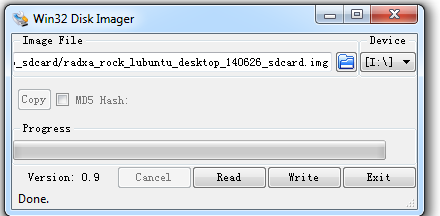
  • Download the Win32DiskImager from here.
  • Download the image from above link.
  • Use the Win32DiskImager to Write the image into SD card

 Win32DiskImager.png


Linux

We use dd in Linux to write the image:
   sudo dd if=radxa_rock_xxxx_sdcard.img of=/dev/sdx              # x is the disk name of your uSD card on your PC

Mac OS X

We use dd and Apple's diskutil utility to write the image:
  1. Run diskutil list to determine the drive associated the SD card (ex: /dev/disk4)
  2. Unmount the existing disk sudo diskutil unmountDisk /dev/diskX where X is the disk name of your uSD card on your PC
  3. Write the image file to the uSD card sudo dd if=radxa_rock_xxxx_sdcard.img of=/dev/diskX where X is the disk name of your uSD card on your PC

Booting to SD Card

  1. Power off the Rock
  2. Insert the SD card
  3. Power on the Rock and it will boot to the SD card 

Radxa - U-Boot

U-Boot

Features

  • both Rockchip proprietary USB protocol and fastboot USB protocol are supported (Rockchip USB tools works)
  • format of partitions (images) are compatible to Rockchip proprietary bootloader (rkcrc, mkbootimg works)
  • (need more investigation...)

For NAND flash

Build

Refer install toolchain if you don't have arm-eabi- on your system. Other toolchain(Linaro arm-linux-gnueabihf-gcc 4.9) may cause data abort errors.
git clone -b u-boot-rk3188 https://github.com/radxa/u-boot-rockchip.git
cd u-boot-rockchip
make rk30xx
The binary we need for nand flash are RK3188Loader_miniall.bin and uboot.img.

Flash

refer flash image page
use the new u-boot to erase the old loader
   sudo upgrade_tool ef RK3188Loader_miniall.bin
flash new loader
   sudo upgrade_tool ul RK3188Loader_miniall.bin
format NAND (first time only)
   sudo upgrade_tool lf
flash parameter
   upgrade_tool di -p parameter
paramter file
   FIRMWARE_VER:4.2.2
   MACHINE_MODEL:radxa_rock
   MACHINE_ID:007
   MANUFACTURER:RADXA
   MAGIC: 0x5041524B
   ATAG: 0x60000800
   MACHINE: 3066
   CHECK_MASK: 0x80
   KERNEL_IMG: 0x60408000
   CMDLINE:console=ttyFIQ0,115200 console=tty0 root=/dev/block/mtd/by-name/linuxroot rw rootfstype=ext4 init=/sbin/init mac_addr=de:ad:de:ad:be:ef initrd=0x62000000,0x00800000  mtdparts=rk29xxnand:0x00002000@0x00002000(uboot),0x00008000@0x00004000(boot),-@0x000c0000(linuxroot)
flash U-Boot
   sudo upgrade_tool wl 0x2000 uboot.img
   sudo upgrade_tool rd
flash kernel + ramdisk
   upgrade_tool di -b boot-linux.img
flash root fs
   upgrade_tool di linuxroot rootfs.img
Booting log can be found at: http://paste.ubuntu.com/9623598/

For SD card

Build

Refer install toolchain if you don't have arm-eabi- on your system. Other toolchain(Linaro arm-linux-gnueabihf-gcc 4.9) may cause data abort errors.
git clone -b u-boot-rk3188-sdcard https://github.com/radxa/u-boot-rockchip.git
cd u-boot-rockchip
make rk30xx
./pack-sd.sh
The binary we need for sdcard is u-boot-sd.img.

Flash

sudo dd if=u-boot-sd.img of=/dev/sdx seek=64
Insert the uSD card to rock pro, it will boot from u-boot on uSD card.

Develop

Some important files and directories related to the Rockchip platform:
 * UserManual - documentation
 * include/configs/rk30xx.h - configuration file
 * tools/rk_tools
 * board/rockchip
    ├── common
    │   ├── armlinux
    │   ├── common
    │   │   ├── A8MMU
    │   │   ├── crc
    │   │   ├── emmc
    │   │   ├── fat
    │   │   ├── rc4
    │   │   ├── rockusb
    │   │   ├── serial_p9
    │   │   └── SPI
    │   └── platform
    │       ├── rk2928
    │       └── rk30
    └── rk30xx
 * arch/arm/cpu/armv7/rk30xx
 * arch/arm/include/asm/arch-rk30xx

Unbrick

If something goes wrong and your device doesn't boot anymore, read Unbrick Rock.

External links

Radxa - Make SD booting images


Make SD booting images

http://wiki.radxa.com/Rock/make_sd_image


Rock/pro/lite has on board NAND flash, but can also boot from exteranl uSD card. uSD card has a higher booting priority. This page introduce how to make a completely off NAND bootable image for sd card.

Introduction

To boot from uSD card and run the system on uSD card, we need the following
  • bootloader for booting from uSD card - u-boot-sd.img
  • parameter for uSD card layout and kernel cmdline - parameter.img
  • kernel+ramdisk - boot.img
  • a rootfs - rootfs.ext4

Prepare images

u-boot for sdcard

Follow the instruction at Make u-boot for sdcard to create the u-boot-sd.img for sd card.

get the parameter

Download the parameter from dl.radxa.com
wget http://dl.radxa.com/rock/images/parameter/parameter_linux_sd
rkcrc -p parameter_linux_sd parameter.img                                      #where to get rkcrc, refer to http://radxa.com/Rock/flash_the_image "Flash with rkflashtool"

build the kernel

Follow the Booting Linux(3.0.36) or build mainline kernl page to make the boot.img.

make the roofts

Follow the instructions here to make the Ubuntu or Debian rootfs - rootfs.ext4.

Write to the sdcard

First, let's clean the uSD card.
sudo dd if=/dev/zero of=/dev/sdx bs=1M count=1

Then, create the partitions with fdisk
export START_SECTOR=65536              

why the start sector is 65536(32MB offset) is we need reserve some sectors # for boot.img/parameter/bootloader before the filesystem starts.
 
sudo fdisk /dev/sdx  << EOF
n
p
1
$START_SECTOR

w
EOF

Now we have a new partition for rootfs starting at START_SECTOR. It's time to write the images to the sdcard.
 
sudo dd if=u-boot-sd.img of=/dev/sdx conv=sync seek=64 
sudo dd if=parameter.img of=/dev/sdx conv=sync seek=$((0x2000))
sudo dd if=boot.img of=/dev/sdx conv=sync seek=$((0x2000+0x2000))
sudo dd if=rootfs.ext4 of=/dev/sdx1 conv=sync

Insert the uSD card to rock/pro/lite, you can boot from uSD card now.

Rockchip Boot flow


Here is Rockchip pre-released binaries which may be mentioned later:
https://github.com/rockchip-linux/rkbin
And Rockcip Linux GPT partition here.

Boot flow

Here is a table show the detail what we may use in Rockchip platform, for 2 boot stage:
- use U-Boot SPL;
- use Rockchp idbLoader which is combinded by Rockchip ddr init bin and miniloader bin;


Then when we talking about boot from eMMC/SD/U-Disk/net, they are in different concept:
  • Stage 1 is always in boot rom, it loads stage 2 and may load stage 3(when SPL_BACK_TO_BROM option enabled).
  • Boot from SPI flash means firmware for stage 2 and 3(SPL and U-Boot only) in SPI flash and stage 4/5 in other place;
  • Boot from eMMC means all the firmware(including stage 2, 3, 4, 5) in eMMC;
  • Boot from SD card means all the firmware(including stage 2, 3, 4, 5) in SD card;
  • Boot from U-Disk means firmware for stage 4 and 5(not including SPL and U-Boot) in Disk, optionally only including stage 5;
  • Boot from net/tftp means firmeware for stage 4 and 5(not including SPL and U-Boot) on the network;


Boot Flow 1 is typical Rockchip boot flow with Rockchip miniloader;
Boot Flow 2 is used for most SoCs with U-Boot TPL for ddr init and SPL for trust(ATF/OP-TEE) load and run into next stage;
Boot Flow 3 is use only for RK3399 with SPL ATF support;
Boot Flow 4 is used for armv7 SoCs which do not support trust;

Note 1. If loader1 have more than 1 stage, program will back to bootrom and bootrom load and run into next stage. eg. If loader1 is tpl and spl, the bootrom will run into tpl first, tpl init ddr and back to bootrom, bootrom then load and run into spl.
Note 2. If trust is enabled, loader1 need to load both trust and u-boot, and then run into trust in secure mode(EL3 in armv8), trust do the initialize and run into U-Boot in non-secure mode(EL2 in armv8).
Note 3. For trust(in trust.img or u-boot.itb), armv7 has only one tee.bin with or without ta, armv8 has bl31.elf and option with bl32.
Note 4. In boot.img, content can be zImage and its dtb for Linux, and can optionally be grub.efi, and can be AOSP boot.img, ramdisk is option;  


SliTaz (and GRUB2) with SSD disks


SliTaz (and GRUB2) with SSD disks


And finally only NVMe support was usefull; setting
# CONFIG_BLK_DEV_PCIESSD_MTIP32XX is not set and
CONFIG_BLK_DEV_NVME=y
SliTaz can now see the disk :)

# fdisk -l
Found valid GPT with protective MBR; using GPT

Disk /dev/nvme0n1: 500118192 sectors, 2534M
Logical sector size: 512
Disk identifier (GUID): 324ef864-7efa-45be-b0b0-c70122bdf99c
Partition table holds up to 128 entries
First usable sector is 34, last usable sector is 500118158

Number  Start (sector)    End (sector) Size Name
    1        2048 534527  260M EFI system partition
    2      534528     796671 128M Microsoft reserved partition
    3      796672  500117503 238G Basic data partition


full support fat32
# tazpkg -gi dosfstools mtools

GParted --> View --> File System Support


Microsoft reserved partition (MSR) - msftres

The Linux kernel configuration item CONFIG_BLK_DEV_PCIESSD_MTIP32XX:

$ grep mtip32xx /lib/modules/3.16.55-slitaz/modules.builtin
kernel/drivers/block/mtip32xx/mtip32xx.ko

Dell Latitude E5470 SATA SSD
Micron SSD 1100 (MTFDDAV256TBN), 256 GB, M.2 2280, 190 GB free


Lenovo E480 PCIe NVMe x2 SSD
Lenovo LENSE20256GMSP34MEAT2TA, 256 GB, M.2 2280 PCIe NVMe x2, 210 GB free


2018-07-30

Next -- slitaz-next-180716.iso


slitaz-next-180716.iso 2018-Jul-17 60.8M
http://mirror1.slitaz.org/iso/next/slitaz-next-180716.iso

root@slitaz:~# uname -a
Linux slitaz 4.14.16-slitaz #2 SMP Sat Feb 24 05:21:35 Europe 2018 i686 GNU/Linux

root@slitaz:~# cat /proc/cmdline
BOOT_IMAGE=/boot/bzImage initrd=/boot/rootfs.gz rw root=/dev/null video=-32 autologin lang=en_US kmap=us tz=America/New_York

root@slitaz:~# blkid
/dev/sr0: UUID="2018-07-16-22-35-51-00" LABEL="SliTaz try" TYPE="iso9660"

2018-06-08

Slitaz -- VirtualBox EFI Shell


VirtualBox EFI Shell
slitaz-core-5in1.iso 2018-May-24 60.4M

1. Enable EFI


2. EFI boot menu
Start VM and PRESS F12 to bring up the EFI boot menu


Continue
Select Language
Boot Manager
[..]


3. Boot Manager
EFI DVD/CDROM
EFI Internal Shell


4. EFI Internal Shell
UEFI Interactive Shell v2.1
EDK II
UEFI v2.40 (EDK II, 0x00010000)
Mapping table
[..]
Press ESC in 4 seconds to skip startup.nsh or any key to continue.
Shell>

map displays a list of device mappings i.e. the names of available file systems (fs0) and storage devices (blk0).


5. startup.nsh
To dump a list of current boot entries:
bcfg boot dump -v

Shell>startup.nsh


6. slitaz-core-5in1


2018-06-02

Slitaz -- hardlink-efi.img


hardlink - efi.img
slitaz-core-5in1.iso 2018-May-24 60.4M

62734336 May 24 09:37 efi.img

/media/cdrom/efi/boot:
total 61125
-rw-r--r--    2 root     root            45 May 24 09:37 rootfs1.gz
-rw-r--r--    2 root     root       8802668 May 24 09:37 rootfs1.gz64
-rw-r--r--    2 root     root      15381904 May 24 09:37 rootfs2.gz
-rw-r--r--    2 root     root      10939212 May 24 09:36 rootfs3.gz
-rw-r--r--    2 root     root      11131148 May 24 09:36 rootfs4.gz
-rw-r--r--    2 root     root       8837600 May 24 09:35 rootfs5.gz
-rw-r--r--    1 root     root          1392 May 24 09:37 startup.nsh
-rw-r--r--    3 root     root       3704000 Mar 15 10:30 vmlinuz-3.16.55-slitaz64.efi
-rw-r--r--    3 root     root       3792224 May 21 18:06 vmlinuz-3.16.55-slitaz.efi

tux@slitaz:~$ file /media/cdrom/boot/isolinux/efi.img
/media/cdrom/boot/isolinux/efi.img: DOS/MBR boot sector, code offset 0x3c+2, OEM-ID "SliTaz", sectors/cluster 4, reserved sectors 4, root entries 64, Media descriptor 0xf8, sectors/FAT 120, sectors/track 32, heads 64, hidden sectors 172, sectors 122528 (volumes > 32 MB), serial number 0x0, label: "SYSTEM ", FAT (16 bit)

tux@slitaz:~$ 7z l /media/cdrom/boot/isolinux/efi.img
7-Zip [64] 16.02 : Copyright (c) 1999-2016 Igor Pavlov : 2016-05-21
p7zip Version 16.02 (locale=en_US.UTF-8,Utf16=on,HugeFiles=on,64 bits,2 CPUs Intel(R) Pentium(R) CPU G3258 @ 3.20GHz (306C3),ASM)
Scanning the drive for archives:
1 file, 62734336 bytes (60 MiB)
Listing archive: /media/cdrom/boot/isolinux/efi.img
--
Path = /media/cdrom/boot/isolinux/efi.img
Type = FAT
Physical Size = 62734336
File System = FAT16
Cluster Size = 2048
Free Space = 0
Headers Size = 131072
Label = SYSTEM
Sector Size = 512
ID = 0
Date      Time    Attr         Size   Compressed  Name
------------------- ----- ------------ ------------  ------------------------
2018-05-24 09:37:54 D....                            efi
2018-05-25 03:02:26 ....A         1540         2048  NvVars
2018-05-24 09:37:56 D....                            efi/boot
2018-05-24 09:37:52 ....A         1392         2048  efi/boot/startup.nsh
2018-05-21 18:06:48 ....A      3792224      3792896  efi/boot/vmlinuz-3.16.55-slitaz.efi
2018-03-15 10:30:18 ....A      3704000      3704832  efi/boot/vmlinuz-3.16.55-slitaz64.efi
2018-05-24 09:35:46 ....A      8837600      8839168  efi/boot/rootfs5.gz
2018-05-24 09:37:52 ....A           45         2048  efi/boot/rootfs1.gz
2018-05-24 09:36:20 ....A     11131148     11132928  efi/boot/rootfs4.gz
2018-05-24 09:37:46 ....A     15381904     15382528  efi/boot/rootfs2.gz
2018-05-24 09:37:52 ....A      8802668      8804352  efi/boot/rootfs1.gz64
2018-05-24 09:36:46 ....A     10939212     10940416  efi/boot/rootfs3.gz
------------------- ----- ------------ ------------  ------------------------
2018-05-25 03:02:26           62591733     62603264  10 files, 2 folders
tux@slitaz:~$


Slitaz-core-5in1-hardlink


hardlink

slitaz-core-5in1.iso 2018-May-24 60.4M

e.g.
-rw-r--r--    3 root     root       3704000 Mar 15 06:30 bzImage64
-rw-r--r--    3 root     root       3704000 Mar 15 06:30 vmlinuz-3.16.55-slitaz64
-rw-r--r--    3 root     root       3704000 Mar 15 06:30 vmlinuz-3.16.55-slitaz64.efi 

tux@slitaz:~$ ls -lR /media/cdrom
/media/cdrom:
total 12
drwxr-xr-x    3 root     root          2048 May 24 09:37 boot
drwxr-xr-x    3 root     root          2048 May 24 09:37 efi
-rw-r--r--    1 root     root          4922 Jan 24 23:09 index.html
-rw-r--r--    1 root     root          1818 May 24 09:37 md5sum
-rw-r--r--    1 root     root           811 Jan 24 23:09 README

/media/cdrom/boot:
total 68818
-rw-r--r--    3 root     root       3792224 May 21 18:06 bzImage
-rw-r--r--    3 root     root       3704000 Mar 15 10:30 bzImage64
-rw-r--r--    1 root     root        331126 Feb 26 10:10 ipxe.exe
drwxr-xr-x    2 root     root          2048 May 24 09:37 isolinux
-rw-r--r--    1 root     root          3911 Feb 25 16:15 linld.com
-rw-r--r--    1 root     root         44920 Feb 26 10:10 memtest.exe
-rw-r--r--    2 root     root            45 May 24 09:37 rootfs1.gz
-rw-r--r--    2 root     root       8802668 May 24 09:37 rootfs1.gz64
-rw-r--r--    2 root     root      15381904 May 24 09:37 rootfs2.gz
-rw-r--r--    2 root     root      10939212 May 24 09:36 rootfs3.gz
-rw-r--r--    2 root     root      11131148 May 24 09:36 rootfs4.gz
-rw-r--r--    2 root     root       8837600 May 24 09:35 rootfs5.gz
-rw-r--r--    3 root     root       3792224 May 21 18:06 vmlinuz-3.16.55-slitaz
-rw-r--r--    3 root     root       3704000 Mar 15 10:30 vmlinuz-3.16.55-slitaz64

/media/cdrom/boot/isolinux:
total 61417
-r--r--r--    1 root     root          2048 May 24 09:37 boot.cat
-rw-r--r--    1 root     root         17123 Feb 25 16:15 c32box.c32
-rw-r--r--    1 root     root      62734336 May 24 09:37 efi.img
-rw-r--r--    1 root     root           857 Feb 25 16:15 help.en
-rw-r--r--    1 root     root           875 Feb 25 16:15 help.fr
-rw-r--r--    1 root     root          3718 Feb 25 16:15 i18n.cfg
-rw-r--r--    1 root     root         24576 Feb 25 16:15 isolinux.bin
-rw-r--r--    1 root     root          2260 May 24 09:37 isolinux.cfg
-rw-r--r--    1 root     root          1446 Feb 25 16:15 kbd
-rw-r--r--    1 root     root           318 May 24 09:37 noram.cfg
-rw-r--r--    1 root     root          1000 Feb 25 16:15 opts.en
-rw-r--r--    1 root     root          1118 Feb 25 16:15 opts.fr
-rw-r--r--    1 root     root         23795 Mar  4 16:48 splash.jpg
-rw-r--r--    1 root     root         74570 Feb 25 16:15 vesamenu.c32

/media/cdrom/efi:
total 2
drwxr-xr-x    2 root     root          2048 May 24 09:37 boot

/media/cdrom/efi/boot:
total 61125
-rw-r--r--    2 root     root            45 May 24 09:37 rootfs1.gz
-rw-r--r--    2 root     root       8802668 May 24 09:37 rootfs1.gz64
-rw-r--r--    2 root     root      15381904 May 24 09:37 rootfs2.gz
-rw-r--r--    2 root     root      10939212 May 24 09:36 rootfs3.gz
-rw-r--r--    2 root     root      11131148 May 24 09:36 rootfs4.gz
-rw-r--r--    2 root     root       8837600 May 24 09:35 rootfs5.gz
-rw-r--r--    1 root     root          1392 May 24 09:37 startup.nsh
-rw-r--r--    3 root     root       3704000 Mar 15 10:30 vmlinuz-3.16.55-slitaz64.efi
-rw-r--r--    3 root     root       3792224 May 21 18:06 vmlinuz-3.16.55-slitaz.efi
tux@slitaz:~$ 
 

2018-05-28

Slitaz -- dualboot (UEFI/BIOS) ISO VS. USB


dualboot (UEFI/BIOS) ISO VS. USB
slitaz-core-5in1.iso 2018-May-24 60.4M
drwxr-xr-x 2 root root 8192 May 26 05:30 syslinux
root@slitaz:~# egrep -A3 'RC4|slitaz|core64' /media/UEFI/boot/syslinux/syslinux.cfg

root@slitaz:~# tree -C -s /media/cdrom
/media/cdrom
├── [       2048]  boot
│   ├── [    3792224]  bzImage
│   ├── [    3704000]  bzImage64
│   ├── [     331126]  ipxe.exe
│   ├── [       2048]  isolinux
│   │   ├── [       2048]  boot.cat
│   │   ├── [      17123]  c32box.c32
│   │   ├── [   62734336]  efi.img
│   │   ├── [        857]  help.en
│   │   ├── [        875]  help.fr
│   │   ├── [       3718]  i18n.cfg
│   │   ├── [      24576]  isolinux.bin
│   │   ├── [       2260]  isolinux.cfg
│   │   ├── [       1446]  kbd
│   │   ├── [        318]  noram.cfg
│   │   ├── [       1000]  opts.en
│   │   ├── [       1118]  opts.fr
│   │   ├── [      23795]  splash.jpg
│   │   └── [      74570]  vesamenu.c32
│   ├── [       3911]  linld.com
│   ├── [      44920]  memtest.exe
│   ├── [         45]  rootfs1.gz
│   ├── [    8802668]  rootfs1.gz64
│   ├── [   15381904]  rootfs2.gz
│   ├── [   10939212]  rootfs3.gz
│   ├── [   11131148]  rootfs4.gz
│   ├── [    8837600]  rootfs5.gz
│   ├── [    3792224]  vmlinuz-3.16.55-slitaz
│   └── [    3704000]  vmlinuz-3.16.55-slitaz64
├── [       2048]  efi
│   └── [       2048]  boot
│       ├── [         45]  rootfs1.gz
│       ├── [    8802668]  rootfs1.gz64
│       ├── [   15381904]  rootfs2.gz
│       ├── [   10939212]  rootfs3.gz
│       ├── [   11131148]  rootfs4.gz
│       ├── [    8837600]  rootfs5.gz
│       ├── [       1392]  startup.nsh
│       ├── [    3704000]  vmlinuz-3.16.55-slitaz64.efi
│       └── [    3792224]  vmlinuz-3.16.55-slitaz.efi
├── [       4922]  index.html
├── [       1818]  md5sum
└── [        811]  README

4 directories, 39 files

----

root@slitaz:~# tree -C -s /media/UEFI
/media/UEFI
├── [       8192]  boot
│   ├── [    3792224]  bzImage
│   ├── [    3704000]  bzImage64
│   ├── [     331126]  ipxe.exe
│   ├── [       3911]  linld.com
│   ├── [      44920]  memtest.exe
│   ├── [         45]  rootfs1.gz
│   ├── [    8802668]  rootfs1.gz64
│   ├── [   15381904]  rootfs2.gz
│   ├── [   10939212]  rootfs3.gz
│   ├── [   11131148]  rootfs4.gz
│   ├── [    8837600]  rootfs5.gz
│   ├── [       8192]  syslinux
│   │   ├── [       2048]  boot.cat
│   │   ├── [      17123]  c32box.c32
│   │   ├── [   62734336]  efi.img
│   │   ├── [        857]  help.en
│   │   ├── [        875]  help.fr
│   │   ├── [       3718]  i18n.cfg
│   │   ├── [       1446]  kbd
│   │   ├── [      38912]  ldlinux.sys
│   │   ├── [        318]  noram.cfg
│   │   ├── [       1000]  opts.en
│   │   ├── [       1118]  opts.fr
│   │   ├── [      23795]  splash.jpg
│   │   ├── [      24576]  syslinux.bin
│   │   ├── [       2260]  syslinux.cfg
│   │   └── [      74570]  vesamenu.c32
│   ├── [    3792224]  vmlinuz-3.16.55-slitaz
│   └── [    3704000]  vmlinuz-3.16.55-slitaz64
├── [       8192]  efi
│   └── [       8192]  boot
│       ├── [         45]  rootfs1.gz
│       ├── [    8802668]  rootfs1.gz64
│       ├── [   15381904]  rootfs2.gz
│       ├── [   10939212]  rootfs3.gz
│       ├── [   11131148]  rootfs4.gz
│       ├── [    8837600]  rootfs5.gz
│       ├── [       1392]  startup.nsh
│       ├── [    3704000]  vmlinuz-3.16.55-slitaz64.efi
│       └── [    3792224]  vmlinuz-3.16.55-slitaz.efi
├── [       4922]  index.html
├── [       1818]  md5sum
└── [        811]  README

4 directories, 40 files
root@slitaz:~# 
 

Slitaz -- core-5in1 BIOS mode


BIOS mode


slitaz-core-5in1.iso 2018-May-24 60.4M

tux@slitaz:~$ uname -a
Linux slitaz 3.16.55-slitaz64 #2 SMP Mon May 21 20:31:03 CEST 2018 x86_64 GNU/Linux

tux@slitaz:~$ cat /proc/cmdline
BOOT_IMAGE=/boot/bzImage initrd=/boot/rootfs5.gz,/boot/rootfs4.gz,/boot/rootfs3.gz,/boot/rootfs2.gz,/boot/rootfs1.gz rw root=/dev/null video=-32 autologin lang=en_US kmap=us tz=America/New_York

tux@slitaz:~$ ls -l /sys/firmware/efi
ls: /sys/firmware/efi: No such file or directory

tux@slitaz:~$ ls -l /media/UEFI/boot/
total 68872
-rwxr-xr-x    1 root     root       3792224 May 21 14:06 bzImage
-rwxr-xr-x    1 root     root       3704000 Mar 15 06:30 bzImage64
-rwxr-xr-x    1 root     root        331126 Feb 26 05:10 ipxe.exe
-rwxr-xr-x    1 root     root          3911 Feb 25 11:15 linld.com
-rwxr-xr-x    1 root     root         44920 Feb 26 05:10 memtest.exe
-rwxr-xr-x    1 root     root            45 May 24 05:37 rootfs1.gz
-rwxr-xr-x    1 root     root       8802668 May 24 05:37 rootfs1.gz64
-rwxr-xr-x    1 root     root      15381904 May 24 05:37 rootfs2.gz
-rwxr-xr-x    1 root     root      10939212 May 24 05:36 rootfs3.gz
-rwxr-xr-x    1 root     root      11131148 May 24 05:36 rootfs4.gz
-rwxr-xr-x    1 root     root       8837600 May 24 05:35 rootfs5.gz
drwxr-xr-x    2 root     root          8192 May 26 05:30 syslinux
-rwxr-xr-x    1 root     root       3792224 May 21 14:06 vmlinuz-3.16.55-slitaz
-rwxr-xr-x    1 root     root       3704000 Mar 15 06:30 vmlinuz-3.16.55-slitaz64

root@slitaz:~# egrep -A3 'RC4|slitaz|core64' /media/UEFI/boot/syslinux/syslinux.cfg
MENU TITLE SliTaz GNU/Linux - 5.0-RC4 20180524
MENU BACKGROUND splash.jpg
MENU WIDTH 78
MENU MARGIN 6
--
LABEL slitaz
 MENU LABEL SliTaz Live
 COM32 c32box.c32
 append ifmem 320M core64 256M core 192M gtkonly 128M justx 48M base noram

label noram
 MENU HIDE
--
LABEL core64
 MENU HIDE
 COM32 c32box.c32
append linux /boot/bzImage initrd=/boot/rootfs5.gz,/boot/rootfs4.gz,/boot/rootfs3.gz,/boot/rootfs2.gz,/boot/rootfs1.gz rw root=/dev/null video=-32 autologin
root@slitaz:~#

2018-05-25

Slitaz core-5in1-uefi


slitaz-core-5in1.iso 2018-May-24 60.4M

tux@slitaz:~$ uname -a
Linux slitaz 3.16.55-slitaz64 #2 SMP Mon May 21 20:31:03 CEST 2018 x86_64 GNU/Linux

tux@slitaz:~$ cat /proc/cmdline
\EFI\BOOT\vmlinuz-3.16.55-slitaz64.efi rw root=0x100 autologin initrd=\EFI\BOOT\rootfs5.gz initrd=\EFI\BOOT\rootfs4.gz initrd=\EFI\BOOT\rootfs3.gz initrd=\EFI\BOOT\rootfs2.gz initrd=\EFI\BOOT\rootfs1.gz64

tux@slitaz:~$ ls -l /sys/firmware/efi
total 0
-r--r--r--    1 root     root          4096 May 26 01:19 config_table
dr-xr-xr-x    2 root     root             0 May 26 01:19 efivars
-r--r--r--    1 root     root          4096 May 26 01:19 fw_vendor
-r--r--r--    1 root     root          4096 May 26 01:19 runtime
drwxr-xr-x   11 root     root             0 May 26 01:19 runtime-map
-r--------    1 root     root          4096 May 26 01:19 systab

tux@slitaz:~$ ls -l /media/UEFI/efi/boot
total 61160
-rwxr-xr-x    1 root     root            45 May 24 09:37 rootfs1.gz
-rwxr-xr-x    1 root     root       8802668 May 24 09:37 rootfs1.gz64
-rwxr-xr-x    1 root     root      15381904 May 24 09:37 rootfs2.gz
-rwxr-xr-x    1 root     root      10939212 May 24 09:36 rootfs3.gz
-rwxr-xr-x    1 root     root      11131148 May 24 09:36 rootfs4.gz
-rwxr-xr-x    1 root     root       8837600 May 24 09:35 rootfs5.gz
-rwxr-xr-x    1 root     root          1392 May 24 09:37 startup.nsh
-rwxr-xr-x    1 root     root       3792224 May 21 18:06 vmlinuz-3.16.55-slitaz.efi
-rwxr-xr-x    1 root     root       3704000 Mar 15 10:30 vmlinuz-3.16.55-slitaz64.efi

tux@slitaz:~$ head -13 /media/UEFI/efi/boot/startup.nsh 
# start \EFI\BOOT\vmlinuz-3.16.55-slitaz64.efi
for %i run (1 10)
  set -v num %i
  if exist FS%num%:\EFI\BOOT\vmlinuz-3.16.55-slitaz64.efi then
    FS%num%:
    \EFI\BOOT\vmlinuz-3.16.55-slitaz64.efi rw root=0x100 autologin initrd=\EFI\BOOT\rootfs5.gz initrd=\EFI\BOOT\rootfs4.gz initrd=\EFI\BOOT\rootfs3.gz initrd=\EFI\BOOT\rootfs2.gz initrd=\EFI\BOOT\rootfs1.gz64
  endif
endfor
if exist FS0:\EFI\BOOT\vmlinuz-3.16.55-slitaz64.efi then
  FS0:
  \EFI\BOOT\vmlinuz-3.16.55-slitaz64.efi rw root=0x100 autologin initrd=\EFI\BOOT\rootfs5.gz initrd=\EFI\BOOT\rootfs4.gz initrd=\EFI\BOOT\rootfs3.gz initrd=\EFI\BOOT\rootfs2.gz initrd=\EFI\BOOT\rootfs1.gz64
endif
# stop \EFI\BOOT\vmlinuz-3.16.55-slitaz64.efi
tux@slitaz:~$ 

----

text mode : boot from virtualbox UEFI
http://alanyih.blogspot.tw/2018/05/slitaz-core-5in1.html

root@slitaz:~# slitaz

SliTaz GNU/Linux
================================================================================================================================
Release      : 5.0
Architecture : i486
Kernel       : 3.16.55-slitaz64
Machine type : x86_64
Home path    : /home/slitaz
Configs      : /etc/slitaz
Main config  : /etc/slitaz/slitaz.conf
Log files    : /var/log/slitaz
Packages DB  : /var/lib/tazpkg
Installed    : 280 packages
Mirror       : http://mirror1.slitaz.org/packages/cooking/
System date  : Thu May 24 16:11:58 UTC 2018
--------------
Boot options : \EFI\BOOT\vmlinuz-3.16.55-slitaz64.efi rw root=0x100 autologin initrd=\EFI\BOOT\rootfs5.gz initrd=\EFI\BOOT\rootfs4.gz initrd=\EFI\BOOT\rootfs3.gz initrd=\EFI\BOOT\rootfs2.gz initrd=\EFI\BOOT\rootfs1.gz64
================================================================================================================================

root@slitaz:~# blkid /dev/sr0
/dev/sr0: UUID="2018-05-24-11-37-58-00" LABEL="SliTaz core-5in1" TYPE="iso9660" PTUUID="5b0687f7" PTTYPE="dos"

root@slitaz:~# df -h
Filesystem                Size      Used Available Use% Mounted on
tmpfs                     1.5G    244.0K      1.5G   0% /run
tmpfs                     2.7G    176.7M      2.5G   7% /
devtmpfs                  1.4G         0      1.4G   0% /dev

2018-05-24

Slitaz core-5in1


UUID="2018-05-24-11-37-58-00" LABEL="SliTaz core-5in1" TYPE="iso9660" PTUUID="5b0687f7" PTTYPE="dos"

root@slitaz:~# uname -a
Linux slitaz 3.16.55-slitaz64 #2 SMP Mon May 21 20:31:03 CEST 2018 x86_64 GNU/Linux

root@slitaz:~# ls -l /sys/firmware/efi
total 0
-r--r--r--    1 root     root          4096 May 24 16:11 config_table
dr-xr-xr-x    2 root     root             0 May 24 16:11 efivars
-r--r--r--    1 root     root          4096 May 24 16:11 fw_vendor
-r--r--r--    1 root     root          4096 May 24 16:11 runtime
drwxr-xr-x    5 root     root             0 May 24 16:11 runtime-map
-r--------    1 root     root          4096 May 24 16:11 systab

root@slitaz:~# slitaz

SliTaz GNU/Linux
================================================================================================================================
Release      : 5.0
Architecture : i486
Kernel       : 3.16.55-slitaz64
Machine type : x86_64
Home path    : /home/slitaz
Configs      : /etc/slitaz
Main config  : /etc/slitaz/slitaz.conf
Log files    : /var/log/slitaz
Packages DB  : /var/lib/tazpkg
Installed    : 280 packages
Mirror       : http://mirror1.slitaz.org/packages/cooking/
System date  : Thu May 24 16:11:58 UTC 2018
--------------
Boot options : \EFI\BOOT\vmlinuz-3.16.55-slitaz64.efi rw root=0x100 autologin initrd=\EFI\BOOT\rootfs5.gz initrd=\EFI\BOOT\rootfs4.gz initrd=\EFI\BOOT\rootfs3.gz initrd=\EFI\BOOT\rootfs2.gz initrd=\EFI\BOOT\rootfs1.gz64
================================================================================================================================

root@slitaz:~# blkid /dev/sr0
/dev/sr0: UUID="2018-05-24-11-37-58-00" LABEL="SliTaz core-5in1" TYPE="iso9660" PTUUID="5b0687f7" PTTYPE="dos"

root@slitaz:~# df -h
Filesystem                Size      Used Available Use% Mounted on
tmpfs                     1.5G    244.0K      1.5G   0% /run
tmpfs                     2.7G    176.7M      2.5G   7% /
devtmpfs                  1.4G         0      1.4G   0% /dev
tmpfs                     1.5G         0      1.5G   0% /dev/shm
tmpfs                     1.5G      4.0K      1.5G   0% /var/lock

2018-04-30

Slitaz -- bootx64.efi / grub-mkimage


bootx64.efi
grub-mkimage
Make a bootable image of GRUB.


root@slitaz:~# uname -a
Linux slitaz 4.16.0-slitaz #2 SMP Thu Apr 5 11:07:34 UTC 2018 x86_64 GNU/Linux
 
root@slitaz:~# grub-mkimage --help | egrep 'Make|DIR|output|FORMAT|x86_64'
Make a bootable image of GRUB.
  -d, --directory=DIR        use images and modules under DIR
  -o, --output=FILE          output a generated image to FILE [default=stdout]
  -O, --format=FORMAT        generate an image in FORMAT
                             i386-ieee1275, i386-qemu, x86_64-efi, i386-xen,
                             x86_64-xen, mipsel-yeeloong-flash,
  -p, --prefix=DIR           set prefix directory

root@slitaz:~# grub-mkimage -d /usr/lib/grub/x86_64-efi -o bootx64.efi -O x86_64-efi -p /boot/grub \
> ntfs hfs appleldr boot cat efi_gop efi_uga elf fat hfsplus \
> iso9660 linux keylayouts memdisk minicmd part_apple ext2 extcmd \
> xfs xnu part_bsd part_gpt search search_fs_file chain btrfs \
> loadbios loadenv lvm minix minix2 reiserfs memrw mmap msdospart \
> scsi loopback normal configfile gzio all_video efi_gop efi_uga \
> gfxterm gettext echo

root@slitaz:~# ls -l bootx64.efi
-rw-r--r-- 1 root root 905728 Apr 30 02:33 bootx64.efi

root@slitaz:~# file bootx64.efi
bootx64.efi: PE32+ executable (EFI application) x86-64 (stripped to external PDB), for MS Windows
root@slitaz:~#

----

grub2 - receipt

http://cook.slitaz.org/next64/grub2/receipt
    efi)
        export EFI_ARCH=i386
        ./configure \
            --with-platform=efi \
            --target=$EFI_ARCH \
            --program-prefix="" \
            $CONFIGURE_ARGS &&
        make clean &&
        make $MAKEFLAGS || return 1

        cd grub-core
        ../grub-mkimage \
            -d . \
            -o ../bootia32.efi \
            -O i386-efi \
            -p /boot/grub \
            ntfs hfs appleldr boot cat efi_gop efi_uga elf fat hfsplus \
            iso9660 linux keylayouts memdisk minicmd part_apple ext2 extcmd \
            xfs xnu part_bsd part_gpt search search_fs_file chain btrfs \
            loadbios loadenv lvm minix minix2 reiserfs memrw mmap msdospart \
            scsi loopback normal configfile gzio all_video efi_gop efi_uga \
            gfxterm gettext echo boot chain || return 1

            install -Dm644 $src/bootia32.efi $install/boot/efi/boot/bootia32.efi