rcS
1.
# ls -l /etc/init.d
total 12
-rwxrwxr-x 1 0 0 986 Apr 4 2012 rcS
-rwxrwxr-x 1 0 0 599 Mar 27 2012 rcS~
-rwxrwxr-x 1 0 0 1200 Mar 27 2012 vchiq
2.
# cat /etc/init.d/rcS
#! /bin/sh
/bin/mount -a
/sbin/ifconfig lo 127.0.0.1
/sbin/ifconfig eth0 10.0.2.15 up
/sbin/route add default gw 10.0.2.2
/bin/hostname raspberrypi
echo /sbin/mdev >/proc/sys/kernel/hotplug
# /sbin/mdev -s
/sbin/syslogd # circular buffer - use logread to read
/sbin/klogd # log kernel messages - also available in dmesg
# load kernel modules listed in /etc/modules
if [ -r /etc/modules ]; then
while read mod; do
modprobe $mod
done < /etc/modules
fi
# create vchiq device
# [ -x /etc/init.d/vchiq ] && /etc/init.d/vchiq start
echo
echo Greetings from standalone Raspberry Pi
echo
if [ -f /proc/cmdline -a -x /usr/local/bin/rpitestmode.sh ]; then
if grep rpitestmode /proc/cmdline > /dev/null; then
# wait for USB ennumeration to finish - otherwise test will fail
sleep 3
/usr/local/bin/rpitestmode.sh
fi
fi
# use an artificial SysRq-g to interrupt
# echo Attempting to enter the debugger! ....
# echo g > /proc/sysrq-trigger
2012-04-07
2012-04-05
Slitaz-arm-emergency-2
# uname -a
Linux raspberrypi 3.1.9-slitaz #1 Wed Apr 4 15:55:17 UTC 2012 armv6l GNU/Linux
# du -sh /
6.5M /
# nslookup www.raspberrypi.org
Server: 10.0.2.3
Address 1: 10.0.2.3
Name: www.raspberrypi.org
Address 1: 93.93.128.176 www.raspberrypi.org
Address 2: 2a00:1098:0:80:1000:13:0:2
# busybox | head -1
BusyBox v1.18.4 (2012-04-04 05:58:32 UTC) multi-call binary.
# tazpkg | head -4
SliTaz packages manager - Version: 2.3
Usage: tazpkg [command] [package|dir|pattern|list|cat|--opt] [dir|--opt]
tazpkg shell
About SliTaz
http://www.slitaz.org/
SliTaz is an open source and free operating system providing a fully featured desktop or server in less than 35 MB. SliTaz is simple to use, fast and stable.
Linux raspberrypi 3.1.9-slitaz #1 Wed Apr 4 15:55:17 UTC 2012 armv6l GNU/Linux
# du -sh /
6.5M /
# nslookup www.raspberrypi.org
Server: 10.0.2.3
Address 1: 10.0.2.3
Name: www.raspberrypi.org
Address 1: 93.93.128.176 www.raspberrypi.org
Address 2: 2a00:1098:0:80:1000:13:0:2
# busybox | head -1
BusyBox v1.18.4 (2012-04-04 05:58:32 UTC) multi-call binary.
# tazpkg | head -4
SliTaz packages manager - Version: 2.3
Usage: tazpkg [command] [package|dir|pattern|list|cat|--opt] [dir|--opt]
tazpkg shell
About SliTaz
http://www.slitaz.org/
SliTaz is an open source and free operating system providing a fully featured desktop or server in less than 35 MB. SliTaz is simple to use, fast and stable.

2012-04-04
Slitaz-arm-emergency

Greetings from standalone Raspberry Pi
1. slitaz_emergency.img is based on kernel_emergency.img
Additional files supplied by the foundation
http://elinux.org/RPi_Advanced_Setup#Additional_files_supplied_by_the_foundation
kernel_emergency.img : kernel with busybox rootfs. You can use this to repair the main linux partition using e2fsck if the linux partition gets corrupted.
2. download
# wget slitaz_emergency.img (5.2M)
3. boot
# qemu-system-arm -m 256 -M versatilepb -cpu arm1176 -kernel slitaz_emergency.img &
.
2012-03-26
raspi-toolchain
root@slitaz:~# echo 'main(){}' | arm-bcm2708-linux-gnueabi-gcc -E -v -
Using built-in specs.
COLLECT_GCC=arm-bcm2708-linux-gnueabi-gcc
COLLECT_LTO_WRAPPER=/opt/arm-bcm2708/bin/../libexec/gcc/arm-bcm2708-linux-gnueabi/4.5.1/lto-wrapper
Target: arm-bcm2708-linux-gnueabi
Configured with: /home/davidung/crosstool-ng/crosstool-ng-1.9.0/.build/src/gcc-4.5.1/configure --build=i686-build_pc-linux-gnu --host=i686-build_pc-linux-gnu --target=arm-bcm2708-linux-gnueabi --prefix=/home/davidung/x-tools/arm-bcm2708-linux-gnueabi --with-sysroot=/home/davidung/x-tools/arm-bcm2708-linux-gnueabi/arm-bcm2708-linux-gnueabi//sys-root --enable-languages=c,c++ --disable-multilib --with-cpu=arm1176jzf-s --with-tune=arm1176jzf-s --with-pkgversion=Broadcom-2708 --enable-__cxa_atexit --disable-libmudflap --disable-libgomp --disable-libssp --with-host-libstdcxx='-static-libgcc -Wl,-Bstatic,-lstdc++,-Bdynamic -lm' --with-gmp=/home/davidung/crosstool-ng/crosstool-ng-1.9.0/.build/arm-bcm2708-linux-gnueabi/build/static --with-mpfr=/home/davidung/crosstool-ng/crosstool-ng-1.9.0/.build/arm-bcm2708-linux-gnueabi/build/static --with-mpc=/home/davidung/crosstool-ng/crosstool-ng-1.9.0/.build/arm-bcm2708-linux-gnueabi/build/static --with-ppl=no --with-cloog=no --with-libelf=/home/davidung/crosstool-ng/crosstool-ng-1.9.0/.build/arm-bcm2708-linux-gnueabi/build/static --enable-threads=posix --enable-target-optspace --with-long-double-128 --with-local-prefix=/home/davidung/x-tools/arm-bcm2708-linux-gnueabi/arm-bcm2708-linux-gnueabi//sys-root --disable-nls --enable-symvers=gnu --enable-c99 --enable-long-long --with-float=softfp
Thread model: posix
gcc version 4.5.1 (Broadcom-2708)
COLLECT_GCC_OPTIONS='-E' '-v' '-mcpu=arm1176jzf-s' '-mfloat-abi=softfp'
root@slitaz:~# echo 'main(){}' | arm-none-linux-gnueabi-gcc -E -v -
Using built-in specs.
COLLECT_GCC=arm-none-linux-gnueabi-gcc
COLLECT_LTO_WRAPPER=/opt/arm-2011.03/bin/../libexec/gcc/arm-none-linux-gnueabi/4.5.2/lto-wrapper
Target: arm-none-linux-gnueabi
Configured with: /scratch/janisjo/arm-linux-lite/src/gcc-4.5-2011.03/configure --build=i686-pc-linux-gnu --host=i686-pc-linux-gnu --target=arm-none-linux-gnueabi --enable-threads --disable-libmudflap --disable-libssp --disable-libstdcxx-pch --enable-extra-sgxxlite-multilibs --with-arch=armv5te --with-gnu-as --with-gnu-ld --with-specs='%{save-temps: -fverbose-asm} %{funwind-tables|fno-unwind-tables|mabi=*|ffreestanding|nostdlib:;:-funwind-tables} -D__CS_SOURCERYGXX_MAJ__=2011 -D__CS_SOURCERYGXX_MIN__=3 -D__CS_SOURCERYGXX_REV__=41 %{O2:%{!fno-remove-local-statics: -fremove-local-statics}} %{O*:%{O|O0|O1|O2|Os:;:%{!fno-remove-local-statics: -fremove-local-statics}}}' --enable-languages=c,c++ --enable-shared --enable-lto --enable-symvers=gnu --enable-__cxa_atexit --with-pkgversion='Sourcery G++ Lite 2011.03-41' --with-bugurl=https://support.codesourcery.com/GNUToolchain/ --disable-nls --prefix=/opt/codesourcery --with-sysroot=/opt/codesourcery/arm-none-linux-gnueabi/libc --with-build-sysroot=/scratch/janisjo/arm-linux-lite/install/arm-none-linux-gnueabi/libc --with-gmp=/scratch/janisjo/arm-linux-lite/obj/host-libs-2011.03-41-arm-none-linux-gnueabi-i686-pc-linux-gnu/usr --with-mpfr=/scratch/janisjo/arm-linux-lite/obj/host-libs-2011.03-41-arm-none-linux-gnueabi-i686-pc-linux-gnu/usr --with-mpc=/scratch/janisjo/arm-linux-lite/obj/host-libs-2011.03-41-arm-none-linux-gnueabi-i686-pc-linux-gnu/usr --with-ppl=/scratch/janisjo/arm-linux-lite/obj/host-libs-2011.03-41-arm-none-linux-gnueabi-i686-pc-linux-gnu/usr --with-host-libstdcxx='-static-libgcc -Wl,-Bstatic,-lstdc++,-Bdynamic -lm' --with-cloog=/scratch/janisjo/arm-linux-lite/obj/host-libs-2011.03-41-arm-none-linux-gnueabi-i686-pc-linux-gnu/usr --with-libelf=/scratch/janisjo/arm-linux-lite/obj/host-libs-2011.03-41-arm-none-linux-gnueabi-i686-pc-linux-gnu/usr --disable-libgomp --enable-poison-system-directories --with-build-time-tools=/scratch/janisjo/arm-linux-lite/install/arm-none-linux-gnueabi/bin --with-build-time-tools=/scratch/janisjo/arm-linux-lite/install/arm-none-linux-gnueabi/bin
Thread model: posix
gcc version 4.5.2 (Sourcery G++ Lite 2011.03-41)
COLLECT_GCC_OPTIONS='-E' '-v' '-march=armv5te' '-funwind-tables' '-D__CS_SOURCERYGXX_MAJ__=2011' '-D__CS_SOURCERYGXX_MIN__=3' '-D__CS_SOURCERYGXX_REV__=41'
root@slitaz:~# echo 'main(){}' | arm-none-linux-gnueabi-gcc -mtune=arm1176jzf-s
-mcpu=arm1176jzf-s -mfloat-abi=softfp -E -v -
Using built-in specs.
COLLECT_GCC=arm-none-linux-gnueabi-gcc
COLLECT_LTO_WRAPPER=/opt/arm-2011.03/bin/../libexec/gcc/arm-none-linux-gnueabi/4.5.2/lto-wrapper
Target: arm-none-linux-gnueabi
Configured with: /scratch/janisjo/arm-linux-lite/src/gcc-4.5-2011.03/configure --build=i686-pc-linux-gnu --host=i686-pc-linux-gnu --target=arm-none-linux-gnueabi --enable-threads --disable-libmudflap --disable-libssp --disable-libstdcxx-pch --enable-extra-sgxxlite-multilibs --with-arch=armv5te --with-gnu-as --with-gnu-ld --with-specs='%{save-temps: -fverbose-asm} %{funwind-tables|fno-unwind-tables|mabi=*|ffreestanding|nostdlib:;:-funwind-tables} -D__CS_SOURCERYGXX_MAJ__=2011 -D__CS_SOURCERYGXX_MIN__=3 -D__CS_SOURCERYGXX_REV__=41 %{O2:%{!fno-remove-local-statics: -fremove-local-statics}} %{O*:%{O|O0|O1|O2|Os:;:%{!fno-remove-local-statics: -fremove-local-statics}}}' --enable-languages=c,c++ --enable-shared --enable-lto --enable-symvers=gnu --enable-__cxa_atexit --with-pkgversion='Sourcery G++ Lite 2011.03-41' --with-bugurl=https://support.codesourcery.com/GNUToolchain/ --disable-nls --prefix=/opt/codesourcery --with-sysroot=/opt/codesourcery/arm-none-linux-gnueabi/libc --with-build-sysroot=/scratch/janisjo/arm-linux-lite/install/arm-none-linux-gnueabi/libc --with-gmp=/scratch/janisjo/arm-linux-lite/obj/host-libs-2011.03-41-arm-none-linux-gnueabi-i686-pc-linux-gnu/usr --with-mpfr=/scratch/janisjo/arm-linux-lite/obj/host-libs-2011.03-41-arm-none-linux-gnueabi-i686-pc-linux-gnu/usr --with-mpc=/scratch/janisjo/arm-linux-lite/obj/host-libs-2011.03-41-arm-none-linux-gnueabi-i686-pc-linux-gnu/usr --with-ppl=/scratch/janisjo/arm-linux-lite/obj/host-libs-2011.03-41-arm-none-linux-gnueabi-i686-pc-linux-gnu/usr --with-host-libstdcxx='-static-libgcc -Wl,-Bstatic,-lstdc++,-Bdynamic -lm' --with-cloog=/scratch/janisjo/arm-linux-lite/obj/host-libs-2011.03-41-arm-none-linux-gnueabi-i686-pc-linux-gnu/usr --with-libelf=/scratch/janisjo/arm-linux-lite/obj/host-libs-2011.03-41-arm-none-linux-gnueabi-i686-pc-linux-gnu/usr --disable-libgomp --enable-poison-system-directories --with-build-time-tools=/scratch/janisjo/arm-linux-lite/install/arm-none-linux-gnueabi/bin --with-build-time-tools=/scratch/janisjo/arm-linux-lite/install/arm-none-linux-gnueabi/bin
Thread model: posix
gcc version 4.5.2 (Sourcery G++ Lite 2011.03-41)
COLLECT_GCC_OPTIONS='-mtune=arm1176jzf-s' '-mcpu=arm1176jzf-s' '-mfloat-abi=softfp' '-E' '-v' '-funwind-tables' '-D__CS_SOURCERYGXX_MAJ__=2011' '-D__CS_SOURCERYGXX_MIN__=3' '-D__CS_SOURCERYGXX_REV__=41'
root@slitaz:~# ls /opt/arm-2011.03/arm-none-linux-gnueabi/libc/
armv4t/ etc/ lib/ sbin/ thumb2/ usr/
.
raspi-kernel
Kernel
http://elinux.org/RPi_Software#Kernel
The initial patches (Media:Rpi-linux-patches-3.1.9.tgz) are released against the 3.1.9 kernel - but may also work against later kernels.The kernel is now also available on https://github.com/raspberrypi/linux
[..]
Compiler
The Broadcom processor on Raspberry Pi contains an ARM v6 general purpose processor and a Broadcom VideoCore IV GPU. No data is currently available on other cores (if any) available in the BCM2835.ARM
There is broad compiler support including gcc - please see ARM CompilersThe ARM is capable of around 500 BOGOMIPS [1], 5400 LINPACK KFLOPS with software floating point and 22000 KFLOPS with softfp hardware floating point[2].
The gcc compiler flags which will produce the most optimal code for the RPi are probably (can someone check!):
-mtune=arm1176jzf-s -mfpu=vfp -mfloat-abi=softfp [-marm or -mthumb][..]
http://elinux.org/Rpi_kernel_compilation#compiling
compiling
Next you have to configure the kernel:
cp arch/arm/configs/bcmrpi_cutdown_defconfig .config
make ARCH=arm CROSS_COMPILE=/usr/bin/arm-linux-gnueabi- oldconfig
Then building the kernel:
make ARCH=arm CROSS_COMPILE=/usr/bin/arm-linux-gnueabi- -kYou can use the "-j" flag to improve compilation time. If you have a dual core machine you can use "-j 3", for a quad core machine you can use "-j 6", and so on.
2012-03-24

Slitaz-arm -network

network
1.
# ifconfig lo 127.0.0.1
# ifconfig eth0 10.0.2.15
# route add default gw 10.0.2.2
2.
# ping -c 3 10.0.2.2
PING 10.0.2.2 (10.0.2.2): 56 data bytes
64 bytes from 10.0.2.2: seq=0 ttl=255 time=7.460 ms
64 bytes from 10.0.2.2: seq=1 ttl=255 time=0.308 ms
64 bytes from 10.0.2.2: seq=2 ttl=255 time=0.311 ms
--- 10.0.2.2 ping statistics ---
3 packets transmitted, 3 packets received, 0% packet loss
round-trip min/avg/max = 0.308/2.693/7.460 ms
3.
# ifconfig eth0
eth0 Link encap:Ethernet HWaddr 52:54:00:12:34:56
inet addr:10.0.2.15 Bcast:10.0.2.255 Mask:255.0.0.0
inet6 addr: fe80::5054:ff:fe12:3456/64 Scope:Link
UP BROADCAST RUNNING MULTICAST MTU:1500 Metric:1
RX packets:4 errors:0 dropped:0 overruns:0 frame:0
TX packets:10 errors:0 dropped:0 overruns:0 carrier:0
collisions:0 txqueuelen:1000
RX bytes:358 (358.0 B) TX bytes:804 (804.0 B)
Interrupt:25 DMA chan:ff
.
Slitaz-arm -2
1. download
# wget qemu-1.0.1.tazpkg
# wget qemu-arm-1.0.1.tazpkg
# wget slitaz-arm.img (3.3M)
2. install qemu & qemu-arm
# tazpkg install qemu-1.0.1.tazpkg
# tazpkg install qemu-arm-1.0.1.tazpkg
3. boot
# qemu-system-arm -M versatilepb -cpu arm1176 -kernel slitaz-arm.img &
# wget qemu-1.0.1.tazpkg
# wget qemu-arm-1.0.1.tazpkg
# wget slitaz-arm.img (3.3M)
2. install qemu & qemu-arm
# tazpkg install qemu-1.0.1.tazpkg
# tazpkg install qemu-arm-1.0.1.tazpkg
3. boot
# qemu-system-arm -M versatilepb -cpu arm1176 -kernel slitaz-arm.img &
2012-03-22
Slitaz-arm


1.
Kernel version: 3.1.9
Architecture: armv6
2.
# uname -a
Linux slitaz 3.1.9-slitaz #1 Thu Mar 22 12:33:31 UTC 2012 armv6l unknown
3.
# du -sh /
1.6M
4.
# cat /proc/cpuinfo
Processor : ARMv6-compatible processor rev 7 (v6l)
BogoMIPS : 348.97
Features : swp half thumb fastmult edsp java tls
CPU implementer : 0x41
CPU architecture: 7
CPU variant : 0x0
CPU part : 0xb76
CPU revision : 7
Hardware : ARM-Versatile PB
Revision : 0000
Serial : 0000000000000000
5.
# dmesg | head
Linux version 3.1.9-slitaz (root@slitaz) (gcc version 4.5.2 (Sourcery G++ Lite 2011.03-41) ) #1 Thu Mar 22 12:33:31 UTC 2012
CPU: ARMv6-compatible processor [410fb767] revision 7 (ARMv7), cr=00c5387d
CPU: VIPT aliasing data cache, unknown instruction cache
Machine: ARM-Versatile PB
Memory policy: ECC disabled, Data cache writeback
On node 0 totalpages: 8192
free_area_init_node: node 0, pgdat c0622808, node_mem_map c0640000
Normal zone: 64 pages used for memmap
Normal zone: 0 pages reserved
Normal zone: 8128 pages, LIFO batch:0
6.
# busybox | head -3
BusyBox v1.12.0 (2012-03-21 23:44:08 UTC) multi-call binary
Copyright (C) 1998-2008 Erik Andersen, Rob Landley, Denys Vlasenko
and others. Licensed under GPLv2.
2012-03-06
Slitaz -- raspi-Distributions
Distributions
1. What Linux distros will be supported at launch?
http://www.raspberrypi.org/faqs
[..]
Fedora, Debian and ArchLinux will be supported from the start. We hope to see support from other distros later. (Because of issues with newer releases of Ubuntu and the ARM processor we are using, Ubuntu can’t commit to support Raspberry Pi at the moment.) You will be able to download distro images from us as soon as the Raspberry Pi is released, and we will also be selling pre-loaded SD cards shortly after release.
2. RPi Distributions
http://elinux.org/RPi_Distributions#Distributions
3. Distributions
http://elinux.org/RPi_Software#Distributions
[..]
Source code and binaries for Raspberry Pi will be available at various places from launch, including pre-built Linux distributions.
Raspberry Pi Fedora Remix 14, developed by Seneca College, is the recommended distribution and pre-loaded SD cards with this distribution will be available shortly after the initial launch through the Raspberry Pi Store.
4. Downloads
http://www.raspberrypi.org/downloads
[..]
Fedora 14 Remix
Our recommended distribution for newcomers to Raspberry Pi and day-to-day use.
Torrent raspberrypi-fedora-remix-14-r1.img.gz.torrent
Direct download raspberrypi-fedora-remix-14-r1.img.gz
SHA-1 af24defe109b37435dfab07b7654974ad434c7eb
Default login root/
5. mirror
Raspberry Pi Distribution Downloads
Total number of mirrors: 96
Total estimated bandwidth: 180 Gbits/s
Total number of mirrors in this continent: 1
Total estimated bandwidth for this continent: 75 Gbits/s
File: debian6-17-02-2012.zip
File Size: 797.11 MiB
Raspberry Pi Distribution Downloads
Total number of mirrors: 96
Total estimated bandwidth: 180 Gbits/s
Total number of mirrors in this continent: 1
Total estimated bandwidth for this continent: 75 Gbits/s
File: archlinuxarm-01-03-2012.zip
File Size: 215.73 MiB
6. Raspberry Pi Fedora Remix 14

SD Card Installation Using the dd Command
http://zenit.senecac.on.ca/wiki/index.php/Raspberry_Pi_Fedora_Remix_Installation
[..]
Steps:
Download the image (link to be provided after mirrors sync up)
.
1. What Linux distros will be supported at launch?
http://www.raspberrypi.org/faqs
[..]
Fedora, Debian and ArchLinux will be supported from the start. We hope to see support from other distros later. (Because of issues with newer releases of Ubuntu and the ARM processor we are using, Ubuntu can’t commit to support Raspberry Pi at the moment.) You will be able to download distro images from us as soon as the Raspberry Pi is released, and we will also be selling pre-loaded SD cards shortly after release.
2. RPi Distributions
http://elinux.org/RPi_Distributions#Distributions
Distributions
| Arch Linux ARM | Debian ARM | Fedora ARM | Meego MER | Risc OS | |
|---|---|---|---|---|---|
| Latest version | 01/03/2012 | Squeeze (16/02/2012) | F14 Remix R1 | ||
| First version | 01/03/2012 | Squeeze (16/02/2012) | F14 Remix R1 | ||
| Type | Linux | Linux | Linux | Linux (embedded) | ARM RISC OS |
| License | OSI GPLv2 | Core: OSI, mixed (GPLv2, BSD, etc) | OSI, mixed (GPLv2, BSD, etc) | OSI, mixed (GPLv2, BSD, etc) | Shared Source |
| Memory footprint | ~34 MiB | ||||
| Image/Installer | raw image | raw image | Fedora RPM: installer Windows Zip: installer Other Linux: Python script | ||
| Packages | 4,416? | [1] | 16,464? | ~320 (core) |
3. Distributions
http://elinux.org/RPi_Software#Distributions
[..]
Source code and binaries for Raspberry Pi will be available at various places from launch, including pre-built Linux distributions.
Raspberry Pi Fedora Remix 14, developed by Seneca College, is the recommended distribution and pre-loaded SD cards with this distribution will be available shortly after the initial launch through the Raspberry Pi Store.
4. Downloads
http://www.raspberrypi.org/downloads
[..]
Debian “squeeze”
Reference root filesystem from Gray and Dom, containing LXDE, Midori, development tools and example source code for multimedia functions.| Torrent | debian6-17-02-2012.zip.torrent |
| Direct download | debian6-17-02-2012.zip |
| SHA-1 | 4bf7a47151ab6f1835be53ec99d8d750861213d4 |
| Default login | pi/suse |
Arch Linux ARM
Arch Linux ARM is based on Arch Linux, which aims for simplicity and full control to the end user. Note that this distribution may not be suitable for beginners.| Torrent | archlinuxarm-01-03-2012.zip.torrent |
| Direct download | archlinuxarm-01-03-2012.zip |
| SHA-1 | 94ba748b1d0de704e5c4bd1335570fe1d23b38ba |
| Default login | root/root |
Fedora 14 Remix
Our recommended distribution for newcomers to Raspberry Pi and day-to-day use.
Torrent raspberrypi-fedora-remix-14-r1.img.gz.torrent
Direct download raspberrypi-fedora-remix-14-r1.img.gz
SHA-1 af24defe109b37435dfab07b7654974ad434c7eb
Default login root/
5. mirror
Raspberry Pi Distribution Downloads
Total number of mirrors: 96
Total estimated bandwidth: 180 Gbits/s
Total number of mirrors in this continent: 1
Total estimated bandwidth for this continent: 75 Gbits/s
File: debian6-17-02-2012.zip
File Size: 797.11 MiB
Raspberry Pi Distribution Downloads
Total number of mirrors: 96
Total estimated bandwidth: 180 Gbits/s
Total number of mirrors in this continent: 1
Total estimated bandwidth for this continent: 75 Gbits/s
File: archlinuxarm-01-03-2012.zip
File Size: 215.73 MiB
6. Raspberry Pi Fedora Remix 14

- Release date: February 29, 2012
- Fedora package collection version: 14
- Kernel version: 3.1.9
- Architecture: armv5tel
SD Card Installation Using the dd Command
http://zenit.senecac.on.ca/wiki/index.php/Raspberry_Pi_Fedora_Remix_Installation
[..]
Steps:
Download the image (link to be provided after mirrors sync up)
.
2012-03-05
Slitaz -- raspi-git repo
git repo
https://github.com/raspberrypi
1. firmware
https://github.com/raspberrypi/firmware
firmware and opt/vc from original debian sdcard release
2. quake3
https://github.com/raspberrypi/quake3
a baseline Quake 3 which may be used for further development.
3. linux
https://github.com/raspberrypi/linux
kernel source
4. tools
https://github.com/raspberrypi/tools
toolchain and tool to produce kernel.img
5. initial patches
http://elinux.org/images/8/8a/Rpi-linux-patches-3.1.9.tgz
http://elinux.org/RPi_Software#Kernel
The kernel is now also available on https://github.com/raspberrypi/linux
6. bcm2708
http://www.cnx-software.com/2012/01/22/linux-kernel-3-1-9-for-raspberry-pi-released
[..]
The code related to Broadcom BCM2835 processor is referred as bcm2708 in the kernel and I can see committed related to the watchdog timer, the framebuffer, the VCHIQ driver (the driver sending messages to the GPU) and general commits for bcm2708.
For those interested in the messages used to communicate between userspace and the GPU, the VCHIQ driver code is located at drivers/misc/vc04_services in the tree. I haven't studied it yet, but as the platform should support graphics standards such as OpenGL and OpenMAX IL, most people should not really care about this interface as I suppose the OpenGL library (Mesa?) uses this driver.
https://github.com/raspberrypi
1. firmware
https://github.com/raspberrypi/firmware
firmware and opt/vc from original debian sdcard release
2. quake3
https://github.com/raspberrypi/quake3
a baseline Quake 3 which may be used for further development.
3. linux
https://github.com/raspberrypi/linux
kernel source
4. tools
https://github.com/raspberrypi/tools
toolchain and tool to produce kernel.img
5. initial patches
http://elinux.org/images/8/8a/Rpi-linux-patches-3.1.9.tgz
http://elinux.org/RPi_Software#Kernel
Kernel
The initial patches (Media:Rpi-linux-patches-3.1.9.tgz) are released against the 3.1.9 kernel - but may also work against later kernels.The kernel is now also available on https://github.com/raspberrypi/linux
6. bcm2708
http://www.cnx-software.com/2012/01/22/linux-kernel-3-1-9-for-raspberry-pi-released
[..]
The code related to Broadcom BCM2835 processor is referred as bcm2708 in the kernel and I can see committed related to the watchdog timer, the framebuffer, the VCHIQ driver (the driver sending messages to the GPU) and general commits for bcm2708.
For those interested in the messages used to communicate between userspace and the GPU, the VCHIQ driver code is located at drivers/misc/vc04_services in the tree. I haven't studied it yet, but as the platform should support graphics standards such as OpenGL and OpenMAX IL, most people should not really care about this interface as I suppose the OpenGL library (Mesa?) uses this driver.
2012-03-03
raspi - GPU

start.elf: The GPU binary firmware image, provided by the foundation.
http://elinux.org/RPi_Software
[..]
BootRom
The boards do not include NAND or NOR storage - everything is on the SD card, which has a FAT32 partition with GPU firmware and a kernel image, and an EXT2 partition with the rootfs.
We're not currently using a bootloader - we actually boot via the GPU, which contains a proprietary RISC core (wacky architecture). The GPU mounts the SD card, loads GPU firmware and brings up display/video/3d, loads a kernel image, resets the SD card host and starts the ARM.
You could replace the kernel image with a bootloader image, and that would work fine.
[..]
GPU
The GPU provides APIs for Open GL ES 2.0, hardware-accelerated OpenVG, and 1080p30 H.264 high-profile decode.
The GPU is capable of 1Gpixel/s, 1.5Gtexel/s or 24 GFLOPs of general purpose compute and features a bunch of texture filtering and DMA infrastructure - the Raspberry Pi team are looking at how they can make this available to application programmers.
The GPU blob is an 18MB elf file, including libraries. It does an awful lot. [3]
http://www.raspberrypi.org/faqs
[..]
Is there a GPU binary?
Yes. The GPU binary also contains the first stage bootloader.
what means “GPU binary”?
Reply ↓
jamesh on September 1, 2011 at 8:19 pm said:
The is a binary blob that runs on the GPU – this is closed source, but there are drivers that run on the Arm that give access to the GPU features ie OpenGLES, OpenVG etc. The device boots the GPU first, the bootloader loads the GPU with this binary blob, then Linux is booted on the Arm.
Raspberry Pi Fedora Remix 14
The Raspberry Pi Fedora Remix 14 was the first version of the Remix released.
- Release date: February 29, 2012
- Fedora package collection version: 14
- Kernel version: 3.1.9
- Architecture: armv5tel
http://zenit.senecac.on.ca/wiki/index.php/Raspberry_Pi_Fedora_Remix_14
Slitaz -- raspi - boot
start.elf: The GPU binary firmware image, provided by the foundation.
0. download util-linux-ng-mount
http://dl.dropbox.com/u/1024195/util-linux-ng-mount-2.19.1.tazpkg
# mount -V
mount from util-linux 2.19.1 (with libblkid support)
1.
root@slitaz:/media/DATA/raspi/debian6-17-02-2012# file debian6-17-02-2012.img
debian6-17-02-2012.img: x86 boot sector; partition 1: ID=0xc, starthead 0, startsector 2048, 153600 sectors; partition 2: ID=0x83, starthead 3, startsector 157696, 3256320 sectors; partition 3: ID=0x82, starthead 3, startsector 3416064, 391168 sectors, code offset 0xb8
2.
root@slitaz:/media/DATA/raspi/debian6-17-02-2012# parted debian6-17-02-2012.img
GNU Parted 2.4
Using /media/DATA/raspi/debian6-17-02-2012/debian6-17-02-2012.img
Welcome to GNU Parted! Type 'help' to view a list of commands.
(parted) unit s
unit s
(parted) print
print
Model: (file)
Disk /media/DATA/raspi/debian6-17-02-2012/debian6-17-02-2012.img: 3862528s
Sector size (logical/physical): 512B/512B
Partition Table: msdos
Number Start End Size Type File system Flags
1 2048s 155647s 153600s primary fat32 lba
2 157696s 3414015s 3256320s primary ext4
3 3416064s 3807231s 391168s primary linux-swap(v1)
(parted) unit b
unit b
(parted) print
print
Model: (file)
Disk /media/DATA/raspi/debian6-17-02-2012/debian6-17-02-2012.img: 1977614336B
Sector size (logical/physical): 512B/512B
Partition Table: msdos
Number Start End Size Type File system Flags
1 1048576B 79691775B 78643200B primary fat32 lba
2 80740352B 1747976191B 1667235840B primary ext4
3 1749024768B 1949302783B 200278016B primary linux-swap(v1)
(parted) quit
quit
root@slitaz:/media/DATA/raspi/debian6-17-02-2012#
3.
root@slitaz:/media/DATA/raspi/debian6-17-02-2012# mount -o loop,offset=1048576 -t vfat debian6-17-02-2012.img /mnt/raspi-fat
root@slitaz:/media/DATA/raspi/debian6-17-02-2012# ls -l /mnt/raspi-fat
total 28072
-rwxr-xr-x 1 root root 2001244 Feb 17 12:02 arm128_start.elf
-rwxr-xr-x 1 root root 2001244 Feb 17 12:02 arm192_start.elf
-rwxr-xr-x 1 root root 2001244 Feb 17 12:02 arm224_start.elf
-rwxr-xr-x 1 root root 16528 Feb 13 18:53 bootcode.bin
-rwxr-xr-x 1 root root 141 Feb 14 18:38 cmdline_testmode.txt
-rwxr-xr-x 1 root root 127 Feb 14 18:52 cmdline.txt
-rwxr-xr-x 1 root root 16412020 Feb 14 18:47 kernel_emergency.img
-rwxr-xr-x 1 root root 3990020 Feb 13 18:53 kernel.img
-rwxr-xr-x 1 root root 314691 Feb 13 18:53 loader.bin
-rwxr-xr-x 1 root root 2001244 Feb 17 12:02 start.elf
root@slitaz:/media/DATA/raspi/debian6-17-02-2012#
4.
https://github.com/raspberrypi/firmware/tree/master/boot
firmware / boot
name age history message
..
file arm128_start.elf 6 days ago
file arm192_start.elf 6 days ago
file arm224_start.elf 6 days ago
file bootcode.bin 6 days ago
file cmdline.txt 6 days ago
file kernel.img 6 days ago
file kernel_emergency.img 6 days ago
file loader.bin 6 days ago
file start.elf 6 days ago
5.
http://elinux.org/RPi_Advanced_Setup
[..]
Setting up the boot partition
The boot partition must contain:
bootcode.bin : 2nd stage bootloader, starts with SDRAM disabled
loader.bin : 3rd stage bootloader, starts with SDRAM enabled
start.elf: The GPU binary firmware image, provided by the foundation.
kernel.img: The OS kernel to load on the ARM processor. Normally this is Linux - see instructions for compiling a kernel.
cmdline.txt: Parameters passed to the kernel on boot.
Optional files:
config.txt: A configuration file read by the GPU. Use this to override set the video mode, alter system clock speeds, voltages, etc.
vlls directory: Additional GPU code, e.g. extra codecs. Not present in the initial release.
Additional files supplied by the foundation
These files are also present on the SD cards supplied by the foundation.
Additional kernels. Rename over kernel.img to use them (ensure you have a backup of the original kernel.img first!):
kernel_emergency.img : kernel with busybox rootfs. You can use this to repair the main linux partition using e2fsck if the linux partition gets corrupted.
Additional GPU firmware images, rename over start.elf to use them:
arm128_start.elf : 128M ARM, 128M GPU split (use this for heavy 3D work, possibly also required for some video decoding)
arm192_start.elf : 192M ARM, 64M GPU split (this is the default)
arm224_start.elf : 224M ARM, 32M GPU split (use this for Linux only with no 3D or video processing. Its enough for the 1080p framebuffer, but not much else)
.
0. download util-linux-ng-mount
http://dl.dropbox.com/u/1024195/util-linux-ng-mount-2.19.1.tazpkg
# mount -V
mount from util-linux 2.19.1 (with libblkid support)
1.
root@slitaz:/media/DATA/raspi/debian6-17-02-2012# file debian6-17-02-2012.img
debian6-17-02-2012.img: x86 boot sector; partition 1: ID=0xc, starthead 0, startsector 2048, 153600 sectors; partition 2: ID=0x83, starthead 3, startsector 157696, 3256320 sectors; partition 3: ID=0x82, starthead 3, startsector 3416064, 391168 sectors, code offset 0xb8
2.
root@slitaz:/media/DATA/raspi/debian6-17-02-2012# parted debian6-17-02-2012.img
GNU Parted 2.4
Using /media/DATA/raspi/debian6-17-02-2012/debian6-17-02-2012.img
Welcome to GNU Parted! Type 'help' to view a list of commands.
(parted) unit s
unit s
(parted) print
Model: (file)
Disk /media/DATA/raspi/debian6-17-02-2012/debian6-17-02-2012.img: 3862528s
Sector size (logical/physical): 512B/512B
Partition Table: msdos
Number Start End Size Type File system Flags
1 2048s 155647s 153600s primary fat32 lba
2 157696s 3414015s 3256320s primary ext4
3 3416064s 3807231s 391168s primary linux-swap(v1)
(parted) unit b
unit b
(parted) print
Model: (file)
Disk /media/DATA/raspi/debian6-17-02-2012/debian6-17-02-2012.img: 1977614336B
Sector size (logical/physical): 512B/512B
Partition Table: msdos
Number Start End Size Type File system Flags
1 1048576B 79691775B 78643200B primary fat32 lba
2 80740352B 1747976191B 1667235840B primary ext4
3 1749024768B 1949302783B 200278016B primary linux-swap(v1)
(parted) quit
quit
root@slitaz:/media/DATA/raspi/debian6-17-02-2012#
3.
root@slitaz:/media/DATA/raspi/debian6-17-02-2012# mount -o loop,offset=1048576 -t vfat debian6-17-02-2012.img /mnt/raspi-fat
root@slitaz:/media/DATA/raspi/debian6-17-02-2012# ls -l /mnt/raspi-fat
total 28072
-rwxr-xr-x 1 root root 2001244 Feb 17 12:02 arm128_start.elf
-rwxr-xr-x 1 root root 2001244 Feb 17 12:02 arm192_start.elf
-rwxr-xr-x 1 root root 2001244 Feb 17 12:02 arm224_start.elf
-rwxr-xr-x 1 root root 16528 Feb 13 18:53 bootcode.bin
-rwxr-xr-x 1 root root 141 Feb 14 18:38 cmdline_testmode.txt
-rwxr-xr-x 1 root root 127 Feb 14 18:52 cmdline.txt
-rwxr-xr-x 1 root root 16412020 Feb 14 18:47 kernel_emergency.img
-rwxr-xr-x 1 root root 3990020 Feb 13 18:53 kernel.img
-rwxr-xr-x 1 root root 314691 Feb 13 18:53 loader.bin
-rwxr-xr-x 1 root root 2001244 Feb 17 12:02 start.elf
root@slitaz:/media/DATA/raspi/debian6-17-02-2012#
4.
https://github.com/raspberrypi/firmware/tree/master/boot
firmware / boot
name age history message
..
file arm128_start.elf 6 days ago
file arm192_start.elf 6 days ago
file arm224_start.elf 6 days ago
file bootcode.bin 6 days ago
file cmdline.txt 6 days ago
file kernel.img 6 days ago
file kernel_emergency.img 6 days ago
file loader.bin 6 days ago
file start.elf 6 days ago
5.
http://elinux.org/RPi_Advanced_Setup
[..]
Setting up the boot partition
The boot partition must contain:
bootcode.bin : 2nd stage bootloader, starts with SDRAM disabled
loader.bin : 3rd stage bootloader, starts with SDRAM enabled
start.elf: The GPU binary firmware image, provided by the foundation.
kernel.img: The OS kernel to load on the ARM processor. Normally this is Linux - see instructions for compiling a kernel.
cmdline.txt: Parameters passed to the kernel on boot.
Optional files:
config.txt: A configuration file read by the GPU. Use this to override set the video mode, alter system clock speeds, voltages, etc.
vlls directory: Additional GPU code, e.g. extra codecs. Not present in the initial release.
Additional files supplied by the foundation
These files are also present on the SD cards supplied by the foundation.
Additional kernels. Rename over kernel.img to use them (ensure you have a backup of the original kernel.img first!):
kernel_emergency.img : kernel with busybox rootfs. You can use this to repair the main linux partition using e2fsck if the linux partition gets corrupted.
Additional GPU firmware images, rename over start.elf to use them:
arm128_start.elf : 128M ARM, 128M GPU split (use this for heavy 3D work, possibly also required for some video decoding)
arm192_start.elf : 192M ARM, 64M GPU split (this is the default)
arm224_start.elf : 224M ARM, 32M GPU split (use this for Linux only with no 3D or video processing. Its enough for the 1080p framebuffer, but not much else)
.
raspi - BCM2835


BCM2835-ARM-Peripherals
http://www.raspberrypi.org/wp-content/uploads/2012/02/BCM2835-ARM-Peripherals.pdf
http://www.raspberrypi.org/archives/615
[..]
We've been leaning (gently and charmingly) on Broadcom, who make BCM2835, the SoC at the heart of the Raspberry Pi, to produce an abbreviated datasheet describing the ARM peripherals in the chip. If you're a casual user, this won't be of much interest to you, but if you're wanting to port your own operating system or just want to understand our Linux kernel sources, this is the document for you.
2012-03-02
Slitaz -- Raspi -2


1.
pi@raspberrypi:~$ uname -a
Linux raspberrypi 3.1.9 #2 Sat Feb 18 12:14:02 ICT 2012 armv6l GNU/Linux
2.
pi@raspberrypi:~$ cat /etc/debian_version
6.0.4
3.
pi@raspberrypi:~$ dmesg | head -12
Linux version 3.1.9 (jaufranc@debian) (gcc version 4.4.5 (Debian 4.4.5-8) ) #2 Sat Feb 18 12:14:02 ICT 2012
CPU: ARMv6-compatible processor [410fb767] revision 7 (ARMv7), cr=00c5387d
CPU: VIPT aliasing data cache, unknown instruction cache
Machine: ARM-Versatile PB
Memory policy: ECC disabled, Data cache writeback
On node 0 totalpages: 65536
free_area_init_node: node 0, pgdat c03d22fc, node_mem_map c03ee000
Normal zone: 512 pages used for memmap
Normal zone: 0 pages reserved
Normal zone: 65024 pages, LIFO batch:15
sched_clock: 32 bits at 24MHz, resolution 41ns, wraps every 178956ms
pcpu-alloc: s0 r0 d32768 u32768 alloc=1*32768
4.
pi@raspberrypi:~$ cat /proc/cpuinfo
Processor : ARMv6-compatible processor rev 7 (v6l)
BogoMIPS : 376.01
Features : swp half thumb fastmult edsp java tls
CPU implementer : 0x41
CPU architecture: 7
CPU variant : 0x0
CPU part : 0xb76
CPU revision : 7
Hardware : ARM-Versatile PB
Revision : 0000
Serial : 0000000000000000
pi@raspberrypi:~$
Slitaz -- Raspberry Pi


An ARM GNU/Linux box for $25. Take a byte!
1.
http://www.raspberrypi.org/
http://elinux.org/RPi-hub
The Raspberry Pi is a credit-card sized computer board that plugs into a TV and a keyboard. It's a miniature ARM-based PC which can be used for many of the things that a desktop PC does, like spreadsheets, word-processing and games. It also plays High-Definition video.
Features
- Broadcom BCM2835 700MHz ARM1176JZFS processor with FPU and Videocore 4 GPU
- GPU provides Open GL ES 2.0, hardware-accelerated OpenVG, and 1080p30 H.264 high-profile decode
- GPU is capable of 1Gpixel/s, 1.5Gtexel/s or 24GFLOPs with texture filtering and DMA infrastructure
- 256MB RAM
- Boots from SD card, running the Fedora version of Linux
- 10/100 BaseT Ethernet socket
- HDMI socket
- USB 2.0 socket
- RCA video socket
- SD card socket
- Powered from microUSB socket
- 3.5mm audio out jack
- Header footprint for camera connection
- Size: 85.6 x 53.98 x 17mm
2. download
Raspberry Pi Releases 1st SD Card Image (Debian)
http://www.raspberrypidownload.co.uk/debian/download/debian6-17-02-2012.zip
http://dl.dropbox.com/u/45842273/zImage_3.1.9
http://dl.dropbox.com/u/1024195/qemu-1.0.1.tazpkg
http://dl.dropbox.com/u/1024195/qemu-arm-1.0.1.tazpkg
3.
# unzip debian6-17-02-2012.zip
debian6-17-02-2012.img
debian6-17-02-2012.img.sha1
4. install qemu-arm-1.0.1
# tazpkg install /pathtodir/qemu-1.0.1.tazpkg
# tazpkg install /pathtodir/qemu-arm-1.0.1.tazpkg
# qemu-system-arm -cpu ? | grep 1176
arm1176
5. start qemu-arm
# qemu-system-arm -M versatilepb -cpu arm1176 -m 256 -hda debian6-17-02-2012.img -kernel zImage_3.1.9 -append "root=/dev/sda2" -serial stdio
Default login pi/suse
$ startx
That's it.
2012-02-24
Slitaz -- UID & GID
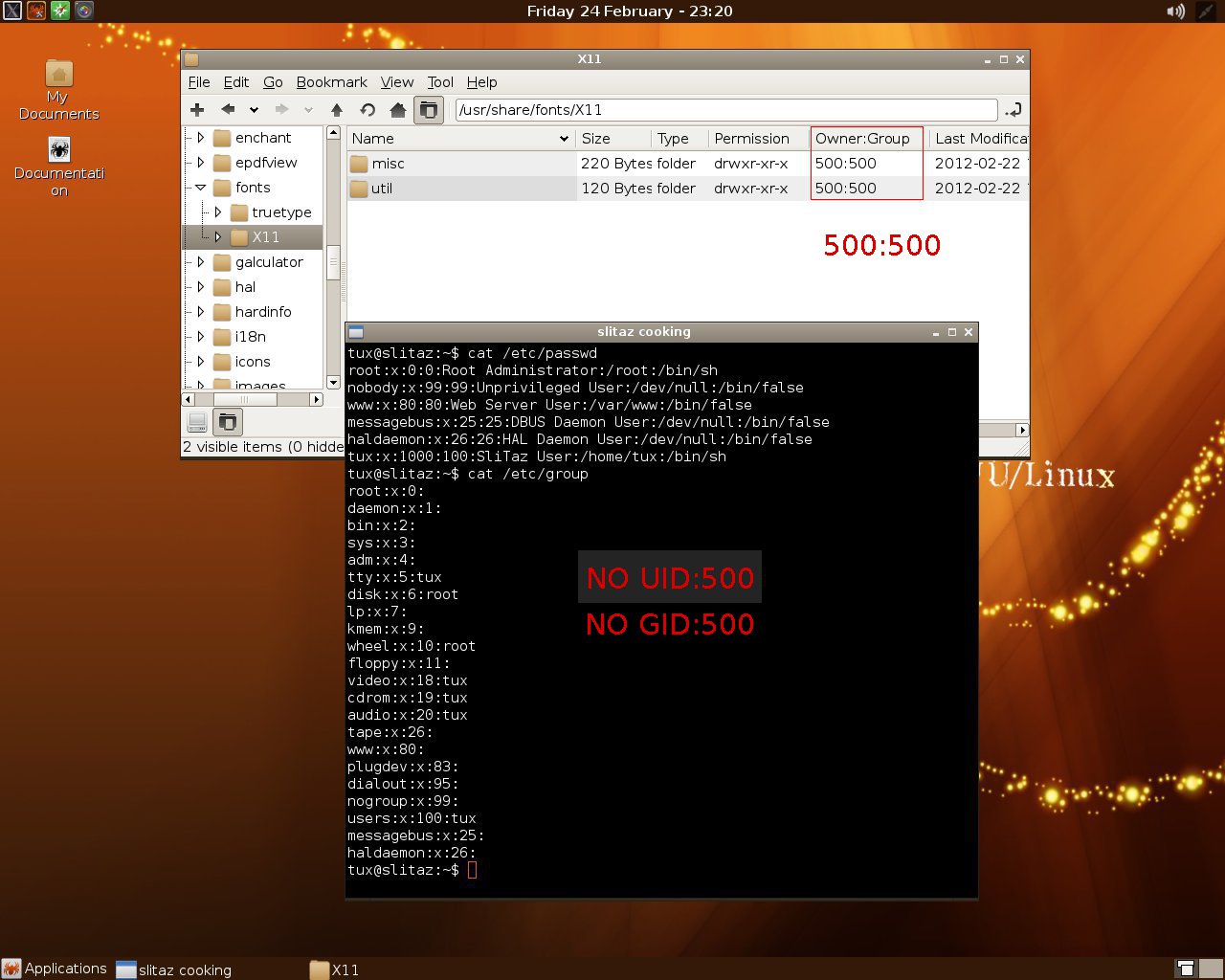

500:500
slitaz-4.0-RC1.iso
1.
tux@slitaz:~$ cat /etc/passwd
root:x:0:0:Root Administrator:/root:/bin/sh
nobody:x:99:99:Unprivileged User:/dev/null:/bin/false
www:x:80:80:Web Server User:/var/www:/bin/false
messagebus:x:25:25:DBUS Daemon User:/dev/null:/bin/false
haldaemon:x:26:26:HAL Daemon User:/dev/null:/bin/false
tux:x:1000:100:SliTaz User:/home/tux:/bin/sh
2.
tux@slitaz:~$ cat /etc/group
root:x:0:
daemon:x:1:
bin:x:2:
sys:x:3:
adm:x:4:
tty:x:5:tux
disk:x:6:root
lp:x:7:
kmem:x:9:
wheel:x:10:root
floppy:x:11:
video:x:18:tux
cdrom:x:19:tux
audio:x:20:tux
tape:x:26:
www:x:80:
plugdev:x:83:
dialout:x:95:
nogroup:x:99:
users:x:100:tux
messagebus:x:25:
haldaemon:x:26:
3.
tux@slitaz:~$ ls -l /usr/share/fonts/X11
total 0
drwxr-xr-x 2 500 500 220 Feb 22 17:31 misc/
drwxr-xr-x 2 500 500 120 Feb 22 17:31 util/
4.
tux@slitaz:~$ su -c 'find / -user 500'
Password:
/usr/share/fonts/X11/misc
/usr/share/fonts/X11/misc/6x13-ISO8859-1.pcf.gz
/usr/share/fonts/X11/misc/nil2.pcf.gz
/usr/share/fonts/X11/misc/cursor.pcf.gz
/usr/share/fonts/X11/misc/fonts.alias
/usr/share/fonts/X11/misc/micro.pcf.gz
/usr/share/fonts/X11/misc/6x13-KOI8-R.pcf.gz
/usr/share/fonts/X11/misc/fonts.dir
/usr/share/fonts/X11/misc/6x13-ISO8859-2.pcf.gz
/usr/share/fonts/X11/misc/6x13.pcf.gz
/usr/share/fonts/X11/util
/usr/share/fonts/X11/util/map-ISO8859-1
/usr/share/fonts/X11/util/map-ISO8859-2
/usr/share/fonts/X11/util/map-JISX0201.1976-0
/usr/share/fonts/X11/util/map-KOI8-R
5.
tux@slitaz:~$ su -c 'find / -group 500'
Password:
/usr/share/fonts/X11/misc
/usr/share/fonts/X11/misc/6x13-ISO8859-1.pcf.gz
/usr/share/fonts/X11/misc/nil2.pcf.gz
/usr/share/fonts/X11/misc/cursor.pcf.gz
/usr/share/fonts/X11/misc/fonts.alias
/usr/share/fonts/X11/misc/micro.pcf.gz
/usr/share/fonts/X11/misc/6x13-KOI8-R.pcf.gz
/usr/share/fonts/X11/misc/fonts.dir
/usr/share/fonts/X11/misc/6x13-ISO8859-2.pcf.gz
/usr/share/fonts/X11/misc/6x13.pcf.gz
/usr/share/fonts/X11/util
/usr/share/fonts/X11/util/map-ISO8859-1
/usr/share/fonts/X11/util/map-ISO8859-2
/usr/share/fonts/X11/util/map-JISX0201.1976-0
/usr/share/fonts/X11/util/map-KOI8-R
6.
tux@slitaz:~$ su -c 'find / -group 1001'
Password:
/etc/skel/.lostirc
/etc/skel/.lostirc/perform.conf
/etc/xdg/menus
/etc/xdg/menus/applications.menu
/etc/lxpanel/default/panels/bottom
/usr/share/applications/httpd-cgi.desktop
/usr/share/applications/vi.desktop
/usr/share/applications/httpd.desktop
/usr/share/applications/obconf.desktop
/usr/share/applications/beaver.desktop
/usr/share/applications/epdfview.desktop
/usr/share/applications/pcmanfm.desktop
/usr/share/applications/pcmanfm-pref.desktop
/usr/share/applications/lostirc.desktop
/usr/share/applications/mhwaveedit.desktop
/usr/share/applications/asunder.desktop
/usr/share/pixmaps/xterm.png
/usr/share/pixmaps/pcmanfm.png
/usr/share/pixmaps/galculator.png
/usr/share/pixmaps/mtpaint.png
/usr/share/mime/packages/obconf.xml
/usr/share/desktop-directories
/usr/share/desktop-directories/SliTazMenu.directory
/usr/share/beaver/resource/beaver.conf.default
/var/www/cgi-bin
/var/www/cgi-bin/index.cgi
/var/www/style.css
/var/www/index.html
/var/www/cgi-env.sh
tux@slitaz:~$
.
Slitaz 4.0 -RC1


23 Feb 2012 - SliTaz 4.0 -RC1 is out
The SliTaz contributor team is pleased to announce the immediate availability of the first release candidate for SliTaz 4.0. SliTaz can boot in 10-12 seconds on fairly new hardware and with the new 4in1 ISO you can install a full SliTaz desktop with only 48MB of RAM. The 4in1 ISO is able to auto detect the memory and can boot SliTaz in text mode, a minimal X environment or a full graphical desktop.
SliTaz 4.0 will have more than 3000 well tested packages in its repository and the RC series lets us track the latest bugs. From our last Cooking release the packages have all been rebuilt twice to ensure build quality.
This RC1 ISO will prompt you with a new graphical menu and a graphical language and keyboard set up. The ISO features a new desktop layout and artwork as well as a new command line installer with a CGI/web interface accessible via TazPanel. You can download this new ISO from our mirror: SliTaz 4.0-RC1
2012-02-21
Slitaz -- Timeline for 4.0
Timeline for 4.0
SliTaz 4.0 Releases Notes (draft)
- Make a RC in February, Erjo is in charge and I'll help him
- Wait 2 weeks and make another RC
- Wait 2 weeks again and make 4.0 (release process takes about 48 hours)
SliTaz 4.0 Releases Notes (draft)
Overview/ChangeLog
Welcome to SliTaz 4.0! Modern, secure, stable, fast and flexible the new SliTaz stable version is now out for Desktops and servers in production use.- More than 6500 commits in the wok
- More than 1000 packages added to database
- Boot in 10 seconds on very recent machine
- Centralized configuration with the new control panel
- New build tool which let you create SliTaz packages in a minute
- …
Slitaz -- raspberry-ssh


tux@slitaz:~$ uname -a
Linux slitaz 2.6.37-slitaz #2 SMP Wed Nov 2 22:01:57 CET 2011 i686 GNU/Linux
2.
tux@slitaz:~$ ifconfig tap0
tap0 Link encap:Ethernet HWaddr 3E:68:FB:31:00:70
inet addr:192.168.2.1 Bcast:192.168.2.255 Mask:255.255.255.0
UP BROADCAST RUNNING MULTICAST MTU:1500 Metric:1
RX packets:1397 errors:0 dropped:0 overruns:0 frame:0
TX packets:476 errors:0 dropped:0 overruns:0 carrier:0
collisions:0 txqueuelen:500
RX bytes:143317 (139.9 KiB) TX bytes:35358 (34.5 KiB)
3.
tux@slitaz:~$ ssh pi@192.168.2.2
Host '192.168.2.2' is not in the trusted hosts file.
(fingerprint md5 26:a4:a1:ab:c2:ff:50:99:d7:e1:49:6e:f2:90:fb:90)
Do you want to continue connecting? (y/n) y
pi@192.168.2.2's password:
Linux raspberrypi 3.1.9 #2 Sat Feb 18 12:14:02 ICT 2012 armv6l
The programs included with the Debian GNU/Linux system are free software;
the exact distribution terms for each program are described in the
individual files in /usr/share/doc/*/copyright.
Debian GNU/Linux comes with ABSOLUTELY NO WARRANTY, to the extent
permitted by applicable law.
Last login: Thu Jan 1 00:02:29 1970
4.
pi@raspberrypi:~$ w
00:20:37 up 20 min, 3 users, load average: 0.01, 0.03, 0.05
USER TTY FROM LOGIN@ IDLE JCPU PCPU WHAT
pi ttyAMA0 00:02 4:33 0.58s 0.37s -bash
pi tty1 00:02 6:44 0.47s 0.19s -bash
pi pts/0 192.168.2.1 00:20 0.00s 0.29s 0.08s w
5.
pi@raspberrypi:~$ ifconfig eth0
eth0 Link encap:Ethernet HWaddr 52:54:00:12:34:56
inet addr:192.168.2.2 Bcast:192.168.2.255 Mask:255.255.255.0
UP BROADCAST RUNNING MULTICAST MTU:1500 Metric:1
RX packets:74 errors:0 dropped:0 overruns:0 frame:0
TX packets:120 errors:0 dropped:0 overruns:0 carrier:0
collisions:0 txqueuelen:1000
RX bytes:6906 (6.7 KiB) TX bytes:13813 (13.4 KiB)
Interrupt:25 DMA chan:ff
6.
pi@raspberrypi:~$ uname -a
Linux raspberrypi 3.1.9 #2 Sat Feb 18 12:14:02 ICT 2012 armv6l GNU/Linux
pi@raspberrypi:~$ lscpu
Architecture: armv6l
CPU(s): 1
pi@raspberrypi:~$
.
2012-02-12
Slitaz -- group 1001 -2

group 1001
group 1000
group 500
....
tux@slitaz:~$ su -c 'find / -group 1001' | wc -l
936
tux@slitaz:~$ su -c 'find / -group 1000' | wc -l
10
tux@slitaz:~$ su -c 'find / -group 500' | wc -l
16
1.
slitaz-core.iso 2012-Feb-12
http://mirror.slitaz.org/iso/rolling/slitaz-core.iso
tux@slitaz:~$ uname -a
Linux slitaz 2.6.37-slitaz #2 SMP Sat Jan 21 01:52:14 CET 2012 i686 GNU/Linux
tux@slitaz:~$
2.
tux@slitaz:~$ df -h
Filesystem Size Used Available Use% Mounted on
tmpfs 2.8G 123.8M 2.6G 4% /
tmpfs 1.5G 0 1.5G 0% /dev/shm
tux@slitaz:~$ cat /etc/group
root:x:0:
daemon:x:1:
bin:x:2:
sys:x:3:
adm:x:4:
tty:x:5:tux
disk:x:6:root
lp:x:7:
kmem:x:9:
wheel:x:10:root
floppy:x:11:
video:x:18:tux
cdrom:x:19:tux
audio:x:20:tux
tape:x:26:
www:x:80:
plugdev:x:83:
dialout:x:95:
nogroup:x:99:
users:x:100:tux
messagebus:x:25:
haldaemon:x:26:
tux@slitaz:~$
3.
tux@slitaz:~$ su -c 'find / -group 1001' | wc -l
936
tux@slitaz:~$ su -c 'find / -group 1000' | wc -l
10
tux@slitaz:~$ su -c 'find / -group 500' | wc -l
16
....
4.
tux@slitaz:~$ ls -l /usr/share/fonts/truetype/ttf-dejavu/
total 1628
-rw-r--r-- 1 tux 1000 634184 Aug 22 2010 DejaVuSans-Bold.ttf
-rw-r--r-- 1 tux 1000 323288 Aug 22 2010 DejaVuSansMono.ttf
-rw-r--r-- 1 tux 1000 683528 Aug 22 2010 DejaVuSans.ttf
tux@slitaz:~$ ls -l /usr/share/fonts/X11/misc/
total 128
-r--r--r-- 1 500 500 4385 Jan 2 2008 6x13-ISO8859-1.pcf.gz
-r--r--r-- 1 500 500 4295 Jan 2 2008 6x13-ISO8859-2.pcf.gz
-rw-r--r-- 1 500 500 4786 Aug 13 2007 6x13-KOI8-R.pcf.gz
-r--r--r-- 1 500 500 68202 Jan 2 2008 6x13.pcf.gz
-r--r--r-- 1 500 500 5094 Jan 2 2008 cursor.pcf.gz
-r--r--r-- 1 500 500 6289 Jan 2 2008 fonts.alias
-rw-r--r-- 1 500 500 444 May 2 2008 fonts.dir
-r--r--r-- 1 500 500 1732 Jan 2 2008 micro.pcf.gz
-r--r--r-- 1 500 500 2394 Jan 2 2008 nil2.pcf.gz
tux@slitaz:~$ ls -l /var/lib/tazpkg/
total 912
drwxr-sr-x 219 root 1001 4380 Feb 12 04:20 installed
-rw-r--r-- 1 root 1001 12414 Feb 12 04:20 installed.md5
-rw-r--r-- 1 root 1001 43 Feb 12 04:19 mirror
-rw-r--r-- 1 root 1001 348430 Feb 12 04:19 packages.desc
-rw-r--r-- 1 root 1001 4039 Feb 12 04:19 packages.equiv
-rw-r--r-- 1 root 1001 60022 Feb 12 04:19 packages.list
-rw-r--r-- 1 root 1001 195035 Feb 12 04:19 packages.md5
-rw-r--r-- 1 root 1001 274068 Feb 12 04:19 packages.txt
tux@slitaz:~$
....
Slitaz -- hwclock
Usage: hwclock [-r|--show] [-s|--hctosys] [-w|--systohc]
-s Set system time from hardware clock
-w Set hardware clock to system time
??
tux@slitaz:~$ hwclock --help
Command line: hwclock --help
BusyBox v1.18.4 (2012-01-24 12:31:29 CET) multi-call binary.
Usage: hwclock [-r|--show] [-s|--hctosys] [-w|--systohc] [-l|--localtime] [-u|--utc] [-f FILE]
Query and set hardware clock (RTC)
Options:
-r Show hardware clock time
-s Set system time from hardware clock
-w Set hardware clock to system time
-u Hardware clock is in UTC
-l Hardware clock is in local time
-f FILE Use specified device (e.g. /dev/rtc2)
tux@slitaz:~$
-s Set system time from hardware clock
-w Set hardware clock to system time
??
tux@slitaz:~$ hwclock --help
Command line: hwclock --help
BusyBox v1.18.4 (2012-01-24 12:31:29 CET) multi-call binary.
Usage: hwclock [-r|--show] [-s|--hctosys] [-w|--systohc] [-l|--localtime] [-u|--utc] [-f FILE]
Query and set hardware clock (RTC)
Options:
-r Show hardware clock time
-s Set system time from hardware clock
-w Set hardware clock to system time
-u Hardware clock is in UTC
-l Hardware clock is in local time
-f FILE Use specified device (e.g. /dev/rtc2)
tux@slitaz:~$
Slitaz -- numlock
Activate numlock when slim starts.
1.
tux@slitaz:~$ grep numlock /etc/slim.conf
# Activate numlock when slim starts. Valid values: on|off
# numlock on
2.
tux@slitaz:~$ sudo sed -i 's/# numlock/numlock/' /etc/slim.conf
3.
tux@slitaz:~$ grep numlock /etc/slim.conf
# Activate numlock when slim starts. Valid values: on|off
numlock on
tux@slitaz:~$
1.
tux@slitaz:~$ grep numlock /etc/slim.conf
# Activate numlock when slim starts. Valid values: on|off
# numlock on
2.
tux@slitaz:~$ sudo sed -i 's/# numlock/numlock/' /etc/slim.conf
3.
tux@slitaz:~$ grep numlock /etc/slim.conf
# Activate numlock when slim starts. Valid values: on|off
numlock on
tux@slitaz:~$
Slitaz -- smplayer / mplayer
smplayer.xpm
mplayer.xpm
??
tux@slitaz:~$ tazpkg list-files smplayer
Installed files with: smplayer
================================================================================
/usr/bin/smplayer
/usr/share/applications/smplayer.desktop
/usr/share/applications/smplayer_enqueue.desktop
/usr/share/smplayer/input.conf
/usr/share/smplayer/shortcuts/default.keys
/usr/share/smplayer/shortcuts/sda.keys
/usr/share/smplayer/translations/smplayer_en_US.qm
/usr/share/smplayer/translations/smplayer_fr.qm
================================================================================
8 files installed with smplayer.
tux@slitaz:~$ tazpkg list-files mplayer
Installed files with: mplayer
================================================================================
/etc/mplayer/example.conf
/etc/mplayer/mplayer.conf
/usr/bin/gmplayer
/usr/bin/mplayer
/usr/share/applications/mplayer.desktop
/usr/share/mplayer/skins/default
/usr/share/mplayer/skins/productive/barfwd.png
/usr/share/mplayer/skins/productive/barnext.png
/usr/share/mplayer/skins/productive/barplay.png
/usr/share/mplayer/skins/productive/barprevious.png
/usr/share/mplayer/skins/productive/barrev.png
/usr/share/mplayer/skins/productive/barstop.png
/usr/share/mplayer/skins/productive/disc.png
/usr/share/mplayer/skins/productive/equalizer.png
/usr/share/mplayer/skins/productive/font.fnt
/usr/share/mplayer/skins/productive/font.png
/usr/share/mplayer/skins/productive/fullscreen.png
/usr/share/mplayer/skins/productive/fwd.png
/usr/share/mplayer/skins/productive/load.png
/usr/share/mplayer/skins/productive/main.png
/usr/share/mplayer/skins/productive/next.png
/usr/share/mplayer/skins/productive/playbar.png
/usr/share/mplayer/skins/productive/playlist.png
/usr/share/mplayer/skins/productive/play.png
/usr/share/mplayer/skins/productive/pospb.png
/usr/share/mplayer/skins/productive/pos.png
/usr/share/mplayer/skins/productive/posvol.png
/usr/share/mplayer/skins/productive/previous.png
/usr/share/mplayer/skins/productive/quit.png
/usr/share/mplayer/skins/productive/README
/usr/share/mplayer/skins/productive/rev.png
/usr/share/mplayer/skins/productive/settings.png
/usr/share/mplayer/skins/productive/skin
/usr/share/mplayer/skins/productive/skins.png
/usr/share/mplayer/skins/productive/stop.png
/usr/share/mplayer/skins/productive/subtitles.png
/usr/share/mplayer/skins/productive/symbols.fnt
/usr/share/mplayer/skins/productive/symbols.png
/usr/share/mplayer/skins/productive/VERSION
/usr/share/mplayer/subfont.ttf
================================================================================
40 files installed with mplayer.
tux@slitaz:~$
mplayer.xpm
??
tux@slitaz:~$ tazpkg list-files smplayer
Installed files with: smplayer
================================================================================
/usr/bin/smplayer
/usr/share/applications/smplayer.desktop
/usr/share/applications/smplayer_enqueue.desktop
/usr/share/smplayer/input.conf
/usr/share/smplayer/shortcuts/default.keys
/usr/share/smplayer/shortcuts/sda.keys
/usr/share/smplayer/translations/smplayer_en_US.qm
/usr/share/smplayer/translations/smplayer_fr.qm
================================================================================
8 files installed with smplayer.
tux@slitaz:~$ tazpkg list-files mplayer
Installed files with: mplayer
================================================================================
/etc/mplayer/example.conf
/etc/mplayer/mplayer.conf
/usr/bin/gmplayer
/usr/bin/mplayer
/usr/share/applications/mplayer.desktop
/usr/share/mplayer/skins/default
/usr/share/mplayer/skins/productive/barfwd.png
/usr/share/mplayer/skins/productive/barnext.png
/usr/share/mplayer/skins/productive/barplay.png
/usr/share/mplayer/skins/productive/barprevious.png
/usr/share/mplayer/skins/productive/barrev.png
/usr/share/mplayer/skins/productive/barstop.png
/usr/share/mplayer/skins/productive/disc.png
/usr/share/mplayer/skins/productive/equalizer.png
/usr/share/mplayer/skins/productive/font.fnt
/usr/share/mplayer/skins/productive/font.png
/usr/share/mplayer/skins/productive/fullscreen.png
/usr/share/mplayer/skins/productive/fwd.png
/usr/share/mplayer/skins/productive/load.png
/usr/share/mplayer/skins/productive/main.png
/usr/share/mplayer/skins/productive/next.png
/usr/share/mplayer/skins/productive/playbar.png
/usr/share/mplayer/skins/productive/playlist.png
/usr/share/mplayer/skins/productive/play.png
/usr/share/mplayer/skins/productive/pospb.png
/usr/share/mplayer/skins/productive/pos.png
/usr/share/mplayer/skins/productive/posvol.png
/usr/share/mplayer/skins/productive/previous.png
/usr/share/mplayer/skins/productive/quit.png
/usr/share/mplayer/skins/productive/README
/usr/share/mplayer/skins/productive/rev.png
/usr/share/mplayer/skins/productive/settings.png
/usr/share/mplayer/skins/productive/skin
/usr/share/mplayer/skins/productive/skins.png
/usr/share/mplayer/skins/productive/stop.png
/usr/share/mplayer/skins/productive/subtitles.png
/usr/share/mplayer/skins/productive/symbols.fnt
/usr/share/mplayer/skins/productive/symbols.png
/usr/share/mplayer/skins/productive/VERSION
/usr/share/mplayer/subfont.ttf
================================================================================
40 files installed with mplayer.
tux@slitaz:~$
Slitaz -- lxpanel
lxpanel: expecting Plugin section
lxpanel: can't start panel
1.
tux@slitaz:~$ lxpanel --profile slitaz &
tux@slitaz:~$ lxpanel: unknown block Plugin
lxpanel: expecting Plugin section
lxpanel: can't start panel
2.
tux@slitaz:~$ rm -fr ~/.config/lxpanel
3.
logout & relogin
lxpanel: can't start panel
1.
tux@slitaz:~$ lxpanel --profile slitaz &
tux@slitaz:~$ lxpanel: unknown block Plugin
lxpanel: expecting Plugin section
lxpanel: can't start panel
2.
tux@slitaz:~$ rm -fr ~/.config/lxpanel
3.
logout & relogin
2012-02-11
Slitaz -- xarchive
xarchive.desktop
xarchive.xpm
??
tux@slitaz:~$ tazpkg list-files xarchive
Installed files with: xarchive
================================================================================
/usr/bin/xarchive
/usr/lib/xarchive/wrappers/slitaz-wrap.sh
================================================================================
2 files installed with xarchive.
tux@slitaz:~$
xarchive.xpm
??
tux@slitaz:~$ tazpkg list-files xarchive
Installed files with: xarchive
================================================================================
/usr/bin/xarchive
/usr/lib/xarchive/wrappers/slitaz-wrap.sh
================================================================================
2 files installed with xarchive.
tux@slitaz:~$
slitaz -- tazpanel-2
Ref: http://alanyih.blogspot.com/2011/04/slitaz-tazpanel.html
1.
tux@slitaz:~$ tazpanel --help
Usage: tazpanel [start|stop|passwd]
2.
tux@slitaz:~$ cat /etc/slitaz/httpd.conf
H:/var/www/tazpanel
A:127.0.0.1
D:*
*.cgi:/bin/sh
I:index.cgi
/:root:root
3.
tux@slitaz:~$ ps ax | grep httpd
2093 www 0:00 /usr/sbin/httpd -u www
3583 root 0:00 httpd -p 82 -u root -c /etc/slitaz/httpd.conf -r TazPanel Authentication - Default: root:root
7020 tux 0:00 grep httpd
tux@slitaz:~$
4.
tux@slitaz:~$ cat /etc/slitaz/tazpanel.conf
# tazpanel.conf: SliTaz Web Control Panel configuration
#
# Copyright (C) 2011 SliTaz GNU/Linux - BSD License
#
# Panel location and theme
PANEL="/var/www/tazpanel"
STYLE="default"
# Absolute paths to images and xHTML skel from $PANEL
IMAGES="/styles/$STYLE/images"
HEADER="/styles/$STYLE/header.html"
FOOTER="/styles/$STYLE/footer.html"
# Display some debug messages
DEBUG="0"
# Activity log file
LOG_FILE="/var/log/tazpanel.log"
# Terminal settings
TERMINAL="xterm"
TERM_OPTS="-geometry 80x16-0+24 -bg black -fg white"
# Generic page loading message
LOADING_MSG="Loading..."
# Busybox HTTP daemon config
HTTPD_CONF="/etc/slitaz/httpd.conf"
HTTPD_PORT="82"
# Shared Tazpkg paths
LOCALSTATE="/var/lib/tazpkg"
INSTALLED="$LOCALSTATE/installed"
tux@slitaz:~$
1.
tux@slitaz:~$ tazpanel --help
Usage: tazpanel [start|stop|passwd]
2.
tux@slitaz:~$ cat /etc/slitaz/httpd.conf
H:/var/www/tazpanel
A:127.0.0.1
D:*
*.cgi:/bin/sh
I:index.cgi
/:root:root
3.
tux@slitaz:~$ ps ax | grep httpd
2093 www 0:00 /usr/sbin/httpd -u www
3583 root 0:00 httpd -p 82 -u root -c /etc/slitaz/httpd.conf -r TazPanel Authentication - Default: root:root
7020 tux 0:00 grep httpd
tux@slitaz:~$
4.
tux@slitaz:~$ cat /etc/slitaz/tazpanel.conf
# tazpanel.conf: SliTaz Web Control Panel configuration
#
# Copyright (C) 2011 SliTaz GNU/Linux - BSD License
#
# Panel location and theme
PANEL="/var/www/tazpanel"
STYLE="default"
# Absolute paths to images and xHTML skel from $PANEL
IMAGES="/styles/$STYLE/images"
HEADER="/styles/$STYLE/header.html"
FOOTER="/styles/$STYLE/footer.html"
# Display some debug messages
DEBUG="0"
# Activity log file
LOG_FILE="/var/log/tazpanel.log"
# Terminal settings
TERMINAL="xterm"
TERM_OPTS="-geometry 80x16-0+24 -bg black -fg white"
# Generic page loading message
LOADING_MSG="Loading..."
# Busybox HTTP daemon config
HTTPD_CONF="/etc/slitaz/httpd.conf"
HTTPD_PORT="82"
# Shared Tazpkg paths
LOCALSTATE="/var/lib/tazpkg"
INSTALLED="$LOCALSTATE/installed"
tux@slitaz:~$
Slitaz -- group 1001
group 1001 : hd
group 500 : livecd
slitaz-core.iso 2012-Feb-08
tux@slitaz:~$ uname -a
Linux slitaz 2.6.37-slitaz #2 SMP Sat Jan 21 01:52:14 CET 2012 i686 GNU/Linux
tux@slitaz:~$ df -h
Filesystem Size Used Available Use% Mounted on
/dev/root 76.9G 311.4M 72.7G 0% /
tmpfs 1.5G 0 1.5G 0% /dev/shm
tux@slitaz:~$
tux@slitaz:~$ cat /etc/group
root:x:0:
daemon:x:1:
bin:x:2:
sys:x:3:
adm:x:4:
tty:x:5:tux
disk:x:6:root,tux
lp:x:7:
kmem:x:9:tux
wheel:x:10:root
floppy:x:11:tux
video:x:18:tux
cdrom:x:19:tux
audio:x:20:tux
tape:x:26:tux
www:x:80:
plugdev:x:83:
dialout:x:95:tux
nogroup:x:99:
users:x:100:
messagebus:x:25:
haldaemon:x:26:
tux:x:1000:
tux@slitaz:~$
tux@slitaz:~$ find /usr/share -group 1001
/usr/share/beaver/resource/beaver.conf.default
/usr/share/mime/packages/obconf.xml
/usr/share/applications/leafpad.desktop
/usr/share/applications/alsamixer.desktop
/usr/share/applications/pcmanfm-pref.desktop
/usr/share/applications/pcmanfm.desktop
/usr/share/applications/gcolor2.desktop
/usr/share/applications/beaver.desktop
/usr/share/applications/httpd-cgi.desktop
/usr/share/applications/httpd.desktop
/usr/share/applications/obconf.desktop
/usr/share/applications/asunder.desktop
/usr/share/applications/lostirc.desktop
/usr/share/applications/mhwaveedit.desktop
/usr/share/applications/epdfview.desktop
/usr/share/applications/vi.desktop
tux@slitaz:~$ find /usr/share -group tux
/usr/share/common-lisp
/usr/share/common-lisp/source
/usr/share/common-lisp/source/gpg-error
/usr/share/fonts/truetype/ttf-dejavu/DejaVuSans.ttf
/usr/share/fonts/truetype/ttf-dejavu/DejaVuSans-Bold.ttf
/usr/share/fonts/truetype/ttf-dejavu/DejaVuSansMono.ttf
/usr/share/locale/fr/LC_MESSAGES/lostirc.mo
/usr/share/pixmaps/lostirc.png
tux@slitaz:~$
--------
livecd:
tux@slitaz:~$ uname -a
Linux slitaz 2.6.37-slitaz #2 SMP Sat Jan 21 01:52:14 CET 2012 i686 GNU/Linux
tux@slitaz:~$ cat /etc/group
root:x:0:
daemon:x:1:
bin:x:2:
sys:x:3:
adm:x:4:
tty:x:5:tux
disk:x:6:root
lp:x:7:
kmem:x:9:
wheel:x:10:root
floppy:x:11:
video:x:18:tux
cdrom:x:19:tux
audio:x:20:tux
tape:x:26:
www:x:80:
plugdev:x:83:
dialout:x:95:
nogroup:x:99:
users:x:100:tux
messagebus:x:25:
haldaemon:x:26:
tux@slitaz:~$ find /usr/share -group 500
/usr/share/fonts/X11/util
/usr/share/fonts/X11/util/map-KOI8-R
/usr/share/fonts/X11/util/map-JISX0201.1976-0
/usr/share/fonts/X11/util/map-ISO8859-1
/usr/share/fonts/X11/util/map-ISO8859-2
/usr/share/fonts/X11/misc
/usr/share/fonts/X11/misc/6x13-ISO8859-1.pcf.gz
/usr/share/fonts/X11/misc/nil2.pcf.gz
/usr/share/fonts/X11/misc/cursor.pcf.gz
/usr/share/fonts/X11/misc/6x13-KOI8-R.pcf.gz
/usr/share/fonts/X11/misc/fonts.alias
/usr/share/fonts/X11/misc/fonts.dir
/usr/share/fonts/X11/misc/6x13-ISO8859-2.pcf.gz
/usr/share/fonts/X11/misc/micro.pcf.gz
/usr/share/fonts/X11/misc/6x13.pcf.gz
tux@slitaz:~$ ls -l /usr/share/fonts/X11/misc /usr/share/fonts/X11/util
/usr/share/fonts/X11/misc:
total 2352
-r--r--r-- 1 500 500 4385 Jan 2 2008 6x13-ISO8859-1.pcf.gz
-r--r--r-- 1 500 500 4295 Jan 2 2008 6x13-ISO8859-2.pcf.gz
-rw-r--r-- 1 500 500 4786 Aug 13 2007 6x13-KOI8-R.pcf.gz
-r--r--r-- 1 500 500 68202 Jan 2 2008 6x13.pcf.gz
-r--r--r-- 1 500 500 5094 Jan 2 2008 cursor.pcf.gz
-r--r--r-- 1 500 500 6289 Jan 2 2008 fonts.alias
-rw-r--r-- 1 500 500 444 May 2 2008 fonts.dir
-r--r--r-- 1 500 500 1732 Jan 2 2008 micro.pcf.gz
-r--r--r-- 1 500 500 2394 Jan 2 2008 nil2.pcf.gz
/usr/share/fonts/X11/util:
total 44
-rw-r--r-- 1 500 500 10592 Jan 1 2008 map-ISO8859-1
-rw-r--r-- 1 500 500 10816 Jan 1 2008 map-ISO8859-2
-rw-r--r-- 1 500 500 7536 Jan 1 2008 map-JISX0201.1976-0
-r--r--r-- 1 500 500 11204 Apr 23 2008 map-KOI8-R
.
group 500 : livecd
slitaz-core.iso 2012-Feb-08
tux@slitaz:~$ uname -a
Linux slitaz 2.6.37-slitaz #2 SMP Sat Jan 21 01:52:14 CET 2012 i686 GNU/Linux
tux@slitaz:~$ df -h
Filesystem Size Used Available Use% Mounted on
/dev/root 76.9G 311.4M 72.7G 0% /
tmpfs 1.5G 0 1.5G 0% /dev/shm
tux@slitaz:~$
tux@slitaz:~$ cat /etc/group
root:x:0:
daemon:x:1:
bin:x:2:
sys:x:3:
adm:x:4:
tty:x:5:tux
disk:x:6:root,tux
lp:x:7:
kmem:x:9:tux
wheel:x:10:root
floppy:x:11:tux
video:x:18:tux
cdrom:x:19:tux
audio:x:20:tux
tape:x:26:tux
www:x:80:
plugdev:x:83:
dialout:x:95:tux
nogroup:x:99:
users:x:100:
messagebus:x:25:
haldaemon:x:26:
tux:x:1000:
tux@slitaz:~$
tux@slitaz:~$ find /usr/share -group 1001
/usr/share/beaver/resource/beaver.conf.default
/usr/share/mime/packages/obconf.xml
/usr/share/applications/leafpad.desktop
/usr/share/applications/alsamixer.desktop
/usr/share/applications/pcmanfm-pref.desktop
/usr/share/applications/pcmanfm.desktop
/usr/share/applications/gcolor2.desktop
/usr/share/applications/beaver.desktop
/usr/share/applications/httpd-cgi.desktop
/usr/share/applications/httpd.desktop
/usr/share/applications/obconf.desktop
/usr/share/applications/asunder.desktop
/usr/share/applications/lostirc.desktop
/usr/share/applications/mhwaveedit.desktop
/usr/share/applications/epdfview.desktop
/usr/share/applications/vi.desktop
tux@slitaz:~$ find /usr/share -group tux
/usr/share/common-lisp
/usr/share/common-lisp/source
/usr/share/common-lisp/source/gpg-error
/usr/share/fonts/truetype/ttf-dejavu/DejaVuSans.ttf
/usr/share/fonts/truetype/ttf-dejavu/DejaVuSans-Bold.ttf
/usr/share/fonts/truetype/ttf-dejavu/DejaVuSansMono.ttf
/usr/share/locale/fr/LC_MESSAGES/lostirc.mo
/usr/share/pixmaps/lostirc.png
tux@slitaz:~$
--------
livecd:
tux@slitaz:~$ uname -a
Linux slitaz 2.6.37-slitaz #2 SMP Sat Jan 21 01:52:14 CET 2012 i686 GNU/Linux
tux@slitaz:~$ cat /etc/group
root:x:0:
daemon:x:1:
bin:x:2:
sys:x:3:
adm:x:4:
tty:x:5:tux
disk:x:6:root
lp:x:7:
kmem:x:9:
wheel:x:10:root
floppy:x:11:
video:x:18:tux
cdrom:x:19:tux
audio:x:20:tux
tape:x:26:
www:x:80:
plugdev:x:83:
dialout:x:95:
nogroup:x:99:
users:x:100:tux
messagebus:x:25:
haldaemon:x:26:
tux@slitaz:~$ find /usr/share -group 500
/usr/share/fonts/X11/util
/usr/share/fonts/X11/util/map-KOI8-R
/usr/share/fonts/X11/util/map-JISX0201.1976-0
/usr/share/fonts/X11/util/map-ISO8859-1
/usr/share/fonts/X11/util/map-ISO8859-2
/usr/share/fonts/X11/misc
/usr/share/fonts/X11/misc/6x13-ISO8859-1.pcf.gz
/usr/share/fonts/X11/misc/nil2.pcf.gz
/usr/share/fonts/X11/misc/cursor.pcf.gz
/usr/share/fonts/X11/misc/6x13-KOI8-R.pcf.gz
/usr/share/fonts/X11/misc/fonts.alias
/usr/share/fonts/X11/misc/fonts.dir
/usr/share/fonts/X11/misc/6x13-ISO8859-2.pcf.gz
/usr/share/fonts/X11/misc/micro.pcf.gz
/usr/share/fonts/X11/misc/6x13.pcf.gz
tux@slitaz:~$ ls -l /usr/share/fonts/X11/misc /usr/share/fonts/X11/util
/usr/share/fonts/X11/misc:
total 2352
-r--r--r-- 1 500 500 4385 Jan 2 2008 6x13-ISO8859-1.pcf.gz
-r--r--r-- 1 500 500 4295 Jan 2 2008 6x13-ISO8859-2.pcf.gz
-rw-r--r-- 1 500 500 4786 Aug 13 2007 6x13-KOI8-R.pcf.gz
-r--r--r-- 1 500 500 68202 Jan 2 2008 6x13.pcf.gz
-r--r--r-- 1 500 500 5094 Jan 2 2008 cursor.pcf.gz
-r--r--r-- 1 500 500 6289 Jan 2 2008 fonts.alias
-rw-r--r-- 1 500 500 444 May 2 2008 fonts.dir
-r--r--r-- 1 500 500 1732 Jan 2 2008 micro.pcf.gz
-r--r--r-- 1 500 500 2394 Jan 2 2008 nil2.pcf.gz
/usr/share/fonts/X11/util:
total 44
-rw-r--r-- 1 500 500 10592 Jan 1 2008 map-ISO8859-1
-rw-r--r-- 1 500 500 10816 Jan 1 2008 map-ISO8859-2
-rw-r--r-- 1 500 500 7536 Jan 1 2008 map-JISX0201.1976-0
-r--r--r-- 1 500 500 11204 Apr 23 2008 map-KOI8-R
.
Slitaz -- tazinst


Tazinst Manual
file:///usr/share/doc/slitaz-tools/tazinst.html
NAME
Tazinst - Tiny autonomous zone installer manager
SYNTAX
tazinst [command] [configuration file]
DESCRIPTION
Tazinst is a lightweight SliTaz HDD installer (~ 29 KB). It installs SliTaz to a hard drive from a Live-CD, LiveUSB key, a SliTaz ISO image, or from the web by downloading a stable version, a cooking version or by giving the http link of another iso (eg: Development ISO).
Tazinst can format the target partition to ext2, ext3, ext4 or other formats if the matching packages are installed. The home partition can be installed on another partition and if need be formatted before installation into any one of the available formats. Tazinst may upon request install the Grub bootloader in the MBR of the target disk. A dual-boot with an existing Windows© partition is possible, finding the Windows© partition can either be done automatically or manually specified.
Tazinst can also update SliTaz installed on a hard disk partition which is handy in case of version changes. In this case, Slitaz is updated, data in /home is preserved and additional packages are reinstalled on to the new version.
Tazinst was created independently for the needs of the SliTaz GNU/Linux mini distribution.
Tazinst is written from scratch in shell script and is compatible with Busybox Ash and Bash. Tazinst is licensed under the GNU Free gpl v3.
tux@slitaz:~$ tazinst --help
Tazinst - SliTaz installer - Version: 2.991
Usage:
tazinst [command] [config-file]
Commands:
usage Print this short usage.
install Install SliTaz on HDD using a configuration file.
upgrade Upgrade SliTaz on HDD using a configuration file.
config Generate a configuration file.
cli Install or upgrade using command line options:
-i Full Install (not upgrading, all present data will be lost).
-u Upgrade (Needs an active internet connection).
-t
-s
-p
-f
-g Install Grub.
-w Dual-boot a Windows partition (auto|hd
-d Debug mode.
tux@slitaz:~$ cat tazinst.conf
# tazinst.conf: SliTaz Installer configuration file.
#
# Install type : [cdrom|usb|iso|web|weboot]
INST_TYPE="cdrom"
# Install source
# usb:/dev/xxx, ex: SRC_FILE=/dev/sdb1
# iso:file.iso, ex: SRC_FILE=~/slitaz.3.0.iso
# web: url, ex: SRC_FILE=http://mirror.slitaz.org/iso/cooking/slitaz-cooking.iso
# web: predefined mirrors (stable|cooking|rolling), ex: SRC_FILE=cooking
SRC_FILE=""
# Install Target (Root Partition).
TGT_PARTITION="/dev/hda5"
# Target File system.
# SliTaz uses ext3 by default but another filesystem can be used if wanted,
# for this please adjust your /etc/fstab after installation. Valid options are:
# (btrfs|ext2|ext3|ext4|fat16|fat32|hfs|hfs+|jfs|ntfs|reiser4|reiserfs|ufs|xfs)
TGT_FS="ext3"
# Home partition.
# On most GNU/Linux systems users personal files are stored in the directory
# /home. Home can be on another hard disk or on a separate partition.
TGT_HOME=""
# Home File system (if /home is on a separate partition)
TGT_HOME_FS=""
# Hostname
TGT_HOSTNAME="slitaz"
# root password
# The root administrator privilege lets you manage and configure the full
# system. A root user can damage your system so you should always setup a
# strong password with special characters and/or numbers.
TGT_ROOT_PWD="root"
# The default user for the system will have his personal files stored
# in /home/*user* (and will be automatically added to the audio group).
TGT_USER="tux"
TGT_USER_PWD=""
# Grub bootloader
# install grub [yes|no]
TGT_GRUB="no"
# Where to find menu.lst (dedicated grub part. or multi-os install)
# If you don't know what to do, it's safe to leave it blank
TGT_MENU_PARTITION=""
# Windows dual-boot
# Dual boot is disabled if WINBOOT is empty: TGT_WINBOOT=""
# You may let tazinst find your win partition, mode=auto: TGT_WINBOOT="auto"
# or use manual setting: "hd[disk],[partition]" ex:TGT_WINBOOT=hd0,0
TGT_WINBOOT=""
tux@slitaz:~$
.
2012-02-05
Slitaz -- local-mirror


tux@slitaz:~$ uname -a
Linux slitaz 3.2-slitaz #2 SMP Thu Jan 12 20:10:13 UTC 2012 i686 Pentium(R) Dual-Core CPU E6300 @ 2.80GHz GenuineIntel GNU/Linux
tux@slitaz:~$ su -c 'local-mirror on'
Password:
0 files updated, 0 files merged, 0 files removed, 0 files unresolved
building lfs.slitaz.org site
building absguide.slitaz.org site
building man-html.slitaz.org site
41 files updated, 0 files merged, 21 files removed, 0 files unresolved
building hgbook.slitaz.org site
building gimp.en.slitaz.org site
building gimp.fr.slitaz.org site
building gimp.es.slitaz.org site
Starting web server: LightTPD... [ OK ]
Starting cron deamon: Crond... [ OK ]
tux@slitaz:~$ cat /etc/hosts
127.0.0.1 localhost slitaz tazpanel
127.0.0.1 lfs.slitaz.org
127.0.0.1 absguide.slitaz.org
127.0.0.1 man-html.slitaz.org
127.0.0.1 hgbook.slitaz.org
127.0.0.1 gimp.en.slitaz.org
127.0.0.1 gimp.fr.slitaz.org
127.0.0.1 gimp.es.slitaz.org
127.0.0.1 tazpanel.slitaz.org
127.0.0.1 www.slitaz.org slitaz.org
127.0.0.1 pizza.slitaz.org
127.0.0.1 boot.slitaz.org
127.0.0.1 mirror.slitaz.org
127.0.0.1 tank.slitaz.org
127.0.0.1 doc.slitaz.org
127.0.0.1 pkgs.slitaz.org
127.0.0.1 hg.slitaz.org
127.0.0.1 cook.slitaz.org
127.0.0.1 people.slitaz.org
127.0.0.1 piratebox.lan
tux@slitaz:~$ ls -l /home/slitaz/www
total 0
lrwxrwxrwx 1 www www 19 Feb 5 15:53 absguide -> /usr/share/absguide
drwxr-xr-x 7 www www 200 Jan 9 20:25 boot
drwxr-xr-x 2 www www 160 Feb 5 15:53 cook
drwxrwxrwx 7 www www 280 Feb 5 15:53 doc
lrwxrwxrwx 1 www www 27 Feb 5 15:53 en -> /usr/share/gimp/2.0/help/en
lrwxrwxrwx 1 www www 27 Feb 5 15:53 es -> /usr/share/gimp/2.0/help/es
lrwxrwxrwx 1 www www 27 Feb 5 15:53 fr -> /usr/share/gimp/2.0/help/fr
drwxr-xr-x 2 www www 80 Feb 5 15:53 hg
lrwxrwxrwx 1 www www 17 Feb 5 15:53 hgbook -> /usr/share/hgbook
lrwxrwxrwx 1 www www 23 Feb 5 15:53 lfs-book -> /usr/share/doc/lfs-book
lrwxrwxrwx 1 www www 19 Feb 5 15:53 man-html -> /usr/share/man-html
drwxr-xr-x 4 www www 120 Sep 11 04:06 mirror-info
lrwxrwxrwx 1 www www 38 Feb 5 15:52 people -> /home/slitaz/repos/slitaz-forge/people
drwxr-xr-x 3 www www 80 Feb 5 15:53 pics
drwxr-xr-x 4 www www 200 Feb 5 15:53 piratebox
lrwxrwxrwx 1 www www 35 Feb 5 15:53 pizza -> /home/slitaz/repos/slitaz-pizza/php
drwxr-xr-x 3 www www 60 Feb 17 2011 slitaz
drwxr-xr-x 5 www www 180 Feb 5 15:53 tank
lrwxrwxrwx 1 www www 26 Feb 5 15:52 website -> /home/slitaz/repos/website
tux@slitaz:~$ ls -l /home/slitaz/www/slitaz/mirror
total 20
drwxr-xr-x 3 www www 100 Jan 10 11:11 css
-rw-r--r-- 1 www www 13268 Jan 10 11:11 dir-generator.php
drwxr-xr-x 2 www www 100 Aug 31 22:20 dvd
drwxr-xr-x 4 www www 220 May 30 2011 floppies
-rw-r--r-- 1 www www 665 May 30 2011 mirrors
drwxr-xr-x 2 www www 40 Feb 5 15:53 packages
drwxr-xr-x 2 www www 80 Feb 17 2011 pxe
tux@slitaz:~$ ls -l /home/slitaz/www/slitaz/mirror/dvd
total 28
-rw-r--r-- 1 www www 4177 Aug 31 22:20 cdrom.png
-rw-r--r-- 1 www www 1121 Aug 31 22:20 download.php
-rw-r--r-- 1 www www 13278 Aug 31 22:20 index.html
tux@slitaz:~$
.